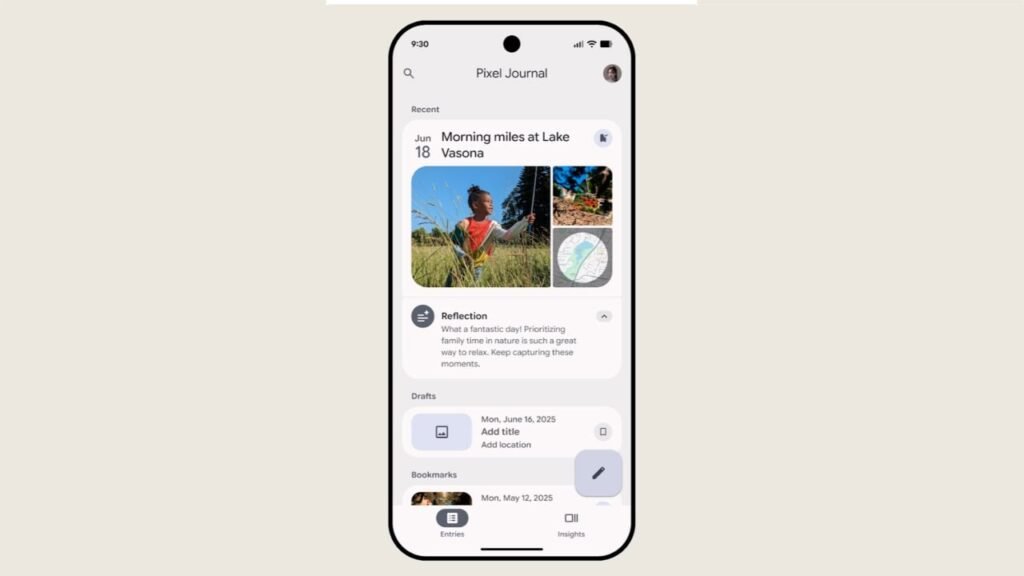

Google’s Journal app is a personal digital diary that lets you jot down your thoughts, add photos, videos, and daily activities, track your mood, and so much more. Google is rolling out a handful of updates to Journal with the launch of the Pixel 11 series, including the Pixel 11 Pro, Pixel 11 XL, and Pixel 11 Pro Fold, and they’re reportedly already reaching older Pixel devices. We’re looking at UI tweaks, a new Customization tab to control Media layout, and a whole lot more.
Google’s Pixel Journal update brings UI tweaks and visual changes
The Inspiration bottom sheet on the compose screen now has a new icon, along with “Refresh” and “Close” buttons. There’s also a new Customization tab to control Media layout. It lets you choose between Compact and Full media layouts for entries. The main update is a new “Auto format” feature that can format entries in either simple or expressive mode. It can be accessed from a new icon at the top.
This uses Google’s Private AI Compute in the cloud while keeping your data protected. In order to ensure your data stays private to you, Pixel Journal apparently works in a secure, isolated environment on your device and in the cloud. You can also turn off AI features in Journal settings.
Not widely rolling out yet
Furthermore, the Journal app can now send journaling reminders at set times: morning at 7 AM, afternoon at around 2 PM, and, finally, in the evening at around 9 PM. Google has tweaked the dark theme in the Entries tab to make the bookmarks icon easier to see. The Insights tab also gets some visual changes to the calendar.
If you are active on Journal, Google is evidently making the experience seamless and smarter. 9to5Google reports seeing these changes/features in version 2026.07.27.x of the Journal app on a Pixel 10a. That said, the update is not widely rolling out yet, but should arrive shortly.


The post Pixel Journal Gets Smarter With Google’s Private AI Compute appeared first on Android Headlines.