
The Pixel Camera is getting an update to the Quick Access Controls feature on Pixel 11 devices via Pixel Camera 11.0 and these are already live on Pixel 11 devices, tough it is reported that they may not be enabled by default. Quick Access Controls itself is not a new feature since it was added to the Pixel Camera app a couple of years ago. However, this update changes the way they appear in the app when you’re taking pictures, and there are a couple of things that have been added in.
To access the Quick Access Controls if they’re not on by default or if you just want to customize things a bit, you can get to these by tapping on the “Photo Settings” button that sits in the bottom right corner of the camera UI. After tapping on that, tap on the three dot button to open the “Camera Settings” menu. From here, scroll until you see the “Quick Access Controls” menu, which will be the top menu you can tap on in the “Fast Access” section. It’s here that you’ll find a toggle to enable the Quick Access controls.


Quick Access controls in the Pixel Camera app are hidden in the viewfinder
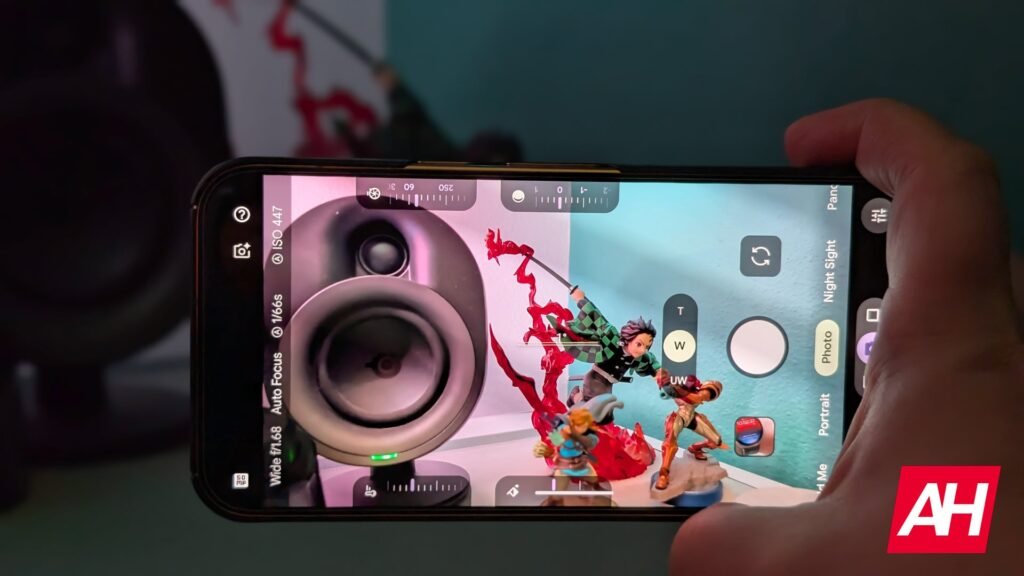
If you have these turned on, you won’t notice them right away when in the viewfinder. You will need to tap the display to get these to show up. At which point these little slider dials will show up on the left and right sides of the viewfinder. These will be on the “top” and “bottom” if you’re taking pictures in landscape mode.
In terms of controls, there are eight different dials to choose from. This includes White Balance, Looks, Shutter Speed, Shadows, Exposure, Focus, and ISO. You can only have four dials on the viewfinder at a time. You can also order them however you want while also choosing whether you want them on the left or right. This change is reportedly expected to hit older Pixel devices but it hasn’t been confirmed by Google yet.
The post The Pixel Camera’s new Quick Access Controls are way more convenient appeared first on Android Headlines.