
It wasn’t until CES earlier this year that I really started to pay attention to robot mowers. The reason? Well, I live in a townhouse and really don’t have a yard. But I really started paying attention to robot mowers for my parents. They’re getting older and can’t really get out to cut the grass every weekend, and paying someone to do it adds up quickly. They were spending north of $1,200. So the real question for me was, can a robot vacuum do the job for less? After spending the Spring and most of the Summer with the Navimow X430 and a few other robot mowers, I think I have the answer.
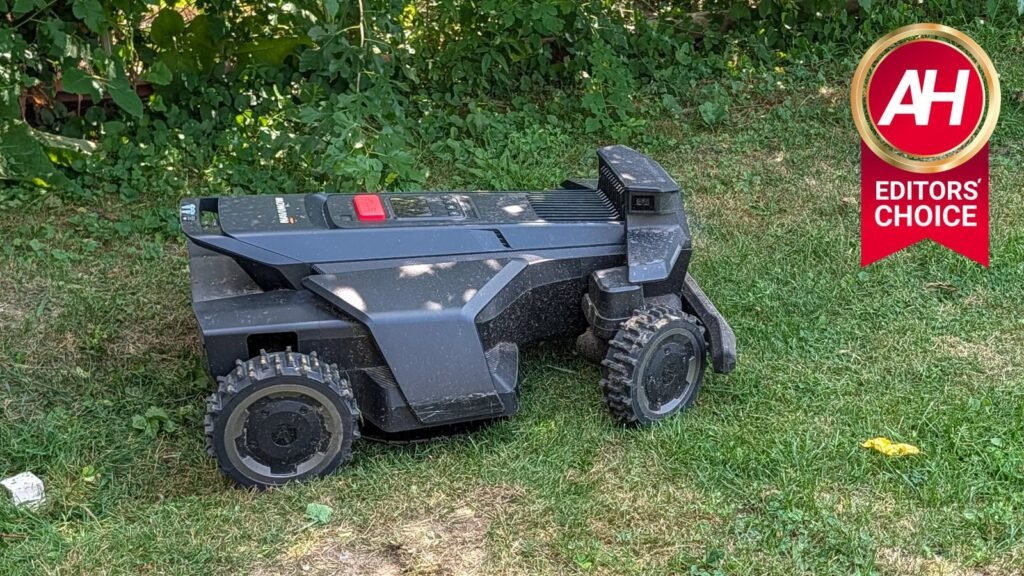
The Navimow X430 is one of the most capable consumer-grade robot mowers on the market today. It really impresses me virtually every time it runs. Let’s jump into the specifics in this review.

After a full spring and summer testing the Navimow X430 against six other robot mowers, it was the only one that never got stuck, cutting hills and divots other models couldn’t handle. For anyone weighing $2,499 against $1,200 a season in lawn service, the math (and the mower) speaks for itself.
Pros
- NRTK support means no satellite antenna needed, big win for tighter yards and dense neighborhoods
- Handles hills, divots, and rough terrain without getting stuck
- Built tough, shrugged off issues that stopped other mowers in testing
- Cuts at a different angle every run for more even coverage
- Cutting height adjusts from 0.7 to 4 inches
- PIN lock makes it far less appealing to steal
Cons
- Starting price of $2,499 is a big upfront investment
- No customizable cutting line patterns like some competitors offer
- Still need a string trimmer for edging
Navimow X430 Review: Setup and Unboxing
What really caught my attention about the Navimow X430 was that it uses RTK but also offers an NRTK option. I’ve used RTK before with Yarbo, and it was honestly more of a headache than anything else. So seeing that there was NRTK available was a big selling point for me. NRTK is regular RTK (real-time kinematic, a satellite navigation technique that provides centimeter-level positioning accuracy), but it doesn’t require a satellite to be mounted in your yard. This is great because in larger cities, there aren’t many spaces between houses, making RTK much harder to use.
The box still includes the RTK antenna, so you can use it if you wish. But honestly, I’ve been using the X430 for months, since around April, and haven’t used the antenna once – it’s still in the box.
Setup is pretty easy. Just pull out the mower from the box, then take out the dock and decide where you want to put. Put in the ground stakes so the dock doesn’t move, then plug it in. Then you’ll push the mower into the dock so it can start charging and boot up.
With the Navimow App, you’re going to set up the mower and enter a PIN directly on the mower. This locks it, so if someone does steal it, it’s essentially a heavy paperweight for them. After that, you may have a slew of updates to install before you can start mapping. When I first set it up, virtually every part of the mower had an OTA waiting. So this part did take a bit, but it was pretty painless.

Like most mowers, Navimow does have an auto-mapping feature. However, this really only works well if you have well-defined borders. In the lawn I’m using this mower in, the backyard is mostly well-defined, but the front yard is not, so I manually mapped it, which was quite easy. You’ll enter mapping mode in the app and use the controls to remote-control the mower to outline the zone. Once you complete the zone, drive it to the next zone you want to map and repeat. You’ll then need to create a “channel” to connect the zones, so it knows how to get there.
When mapping, stay about 6 inches from the edge of the lawn. You can enable “EdgeSense” in the lab settings to get closer to the edge when it’s actually cutting the lawn.
Once you’re finished mapping, you’re ready to start cutting the grass.
Navimow X430 Review: Performance
Before we jump into the performance section, let’s talk about the two different versions of the Navimow X4. So there’s the X430 and the X450. The main difference is how much lawn it can cover. The X430 can cover 1.0 acre per day, while the X450 can cover 1.5 acres and costs about $500 more. For the lawn I’m using this on, 1.0 acre is way more than enough. An acre is around 43,560 square feet, while the lawn it is cutting is just under 2,000 square feet. The area limitation is typically down to what the computer can handle. Keep in mind it’s not just handling small amounts of data to map out your yard; this is quite a bit of data.
Perhaps the most important aspect of any robot mower is how well it cuts the grass. Now I’ll be honest, I’m not a lawn snob. I don’t really care how the grass looks; I want it cut and to look pretty good. The lawn this robot is cutting is far from perfect, and it’s nowhere near flat, which is a great test of how well it can navigate the hills and divots in the lawn.

Since the X430 is built like a tank and can really take a beating, it navigated the backyard with ease. It does have some very noticeable divots that other robot mowers I’ve used, including Navimow’s i2 LiDAR, get stuck in or avoid altogether. Not the Navimow X4; it just handles it like a tank.
Over the past few months, the Navimow X430 has cut around 17,000 square feet, which is about 9-10 cycles for my yard. During that time, it had one issue, which it fixed itself. The blades were stuck, but after a day, it seemed to have fixed itself. This is something that I can’t say about the other 6 robot mowers that I have been using this Summer. That’s what has really impressed me about this mower.
Cutting lines are great, but not customizable
Other mowers allow you to adjust the cutting lines in your yard. Whether you want them left to right, front to back, or diagonal. But with Navimow, that is not an option. It’s not the end of the world though, as each time the Navimow X4 cuts the grass, it cuts at a different angle, ensuring that it gets every blade of stubborn grass. Which, for me, as a non-lawn snob, that is perfectly fine.
You can, however, adjust how high the mower cuts. From 0.7 inches up to 4 inches. I typically cut it at either 1 inch or 1.25 inches, especially now that we’re in August and not getting much rain. So that the yard still looks taken care of, but still allows the grass to actually grow.
There are two spinning discs of razor blades on the bottom of the Navimow X4, which allows it to cut quite a bit more grass with every cut, versus something smaller like the Navimow i2 LiDAR. These razor blades should be replaced about once or twice per season, all depending on the size of your yard and how often you have it cutting the grass. So far, I haven’t yet needed to replace the blades, but Navimow does include a replacement set in the box, and you can purchase more from Navimow and other places quite easily. A replacement set will run you about $20. Not too shabby, since that’s the main maintenance costs with this mower.
It’s slow, but who cares
One of the big complaints I’ve seen about robot mowers is that they are slower at cutting your grass. Yeah, that’s true, especially with smaller ones like the Navimow i2 LiDAR, but to be honest, who cares? You’re not out there cutting the grass. The robot is, and if it takes all day to cut the grass, it really doesn’t matter.
This brings up another point which is, you should run your robot mower several times a week. Most robot mowers are not made to cut several inches of grass on each run. It’s made to cut a tiny bit off each time, so running it a few times a week is definitely what you want to do. Some people have it cut the grass daily, I’ve found the best schedule is three times per week. Usually have it scheduled to cut Tuesday, Thursday and then on Saturday.
Having it cut the grass several times a week is actually better for your lawn. As it’s not stressing your grass out as much, and because it’s cutting so little off the top, it’s actually turning it into mulch to help grow your grass and make it healthier. While I can’t see a huge difference right now because it’s August and it’s been fairly hot recently, it does seem to have made a difference this season.
Navimow X430 Review: App and Software
The Navimow app is actually quite good. I was pleasantly surprised by how easy it was to use. On the main screen, you will see most of the settings and tools you need to use. Including the map, as well as a button to adjust the map or create another one if you were to use it on another lawn. You can also tap on “Mow” at the bottom to start a job. It’ll then ask you which zones you want it to cut and which order. Then you’re all set to let the robot get to work.
In the Settings, there’s a lot more that you can adjust, but it’s not overly complicated. That’s something I really like about the Navimow app. Is you get a lot of the settings you’d want and need, but it’s not overwhelming.


One of the cooler features that Navimow has included with the X430 and its other 2026 robot mowers, is Apple Find My. This means that if someone did steal your mower, you can use Apple Find My to find out exactly where it is. That is a huge feature, and I really hope that Navimow will add support for Google’s Find Hub in the future. Something I’ve brought up to Navimow and Segway at CES earlier this year when these models were announced.
Can the Navimow X430 replace a human and gas-powered mower?
So after roughly 3 months of using the Navimow X430, can it replace a human using a real lawn mower? I think it can. This might depend on your property, but for smaller properties or those with very little obstacles, it’s perfect. What really makes this such a great robot mower is the fact that it, just works. As I’ve said before, I’m also testing a number of other robot mowers, and every single one (except for the Navimow i2 Lidar) have gotten stuck at least once, with the Lymow mower having a ton of issues.
Of course, a robot is going to do better lines than most humans with a mower, which makes this even more impressive. But let’s not forget that you will still need to do a bit of edging. Depending on your yard, you might still need to get a string trimmer to trim around the edges of the yard. Which is what I’ve been using.
So getting back to my parents, this has been a whole lot better than paying someone $80/week to come and cut the grass. I have the Navimow X430 cutting the grass 3x a week and about once a month I use a string trimmer to trim the edges of the yard. Now, with a starting price of $2,499, this is a big purchase, but it will start to pay for itself after two years. I don’t yet know how well this will perform after two, three, four years, obviously, but I’m very hopeful.

Should you buy the Navimow X430?
If you’ve got a yard with a decent amount of complexity, hills, divots, obstacles, this is one of the few robot mowers I’d actually trust with it. The NRTK option alone makes it worth a serious look if you live somewhere too tight for a satellite antenna, and after months of near-flawless cutting while other mowers in my test group kept getting stuck, that reliability speaks for itself.
The $2,499 starting price is steep, no question. But run the math against paying a lawn service. For my parents, that’s $80 a week gone, north of $1,200 a season. At that rate, the X430 pays for itself in about two years, and every year after that is basically free cutting.
Where it makes less sense is if you’ve got a small, simple, flat yard with clean borders. You’ll still get great results, but you’re paying for capability you don’t need. In that case, the smaller Navimow i2 LiDAR or something similar might get you there for less.
For anyone with a bigger, messier, or hillier lawn, especially if you’re looking for something to hand off to aging parents or just want your weekends back, the Navimow X430 is worth the investment. I’ve put it through a full spring and summer, and it hasn’t given me a real reason to doubt it yet.
The post Navimow X430 Review: I Tested It All Spring and Summer, and It Still Impresses Me appeared first on Android Headlines.