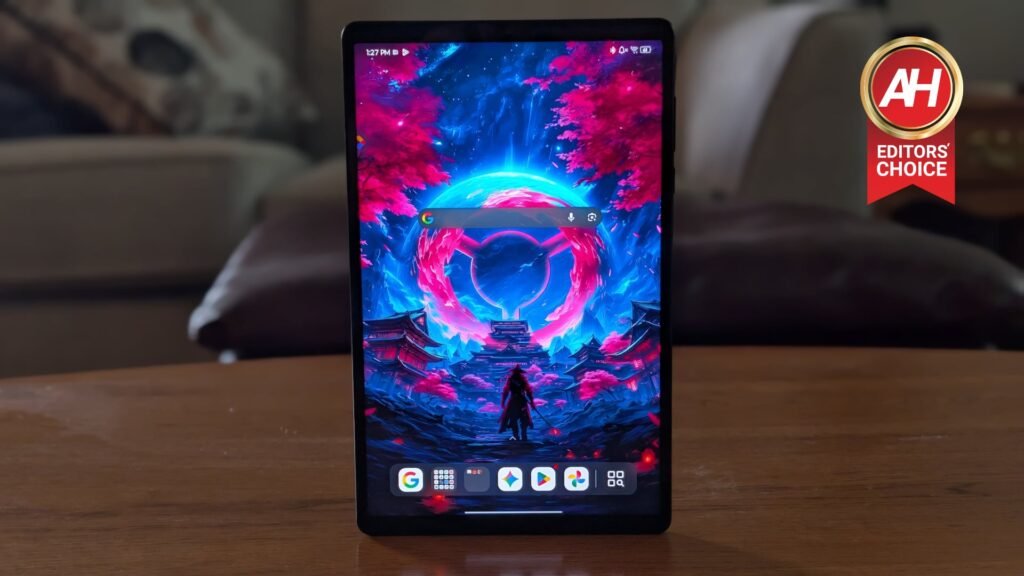

The Lenovo Legion Tab Gen 5 is the latest gaming hardware from Lenovo in the mobile space if you don’t count devices like its Legion Go 2 handheld. Those are technically mobile in the sense that they can be taken anywhere you go when you leave the house, but they’re not mobile like most users think of the mobile category, which is phones and tablets.
The Legion Tab Gen 5 is not only Lenovo’s latest mobile gaming device, it’s the newest proper gaming tablet on the market at the moment, and it comes with some beefy specs. When Lenovo unveiled this tablet at the beginning of 2026, I was eager to see if it could live up to the previous model – the Legion Tab Gen 3 which was powered by the Snapdragon 8 Gen 3 chipset. This new tablet is powered by the Snapdragon 8 Elite Gen 5, a more powerful chipset that really shines when the tablet begins taking on demanding tasks like gaming.
Lenovo makes a few different configurations of this, starting with a model that has 12GB of RAM and goes up to a model with 24GB. I’ve been spending some time with the 12GB model for review, and it has mostly lived up to my expectations for a great gaming tablet experience. But at a starting cost of $699.99, the Legion Tab Gen 5 is a semi-costly device. So, is this tablet worth your money? Let’s dive into the review and take a closer look at it.

The Lenovo Legion Tab Gen 5 is a powerful gaming tablet that excels in just about everything you could want in a tablet. At just under 9 inches for the display size it’s perfectly portable, making it an ideal solution for those who want a bigger screen device than their phone, but not something massive. It’s also packed with a very powerful chipset that delivers console-level gaming experiences. With loads of storage, a big battery capacity, and a beautiful screen, gaming is a top-tier activity on this device. It also works well for entertainment like watching movies and TV shows, and with the desktop mode it even works as a decent little PC.
Pros
- Powerful performance for gaming
- Pretty decent battery life for a tablet with this much power
- PC game emulation lets you play PC games locally
- Comes with a folio case and a screen protector
- Dolby Atmos audio support is a big plus
- 68W wired charging
- A side-mounted USB-C port allows for charging while playing games
- You can expand storage with the microSD card slot
Cons
- A bit pricey compared to the last model
- The PC game emulation didn’t work well with all games
- Low amount of RAM for the price, but more than suitable for use.
Lenovo sent us out the Legion Tab Gen 5 for review and I’ve been spending the past week or so with the device to get a feel for its capabilities. This is not a sponsored review, and Lenovo did not see this review before it was published.
Lenovo Legion Tab Gen 5 Specs
Lenovo Legion Tab Gen 5 Specs
| Processor | Qualcomm Snapdragon 8 Elite Gen 5 |
| Operating System | Android 16 |
| RAM | 12GB |
| Storage | 256GB |
| Battery | 9,000mAh |
| Audio | 2x microphones, 2x 2712 superlinear speakers, Dolby Atmos |
| Camera | Front: 8MP with 78-Degree Ultrawide, Rear: 50MP AF with Flash |
| Ports/Slots | USB-C (USB 10Gbps) – charging / DP-out / OTG / audio, USB-C (USB 480Mbps) – charging / OTG / audio, MicroSD with upport for up to 2TB |
| Wireless Connectivity | WiFi 7 (802.11a/b/g/n/ac/ax/be), Bluetooth 6.0 |
| Display | 8.8 Inch 3K PureSight |
| Refresh Rate | Up to 165Hz |
| Dimensions | 128.5mm x 206.46mm × 7.59mm |
| Weight | 360g |
| Color | Eclipse Black, Glacier White |
Lenovo Legion Tab Gen 5 Review: Design and Build Quality
When it comes to the design, the Legion Tab Gen 5 is a pretty great-looking tablet. It doesn’t deviate too much from the design of Lenovo’s last model, but it does so just enough to make it obvious that this is a new device. The main difference is that Lenovo’s new Legion Tab Gen 5 doesn’t come with dual rear cameras like the earlier model. Instead, it uses one main camera with a 50MP sensor. This is a big departure from the 13MP main sensor and 2MP macro sensor combination Lenovo was using, and it results in some better pictures, too.
Other than one thing, and perhaps the additional color options this time around, the Legion Tab Gen 5 mostly looks the same. You still have the side-mounted USB-C port for charging while gaming or watching movies, and that’s a big plus because I can sometimes play games for hours, which will drain the battery much faster. This way, it’s possible for me to charge the device and play at the same time. You also still have the USB-C port on the bottom if you want to charge that way. Lenovo is still using dual stereo speakers here which is also nice to see, as that pairs nicely with the Dolby Atmos support when engaging with content that offers it. Outside of that, the speakers are just really nice for sound quality for mobile content of any type.


You still have the front camera but also some slightly slimmer bezels, which is going to be a nice touch for some people. The bezels on the previous model didn’t really bother me, so I wasn’t overjoyed when I noticed they had been toned down a bit. I wasn’t unhappy with the change either, just not extremely excited as it’s a pretty minor design tweak.
In place of the second camera sensor, there’s now an RGB LED light ring that sits below the camera bump. This can be turned off in the tablet’s settings, and you don’t even have to dig for it. Lenovo was kind enough to give it its own settings menu and place it near the very top so it’ll be one of the first things you see.
Top-tier build quality that is unmistakably premium
When it comes to build quality, Lenovo’s products generally feel very premium, and that’s most certainly present with the Legion Tab Gen 5. With the aluminum frame and aluminum back, the feel of smooth metal in your hands is hard to beat in smaller consumer electronics like this. It also feels very solid. I’m not saying it feels durable, or rugged, because it’s not that kind of device. However, it does feel like a solid, quality-made product.
Lenovo clearly considered attention to detail when choosing everything from build materials to placement of things like the speakers or the cooling system on the inside. If there is one thing I could grip about, it’s that the tablet feels fairly slick, perhaps making it easier to drop if you aren’t careful. Thankfully, Lenovo does package a folio case in here with the tablet. And, the folio display cover is magnetic, so you can pull it off at any point if you want the case on there.
The case is a pretty thin plastic shell, so it’s not going to prevent damage from bigger impacts. However, it does make the tablet easier to grip, and that’s the important part. Overall, the build quality of the Legion Tab Gen 5 is great.

Lenovo Legion Tab Gen 5 Review: Display
Without beating around the bush, this is a very nice display. It’s 3K resolution with a refresh rate of up to 165Hz. It also has a high brightness mode that goes up to 800 nits. That’s definitely far from the highest brightness we’ve seen on devices. Many smartphones, in fact, offer way higher brightness than this. However, 800 nits is still plenty bright and more than enough to really use this in any setting you like. Lenovo says the high brightness mode brings scenes to life inside or out and that’s really pretty spot-on.
The display also offers 99% DCI-P3 color accuracy that helps images and game visuals pop off the screen and sort of bring them to life a little bit more. That paired with the 3K resolution really makes things look excellent. One thing that I don’t think gets talked about enough is the touch sampling of these displays.
On the Legion Tab Gen 5, it has a touch sampling rate of up to 480Hz. It also features 10x touch resolution. Lenovo says this offers instant input recognition that registers your touches instantly and accurately. I found this to be accurate. It is worth noting of course that I probably don’t take advantage of the full potential. I’m not playing games like Call of Duty: Mobile or other shooters with several fingers per hand on the display. I play with my thumbs and that’s basically it. However, if you DO play with several fingers touching the display at once, this will be a big benefit for you.
Another really cool feature with the display is that it supports the capability to switch the refresh rate. Instead of just being a flat 165Hz, you can pretty easily change it to intelligent or standard. It’s not always working at 165Hz. If you have it on the intelligent setting, it will adjust on its own as needed. You can also set it to 165Hz all the time, or down to standard, which puts the refresh rate at 60Hz. Intelligent and standard will often use less battery. That being said, intelligent mode will at least crank the refresh rate higher for games and such. This is what it’s on by default and this is what I recommend using. However you cut it, this is a really good display to work with. Games look great on it, colors are vibrant, and they’ll look smooth too. It’s also sizeable enough for reading and browsing but not too big to be unwieldly.

Lenovo Legion Tab Gen 5 Review: Performance
Right out of the gate, performance on this tablet is awesome. During my many hours of playing games it never felt clunky or like things were limping along after a long session. The only time performance really wasn’t visibly peak was during a couple moments of the graphics benchmarks. But then again, those are meant to push devices to their limits, so that’s understandable. In everyday activities, like mobile gaming, or gaming through the PC emulator (yes, you can emulate PC games on this thing) the Legion Tab Gen 5 was fast and fluid as you would expect it to be.
I found myself easily picking up and playing games like Genshin Impact, Diablo Immortal, and The Division Resurgence with maxed out graphics and fast frame rates. Without issue. Even after a few hours of gaming, the Legion Tab Gen 5’s ‘Legion Coldfront’ cooling system kept the device at reasonable temperatures to help sustain performances. And importantly, the tablet didn’t heat up to uncomfortable levels so I was still able to hold it.
General browsing and just day-to-day simple use activities also always felt really smooth, but that shouldn’t be surprising given the specs this has, and the low-demand on resources from light tasks. Overall the performance is top-notch and it’s easily the most powerful Android gaming tablet out there right now. In addition to real-world performance, we also run devices through benchmark tests to see how they perform on paper. Surprise, the Legion Tab Gen 5 did very well.
Benchmarks
For benchmarking, we put each device through three different tests using the following apps: 3DMark, AnTuTu, and Geekbench 6. With 3DMark we use the Wildlife Extreme Stress Test, because its entire reason for existing is to puts stress on the device’s resources to see how it handles long and sustained high-performance activities. AnTuTu with the AnTuTu 3D Bench tool does something similar as it tests the graphics, while Geekbench 6 is mostly about testing the CPU. Although it does offer a GPU test as well, and we do test that. For starters, let’s begin with Geekbench 6.
In this test the Legion Tab Gen 5 did very well with high scores that you would expect to come from a device with this chipset. In fact, there was only one tablet out of the ones we’ve tested that beat out the Legion Tab Gen 5, and it was the 13-inch Apple iPad Pro with the M4 chip. Every other tablet received lower scores in both the single-core and multi-core CPU tests, and in the GPU test. In short, great performance even on paper. You can check the Geekbench 6 scores in the table below.
| Tablet | Geekbench Single-Core | Geekbench Multi-Core | Geekbench GPU |
|---|---|---|---|
| Lenovo Legion Tab Gen 5 | 3,567 | 10,468 | 22,576 |
| Apple iPad Pro (M4) | 3,756 | 13,305 | 53,342 |
| REDMAGIC Astra | 3,099 | 7,870 | 19,509 |
| Lenovo Legion Tab Gen 3 | 2,190 | 6,765 | 14,569 |
| OnePlus Pad 3 | 2,994 | 9,044 | 19,178 |
As you can see, pretty impressive scoring from the Legion Tab Gen 5 and it doesn’t stop there. Even in AnTuTu it scored pretty highly. Only this time it has the highest AnTuTu score of any tablet we’ve tested up to this point, which is about 14 different devices.
| Tablet | AnTuTu Score |
|---|---|
| Lenovo Legion Tab Gen 5 | 3,945,194 |
| Apple iPad Pro (M4) | 2,797,277 |
| REDMAGIC Astra | 2,604,996 |
| Lenovo Legion Tab Gen 3 | 889,460 |
| OnePlus Pad 3 | 2,806,068 |
Lastly we have the results for the 3DMark test which can be seen below. Again, it was able to outscore every other tablet except for the Apple iPad Pro 13 with the M4 chip. In short, the benchmark tests are yet more proof that this tablet is a performance beast.
- Best Loop: 6,855
- Lowest Loop: 5,541
- Stability: 80.8%
Thermals
We don’t just like to test out the real-world performance and benchmark performance of the device. We also like to test out the thermals. This is an important part of how a device is going to perform. For one, you’re going to be holding it for extended periods of time. And you want to make sure that it’s not going to get overly warm or hot while that happens. Because that’s uncomfortable. While I have only had a couple of phones get exceedingly hot during extended use, most will still get noticeably warm.
And that temperature increase doesn’t just affect your comfort in holding the device. It can also impact the performance sometimes. Of course, phones and tablets with good cooling systems and thermal management can bypass that performance drop, or at least mitigate it. To that end, we like to test the thermals to see how much of a temperature increase the devices get during extended heavy use. We do this by checking the thermal temperature after three activities that ten to use a lot of resources, and therefore cause the temperature to go higher more consistently.
This includes playing Genshin Impact at the highest graphics possible for about an hour or more, then we also check the temps after running the 3DMark Wildlife Extreme Stress Test, and after 10 minutes of recording video at 4K60, or as high as is allowed by the device. You can see the results of those temps below.
| Device | Thermal Genshin Impact | Thermal 3DMark | Thermal 4K Video |
|---|---|---|---|
| Lenovo Legion Tab Gen 5 | 99.5 | 120.3 | 98.7 |
| Apple iPad Pro (M4) | Not tested | 101.1 | Not tested |
| REDMAGIC Astra | 97.1 | 110.4 | 92.1 |
| Lenovo Legion Tab Gen 3 | 103.8 | 111.7 | 87.1 |
| OnePlus Pad 3 | Not tested | 93 | Not tested |

Lenovo Legion Tab Gen 5 Review: Battery Life and Charging
Battery life can be a super important factor in how good a device is depending on how often you use that device throughout the day. I personally don’t think it’s as big of a factor on devices like tablets, because you’re bound to be using these less often than your phone on a daily basis. That being said, if you’re specifically getting a tablet like this one for gaming, you still want the battery life to run you a decent amount of time so you can play games for longer.
After my testing I can say I wasn’t really disappointed with the performance of the battery life on this tablet. Sure, I would never mind if it ran longer than it did. That’s always nice. But I think the results of this model came out pretty good. For starters, the battery life during my testing was better than that of the Legion Tab Gen 3. To do our battery life tests, we turn up the screen brightness, then open up YouTube and find a 24-hour 4K fireplace video and let it play until the battery runs out. We then mark that time. For the Legion Tab Gen 5, it lasted for 8 hours, 56 minutes, and 1 second. That’s compared to the Legion Tab Gen 3 which was 8 hours, 15 minutes, and 37 seconds. Considerably longer.
As for charging, we simply mark how long it takes for the battery to go from 1% to 100% using the fastest charging the device supports. For the Legion Tab Gen 5, it took about 1 hour, 17 minutes, and 43 seconds. Mind you this tablet has a 9,000mAh battery, so it’s quite sizeable and didn’t take too long to charge up. In my everyday use, I was more than capable of taking the tablet from 100% after puling it off in the morning to about 35%-40% by the end of the day. This is with bringing up YouTube to stream music throughout the day while I work, stop for the occasional break to browse reddit, and play a few hours of games after work. Overall, very pleased with the battery life in general.

Lenovo Legion Tab Gen 5 Review: Software
For the Legion Tab Gen 5, the software experience is part of this tablet being a gaming tablet. It’s part of what it differentiates it from other Android tablets on the market. Not so much from gaming tablets, as a lot of them will offer very similar features, like ways to adjust between performance modes depending on your activities, a game hub, etc. These kinds of things aren’t often found on non-gaming devices, but gaming tablets and phones almost always include them.
The Legion Tab Gen 5 does as well, and this is a big part of why this tablet is so cool. For starters, it has the Game Assist feature. This is just a small tab that you can swipe inward on the display from the left edge to open the panel. From there, you’ll find performance modes you can swap between, toggles for disabling notifications while playing games, a screenshot button, and many more features.
On the whole, the software for the tablet is a pretty close approximation of stock Android like you’d see on an ASUS gaming phone when those were still being made, or like on Motorola devices. There isn’t a lot of extra fluff. And that’s always nice to see. One of my favorite software features though was Lenovo’s inclusion of the Gaming Hub. This app is a PC emulation app that lets you emulate PC games. It’s not streaming games to the tablet, it’s actually installing them as emulated versions and running them locally on the tablet. This can be connected to your Steam account so you can install some of your game library. It’s actually quite cool and makes the case for this being a tablet that’s viable for more than just mobile games.
That being said, the emulation didn’t work on everything I tried. First I tried to install The Witcher 3, and anytime I tried to launch the game it would start and then crash before the game actually got to the start screen. However, I was able to boot up Hades II with no problems at all. On top of that the game was getting a pretty stable 60 frames per second with decent graphics settings in that game. There are loads of other supported games in the list of possible titles to play, too. I haven’t seen this pre-packaged in any other tablet or phone before. So that’s a nice bonus that Lenovo managed to toss in.
The desktop mode
If you use your tablets for work or school, then the desktop mode is a feature that you have to check out. I didn’t use this a whole lot myself but I did want to check it out, and it’s a neat way to get that desktop computer-like experience with an Android tablet. You can hook up Bluetooth mouse and a Bluetooth keyboard so it feels like you’re using a regular laptop or desktop. Obviously, it’s still running Android. But you get to type with physical keys and click on stuff with the mouse. This really kind of simplifies a lot of use cases if you’re doing other things besides playing games or watching movies. In short, don’t sleep on this feature. Give it a go at least once.
Lenovo Legion Tab Gen 5 Review: Camera
Nobody is going to be buying this tablet for the camera quality but that doesn’t mean you won’t use the camera in a pinch from time to time. If you’re like me, then you will probably never have this tablet on you and not also have your phone on you somewhere. And in every single one of those scenarios, the phone is probably going to be the better option. Because let’s face it, tablets aren’t generally designed for their camera prowess. They’re meant as entertainment devices, work devices, study devices, and the like.


However, it is nice to know that if you needed to use it for pictures, that it would produce some decent images. Taking photos with a nearly 9-inch tablet feels a bit unwieldly, but it’s doable. And quite honestly the photos ended up coming out ok with this device. Decent color reproduction with a decent amount of detail still left in the image. It’s nothing too crazy, but you shouldn’t be disappointed with the images that this tablet is capable of capturing.
Nothing looks too washed out or overly saturated or anything. You do start to lose some detail more quickly the more you zoom out, but you won’t often be doing stuff like that if you’re using this for photos. More than likely you’d be using it for closer shots. All in all, an alright camera if you happen to need one and have no other alternatives.

Should you buy the Lenovo Legion Tab Gen 5?
At $699.99, it’s a little harder to swallow than the previous model that came in at well under $500. But the RAM crisis is still ongoing and this has unfortunately cause price increase on just about all consumer electronics. The Legion Tab Gen 5 is not exempt from that. If you can overlook the higher price, then I absolutely think this tablet is worth buying. But not if you’re not into mobile gaming, or at the very least buying this for someone who is.
As a gaming device, the Legion Tab Gen 5 is a top-notch option for gamers on the go. Especially when you consider the PC game emulation that you can connect to your Steam account for playing some of your PC games. And of course you can connect a controller for those games so you can play like normal. With a high refresh rate, a d beautiful display, and an extremely portable design, this is a tablet any gamer should consider.
The post Lenovo Legion Tab Gen 5 Review: The Gaming Tablet To Beat appeared first on Android Headlines.