
Google’s devices have always been my absolute favorite even when they weren’t actually made by Google in the first place. I remember working several hours of overtime back in 2010 when the Nexus One came out just so I could afford one, and that desire to use Google’s phones has stuck with me through the years.
While I wouldn’t always be using a Nexus or Pixel phone as my main device every generation, there were just a few lapsed years where that would be true. Once with the Sony Xperia Z3, and then a few years of gaming devices from the ASUS ROG brand when ASUS was still making phones. But in between all that, I went from the Nexus One to the Galaxy Nexus, then to the Nexus 4, the Nexus 5, the Nexus 6, and I also had a couple of the Nexus 7 tablets. From there I ended up with the very first Pixel in 2016, then I went to a Pixel 2, and a Pixel 4.
I didn’t come back to a Pixel device until the Pixel 8, having gone through a phase of being really into mobile gaming and I always wanted to use one of the gaming phones as my main device. The point is, Nexus and Pixel devices have been my go-to options since the very early days of Android. Despite the many options for a daily driver, Google devices have had a tight grip on me to the point where I’ve used many of them. Not every one, but enough of them to know when Google really nails it. And I think Google has really nailed it for the most part with the Pixel 11 Pro XL. I say this coming from a Pixel 10 Pro, which isn’t that different of a device. But, the little refinements and adjustments made here with the 11 series, colors and all, have made for a great device.
That isn’t to say the phone is perfect. It has a few flaws, some of which confound me on levels I didn’t think possible. But we’ll get into those later. With a starting price of $1,299, the Pixel 11 Pro XL is anything but inexpensive. So, is the phone worth your hard-earned money? Let’s dive into this review and find out.

The Google Pixel 11 Pro XL is a tried and true flagship masquerading as a series of incremental upgrades.
Pros
- A timeless design that no other flagship smartphone has been able to beat.
- Qi 2.2 support for optimal wireless charging speeds + faster charging overall
- 7 Years of OS updates
- Really good thermals compared to the past few Pixels
- The display is incredibly bright
- Excellent camera with genuinely impressive features like Magic Capture
- Buttery smooth software experience
Cons
- HiLight is a huge missed opportunity with no third-party app support
- Battery life is somehow worse than all of last year’s Pixel phones
- $100 price jump
- PowerVR GPU has some weird graphical issues in high-end games
- Video Boost is causing audio glitches during video recording (This isn’t necessarily an issue with every Pixel 11 series phone)
Google sent over the Pixel 11 Pro XL for review, and I’ve been using it for the past couple of weeks to see how it stacks up. This is not a sponsored review, and Google did not see this review before publishing.
Google Pixel 11 Pro XL Specs
Network
| Types | GSM / HSPA / LTE / 5G |
Display
| Type | Super Actua (LTPO) |
| Size | 6.8-inch |
| Resolution | 1344 x 2992 |
| Refresh Rate | Smooth Display (1Hz – 120Hz) |
| Brightness | 2,400 nits HDR / 3,600 nits peak |
| Protection | Corning Gorilla Glass Victus 2 with anti-glass shield |
Body
| Colors | Canyon, Olive, Fog, Obsidian (Matte) |
| Dimensions | 162.7 x 76.5 x 8.5 mm (6.41 x 3.01 x 0.33 inches) |
| Weight | 226g (7.97oz) |
| Build | Aluminum frame, glass back |
| SIM | Dual eSIM (two active eSIMs; stores 8 more eSIMs) [US] / Dual SIM (one nano SIM and one eSIM) or (two eSIMs) [JP] / Dual SIM (Single nano SIM and eSIM) [all other regions] |
| Protection | IP68 |
Platform
| OS | Android 17 (7 years of updates) |
| SoC | Google Tensor G6 |
| Coprocessor | Titan M3 Security coprocessor |
Memory
| RAM | 12GB/16GB |
| Storage | 256GB, 512GB, 1TB |
Cameras
| Main | 50MP, f/1.68, 1/1.3″, Octa PD Wide |
| Ultrawide | 48MP, f/1.7, 1/2.51″, 123°, Quad PDAF |
| Telephoto | 48MP, 5x optical zoom, f/2.8, 1/1.95″, Dual PDAF |
| Selfie | 42MP, f/2.2, 95°, Dual PDAF |
| Video Capture | 8K 24/30fps, 4K 24/30/60fps, 1080p 24/30/60fps |
Sound
| Speakers | Dual stereo speakers |
| Audio Jack | No |
Battery
| Capacity | 5,115mAh |
| Charging | 45W; up to 75% in about 30 minutes |
| Charger | Not included |
Network bands
| 2G | GSM 850 / 900 / 1800 / 1900 |
| 3G | HSDPA 800 / 850 / 900 / 1700(AWS) / 1900 / 2100 |
| 4G | 1, 2, 3, 4, 5, 7, 8, 12, 13, 14, 17, 18, 19, 20, 25, 26, 28, 29, 30, 38, 40, 41, 48, 66, 71 |
| 5G | 1, 2, 3, 5, 7, 8, 12, 14, 20, 25, 26, 28, 29, 30, 38, 40, 41, 48, 66, 70, 71, 77, 78, 258, 260, 261 SA/NSA/Sub6/mmWave |
Connectivity
| Sensors | Fingerprint (under display, ultrasonic), accelerometer, gyro, proximity, compass, barometer, temperature |
| Location services | GPS, A-GPS, Glonass, Galileo |
Google Pixel 11 Pro XL Review: Design and Build Quality
There are a lot of good designs out there for smartphones. For example, the Galaxy Z Flip 8 design has started to grow on me, and I’m a big fan of the design for the Galaxy Z Fold 8 and its passport style. I was a really big fan of the ROG Phone 8 Pro as well, and Motorola’s new Razr line has been great these past few generations. But nothing holds a candle to the Pixel these days.
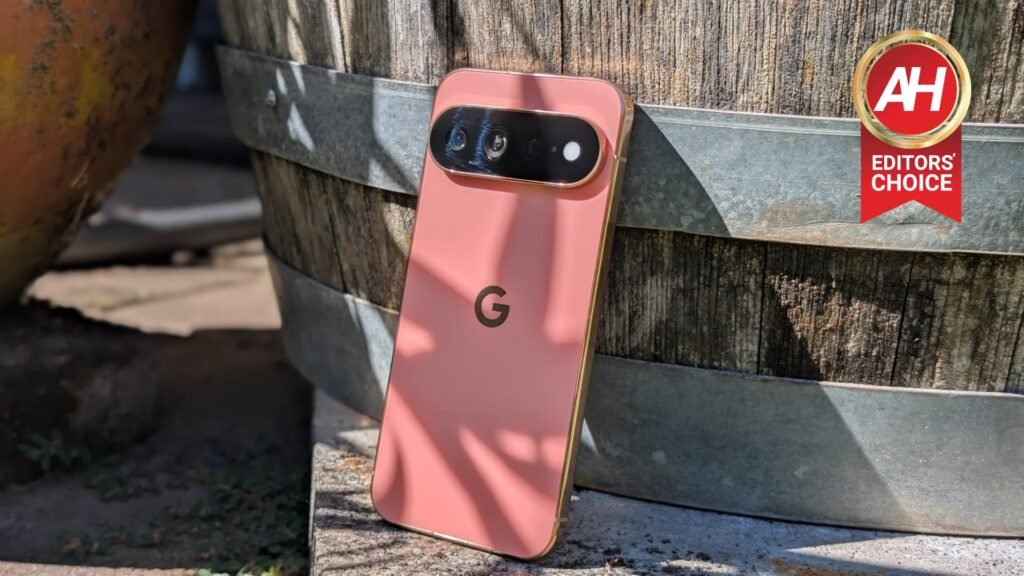
The Pixel 11 series is third year that Google has used this design for its Pixel phones and it has maintained the best design of any smartphone available for the third year in a row. Not only are Google’s colors on point again this year (the Canyon color truly is chef’s kiss), but that wide camera bar that stretches across nearly the entire back fixes a big issue that several smartphones still have to this day. The dreaded wobble if you lay your phone down on surfaces with the display facing up. This idea of a large, tall camera bump that sticks to the left corner is terrible and I for the life of me have no idea why it has stayed popular with manufacturers for so long. Thankfully, Google has the good sense to avoid this trend.
The Pixel 11 Pro XL is the best-looking of the Pixel 11 series if you like bigger phones that aren’t foldables, but overall it’s mostly the same design as the other versions. And that’s a good thing because you generally get the same phone style with just a few differences, such as the colors.


Speaking of colors, while they are all very nice this year, I do wish Google would have finally done away with the glossy frame on the Pro models. This copper color frame on the Pixel 11 Pro XL in Canyon is my particular favorite and it goes so well with the Canyon color on the back. But the glossy frame as ever, is a fingerprint magnet and I hate that. A matte finish for the copper frame would have been so good here. As a small aside, the Canyon color does look slightly different from the photos Google uses. It’s a bit lighter, and doesn’t really have that orange-reddish hue. It’s almost more of a salmon, though it does look darker in certain lighting.
Google is still using an eSIM only for the Pixel 11 series so that means no options for using physical SIM cards, but I personally think that this is a better look for the phone if you’re not putting a case on it. The design looks more cohesive without a pop-out SIM tray in my opinion.
Build-wise, the Pixel 11 Pro XL feels very solid and well-built. While I don’t want to test the durability of the device, I feel like if I did happen to drop it that the Pixel 11 Pro XL would go on kicking with just some minor aesthetic imperfections from the impact.
Without the SIM tray, the left side of the device is completely free of anything other than the antenna lines, while you’ll find two speaker grilles on the bottom flanking the USB-C charging port. Both the volume rocker and the power button are on the right side, with a mic up on the top. On the back you have Google’s signature G logo in a similar copper-like hue to match the frame, and then the body-wide camera bar with three sensors, and the new HiLight feature on the back that could have been so much more if Google had only dreamed bigger. All in all, a top-notch design with top-notch build quality that continues to sit atop the pile as the best looking smartphone on planet earth.
Google Pixel 11 Pro XL Review: Display
While not the highest resolution display I’ve used in the past few years, I really, really love the display on the Pixel 11 Pro XL for a few reasons. One, the display is bigger and I’m loving being back to a bigger display after using the Pixel 10 Pro for the past year. More importantly, though, the display on the Pixel 11 Pro XL is incredibly bright and that makes it very, very easy to see in direct sunlight. If I crank the brightness bar all the way up I can easily see it even when the sun is at its highest during the day. With a peak brightness of 3,600 nits, there is zero trouble seeing anything.
At 6.8 inches, the size plus the more than suitable resolution of 1344 x 2992 and the peak brightness of 3,600 nits makes for a compelling visual experience regardless of what you’re doing on the phone. I find that colors really pop even without the saturation and higher resolution I’ve been used to seeing with Samsung’s Super AMOLED panels.

One of the main complaints I’ve seen about displays on Pixel phones over the years has been the bezels. Mainly that they’re too big. This has honestly never bothered me one bit. To me, the bezels on the Pixel 11 Pro XL are slim enough and I really never notice them anyway. I think that’s a good indicator that they’re thin enough without going thinner for the sake of it. Personally, I also feel like what little bezels are there make the phone easier to hold without touching the display and having some accidental presses. This is just my opinion and I know some people will disagree with it, but I think Google has found a happy medium here.
While I would never scoff at the idea of a higher resolution or anything like that, I think the display as a whole on the Pixel 11 Pro XL is right where it needs to be for a good balance. It can go up to 120Hz when necessary but it doesn’t need to go higher since this isn’t really a gaming phone. It’s brighter than a lot of other phones on the market, and the colors are vibrant and basically any content looks great on this screen. In short, I wouldn’t change anything.
Google Pixel 11 Pro XL Review: Performance
Now we come to the performance, which can be a bit of a mixed bag with Pixel phones depending on what sort of performance you’re looking for. If it’s gaming performance, the Pixel 11 Pro XL is certainly capable of playing games. I spent more than hour or two on multiple occasions playing some Zenless Zone Zero, both for testing purposes and just for fun, and the game ran fine and looked good too. However, it’s not going to look or run as good as it would on something like the REDMAGIC devices. So for high-end gaming performance, the Pixel 11 Pro XL can get by but it won’t be your best option.
Now for everyday performance, I think the Pixel 11 Pro XL passes with flying colors. The combination of the software, UI, and Google’s custom Tensor G6 chip make for a satisfying and snappy user experience that never felt slow or sluggish. I’ve been using this phone for about two weeks at this point and never once did I have any concerns or internal gripes about the performance for my everyday use, whether that was taking pictures, watching videos on YouTube, interacting with Gemini, etc. And I truly believe that most people who try this phone will feel the same way if their expectations are tempered accordingly. By that I mean going into this knowing that this isn’t designed for high-performance gaming, but it will still excel at mostly every other task you give it.
One thing I have noticed is that during my time with the phone so far, it has stayed noticeably cooler throughout the day and during more resource intensive activities. Even after an hour of gaming it was cooler to the touch than the Pixel 10 Pro has ever been. So Google really did do a good job with improving the thermals this year, which is a sentiment that our own Alex Maxham shares and has mentioned as well.
Benchmarks
Outside of general day-to-day real-world use, we also look at performance by testing it with benchmarks. To do our benchmark testing we use 3DMark with the Wildlife Extreme Stress Test, AnTuTu, and then Geekbench 7.
Starting off with Geekbench 7, we’re testing the Pixel 11 Pro XL against the Pixel 11 Pro and the Pixel 10 Pro while we work through testing some older devices that we had previously used Geekbench 6 to test.
| Device | Geekbench 7 Single-Core | Geekbench 7 Multi-Core | Geekbench 7 GPU |
|---|---|---|---|
| Google Pixel 11 Pro XL | 2,269 | 6,875 | 3,224 |
| Google Pixel 11 Pro | 2,748 | 7,557 | 3,123 |
| Google Pixel 10 Pro | 2,331 | 6,195 | 2,004 |
From Tensor G5 to Tensor G6, there are some noticeable improvements on computing and graphics, but we’re not talking leaps and bounds here and Google’s devices will still fall behind flagships like the Galaxy S26 Ultra, Galaxy Z Flip 8, and Galaxy Z Fold 8 as these use higher performance chips like the Qualcomm Snapdragon 8 Elite Gen 5. Again though, in everyday use, performance feels really good in-hand even if it doesn’t look like it’s winning any awards on paper.
Where the Pixel 11 Pro XL really shows up on paper as lagging behind is with AnTuTu. Keep in mind that the scores here are really evident of how performance will feel for normal use, but it is a good way to see what you can probably expect in terms of gaming and multi-tasking. Though truly, real-world performance so far for me has been perfectly fine.
| Device | AnTuTu |
|---|---|
| Google Pixel 11 Pro XL | 1,592,560 |
| Google Pixel 11 Pro | 1,992,456 |
| Samsung Galaxy Z Flip 8 | 2,275,786 |
| Samsung Galaxy S26 Plus | 3,308,075 |
Next, let’s talk about 3DMark. We use the Wild Life Extreme Stress Test for this because it serves two purposes. One, it’s designed to really test phones by pushing them to their limits, and two, we use this to test thermals after the benchmark is done because this is probably the warmest the phone will get.
- Best Loop: 3,179
- Lowest Loop: 2,299
- Stability: 72.3%
Overall, these are better scores than the Pixel 11 Pro and mostly better than last year’s Pixel 10 Pro XL when it comes to 3DMark. For performance as a whole, Google is still considerably behind other flagships on paper, but trust me when I tell you that outside of high-end gaming with demanding graphics, you won’t really be disappointed with how this phone performs.
Thermals
Now I also mentioned that we test thermals to give an idea of how warm the phone is going to get during its most resource-intensive activities. This generally tends to be during high-end gaming, like with Genshin Impact, and things like video recording. So, what we do is test at least an hour of gaming, 10 minutes of video recording at 4K 60, and right after the 3DMark Wild Life Extreme Stress Test. We let the phones cool down before doing the other thermal tests as well so we can ensure an accurate temperature reading.
For gaming, we couldn’t do Genshin Impact here because there is a weird bug with the PowerVR GPU that blankets like 90% of the display in a weird purple graphical filter so you can really see any of the game’s in-game graphics or UI elements. Instead, I tested Zenless Zone Zero here, which is another game from the same studio, with similar gorgeous anime graphics. You can see all the thermals from the Pixel 11 Pro XL and a few other flagships below.
| Device | Genshin Impact/Zenless Zone Zero | 3DMark Wild Life Extreme Stress Test | 4K60 Recording |
|---|---|---|---|
| Google Pixel 11 Pro XL | 98 | 103 | 97.9 |
| Google Pixel 11 Pro | 104.3 | 102.2 | 98.2 |
| Google Pixel 10 Pro XL | 105.8 | 109 | 98.7 |
| Samsung Galaxy S26 Plus | 93.2 | 107.9 | 96.1 |
All the thermals are good here especially compared to older Pixel phones. The drop between last year’s Pixel 10 Pro XL and this year’s Pixel 11 Pro XL is six degrees in the 3DMark test which is a pretty big decrease. It’ll be even less noticeable to your hands if you have a case on the phone too. Even the thermals while gaming dropped by about seven degrees, so all in all Google has done a good job at ensuring the phone gets rid of heat more efficiently.
There are still some improvements to be made with regards to performance in games like Genshin Impact, specifically with the PowerVR GPU issues, which Google is said to be working with HoYoverse on to fix. Thermals, however, are pretty good and we love to see that here.
Google Pixel 11 Pro XL Review: Battery Life and Charging
If there was one area where I was a little disappointed with this phone it’s with the battery life. Charging speeds are great, considering that there is a bigger battery inside the phone and yet it charges faster than the regular Pixel 11 Pro model, not to mention it charges faster than last year’s Pixel 10 Pro XL by a couple of minutes, though that’s probably due to the 5,115mAh battery as opposed to the 5,200mAh used in the Pixel 10 Pro XL.
Battery life, though, is another story. It should be better. Considering the more efficient chip. Yet, during my personal testing, it ended up getting down to 1% much faster than the Pixel 11 Pro and even last year’s Pixel 10 Pro XL and Pixel 10 Pro. Granted, this is just with the way we do battery benchmarking. For some context, we test batteries by general use throughout the day and seeing how much we have left after a full day’s use, and we test them by bringing up a 4K, 24-hour video and letting the video play until the battery gets down to 1%.

It’s the latter test where the results were disappointing. I tried the test three different times with varying results, with the last time doing everything the same as what we did for the Pixel 11 Pro, which is bringing the display brightness down around 200 lux using a lux meter (I had it sitting somewhere around 196), and I ensure the video resolution was down to 1080p after Alex mentioned that’s what he uses when I told him I was measuring with the video at 4K. I also turned on do not disturb mode and made sure nothing was connected to Bluetooth, save for the Pixel Watch 4 as Alex had his Pixel Watch 5 connected to the Pixel 11 Pro when testing. Lastly, I also turned off mobile data.
What baffles me is that the battery still ran out before last year’s Pixels and the Pixel 11 Pro. I don’t get it. Outside of this test, I’m getting decent enough battery life for a big-screen display like this and I usually keep brightness at around 95%. On average, I’m pulling the phone off the charger at around 6:30am, and it isn’t going back on the charger until pretty late, usually around 10pm or 11pm. Throughout the day I’m mostly using apps like Reddit and Twitter for the occasional browsing, I often play about 30 minutes to an hour of some mobile game, and I watch a total of about 2 hours of YouTube. I will also stream music with YouTube Music for a few hours throughout the day and do the occasional web browsing and checking emails. After all that, I was usually ending up with about 25%-30% battery. Not bad at all.
For charging, I was plugging this phone into Google’s 67W dual port fast charger, so I was getting the 45W max for the Pixel 11 Pro XL for wired charging, and it wasn’t taking more than an hour and 20 minutes to be back at 100% from 1%. These are pretty good speeds. I don’t have a Qi2 wireless charger so I wasn’t able to test the wireless speeds properly. But I think the charging speeds are pretty good given the battery size.
Benchmarks
Now let’s talk about the benchmarks because this is where the battery life falls behind on this phone and I’m simply confused as to how that’s possible when I made sure I was testing with the same parameters as the Pixel 11 Pro. As mentioned above, I brought the the display brightness down till our Lux meter measured close to 200 Lux, then loaded up a 24-hour YouTube video with the resolution at 1080p. And I just let it play until the battery is down to 1%.
Right after that, I plugged it in with the 67W USB-C fast charger from Google since it was made for Pixel devices, and I was using a 100W Ugreen USB-C cable.
| Device | Battery Life | Charging Time |
|---|---|---|
| Google Pixel 11 Pro XL | 14:53:40 | 1:17:07 |
| Google Pixel 10 Pro XL | 23:43:20 | 1:19:20 |
| Samsung Galaxy S26 Plus | 21:34:01 | 1:02:53 |
| Samsung Galaxy Z Flip 8 | 20:30:58 | 1:19:09 |
As you can see, it scored the lowest here, and was drained down to 1% nearly 10 hours before the Pixel 10 Pro XL. I tried testing three times, each time adjusting a little more till I had everything how Alex tests devices, and the battery still drained much faster than I would have guessed. I still feel like something isn’t quite right, so I will be re-testing down the road, just to be extra sure. For now, though, this is what we’re looking at. All of that said, you probably aren’t going to be watching YouTube until the battery dies every day, so this isn’t a huge deal.
And for me, I’ve had plenty of battery life by the time I plug the device in at night, not to mention I’ll be having a MagSafe battery pack to snap onto the back before long, but I definitely feel like the battery life should be better here in this test.
Google Pixel 11 Pro XL Review: Software
Software on Pixel phones is one of the biggest parts about a Pixel phone, because it comes with some highly specialized features that either never make it to other Android devices, at least in Google’s interpretation, or it ends up being quite a while before Google rolls them out as native Android features. In the case of the Pixel 11 Pro XL, there are several software features that are quite excellent on a daily basis. Some are not exclusive to the Pixel 11 series, while some, like the Rambler feature powered by Gemini Intelligence, are exclusive to this year’s devices. And let me tell you, Rambler is awesome.

If you missed Google’s announcements about Rambler, it basically takes all those messy text messages and it cleans up them up so they actually sound like more coherent speech. Let me explain. If you’ve ever sent text messages to friends and family and you tend to use a lot of things like “um” and “ah” and your messages are just generally messy-looking and somewhat hard to read, Rambler will clean this up so it reads more normal.
Obviously, the seven years of OS updates and Pixel Feature Drops and Security patches is always going to be a really nice thing here. It means you can use this phone for several years without needing to upgrade to a new phone just because the software and features are out of date.
HiLight is not the highlight of the software experience
In terms of other new features, the Pixel 11 Pro XL and the Pixel 11 Pro have the new HiLight feature. This is paired with the HiLight LED on the back that’s next to the camera sensors, and it’s one of my main disappointments with this device. Before the phones were announced, everyone thought this was going to be a custom color LED for notifications of all kinds. That is not at all what we got and it truly, truly confounds me.
I have fond memories of using the Galaxy Nexus and customizing the LED on front with different colors for every notification. Calls, Gmail, text messages, everything. What I was hoping for with HiLight was the ability to give a custom color to everything. So I could flip the phone face down and know what the notification was just by the color of the LED. Instead, Google thought it was a good idea to limit the HiLight feature to just your contacts that are set as favorites, so it lights up those colors when they call, and for Gemini conversations when you’re talking to Gemini. WHAT?? Hopefully in time there will be an app that will just let you customize HiLight for all of your third-party apps without having to go through a series of long steps like the Github project we reported on earlier this month. Until then, unless you interact with Gemini a lot or receive calls from your favorite contacts a lot, HiLight is a useless gimmick and nothing more.
Customize your vibrations with a unique pattern
Another really neat feature of the software that I really have enjoyed so far is with the customizable vibrations and tones. This isn’t exclusive to the Pixel 11 series and I was able to use the exact same settings on the Pixel 10 Pro, but I just now really discovered them so I’m mentioning it. Specifically with the vibrations. You can set the vibrations to a unique customized pattern so that the phone vibrates different for calls, notifications, etc., and it’s just a really neat little detail that doesn’t really need to be there, but I found it fun and enjoyable to have access to it. Another really neat thing that I haven’t really used a ton yet just cause there weren’t many opportunities, is the Live Translate for media. I will from time to time watch game trailers or anime in Japanese with English subtitles, so I found this to be quite awesome for those times when no subtitles are available.
Gemini Intelligence should get better with time
Gemini Intelligence is the other really big software feature this year. This is supposed to handle some of those more mundane daily tasks for you that you won’t want to do yourself, but you still do because they need to get done. The shopping list creation is a great example here because it’s something that can be a tedious task, but this is something Google had advertised Gemini Intelligence as being able to do. It’s also supposed to be able to make suggestions for you when doing things like talking with a friend. The example here would be something like Google Maps proactively suggesting a restaurant after a friend mentioned it in a text conversation. I haven’t really experienced this yet myself because those scenarios have never come up. But I can see how this would be pretty useful when it happens organically. Overall, the software experience is pretty polished as it tends to be on Pixel devices.
Google Pixel 11 Pro XL Review: Camera
Finally we’ve come to the camera and this is the other big thing with Pixel devices. They’re always touted as some of the best camera phones in the world because, well they really are. They provide consistently great photos every year even if they’re not always number one. And this year Google has added in some neat little tricks.
One specific new feature is Magic Capture and I think this is the real standout of the Pro models this year. You just open the camera app, tap the Magic Capture button, and then it begins recording video. As you move around and record like you would normally, Magic Capture is taking frames out of the video and picking high quality photos from the recording so you can have both the video and some great still shots. The idea behind this is to allow you the capability to capture those great moments on video but still be present in the moment because you’re not watching really on the phone screen. Magic Capture is more or less taking care of everything for you. It’s pretty sweet, and although I only really got to use it a little bit so far, I know I’ll be using it a lot more in the future.


When it comes to photo quality, images come out superb. The 120x Super Res Zoom is absolutely wild to me. Over the weekend, I took the camera to downtown Portland here and went to the top floor of one of the parking garages to get some shots of the skyline and some far off buildings and bridges, and was quite amazed at how well the images came out after. For standard photos and Portrait mode, images are slightly better than what I’ve been used to with the Pixel 10 Pro the past year or more.
Google also improved Night Sight this year so it works faster and it’s supposed to be an almost instantaneous thing. In my experience it was faster, but not by a whole lot, though it was enough to notice the difference in speed compared to last year and even older Pixel phones. Overall I think Google has done a really good job with the image colors this year too. Colors don’t come out too saturated and there was only an occasional image where colors appeared a little more muted than the rest. At the end of the day, it’s an excellent phone camera and still one of the best of any smartphone on the market.
Should you buy it?
If you’re coming from a Pixel 10 Pro XL, then I would say it’s probably not worth the upgrade. Spending a minimum of $1,299 for a small number of improvements is not what I would call a good investment. Granted, you can save some money with trade-ins and discounts, but I don’t think it’s worth it. If you’re using a Pixel 10 Pro and you want the bigger screen, or if you’re coming from an older Pixel phone, or an older device from a different brand from before 2025, then I think this is a really great purchase and yes, you should buy it.
It’s one of the most if not the most polished Android software experiences out there. It has the best design of any smartphone out there, and its cameras are top-notch so your photos are always going to look superb. Plus it has all those Gemini-powered smarts to make your day more convenient and less stressful. It has a few flaws, but they’re easy to overlook for all the good this phone provides.
The post Google Pixel 11 Pro XL Review: It’ll make you fall in love with Pixel phones appeared first on Android Headlines.