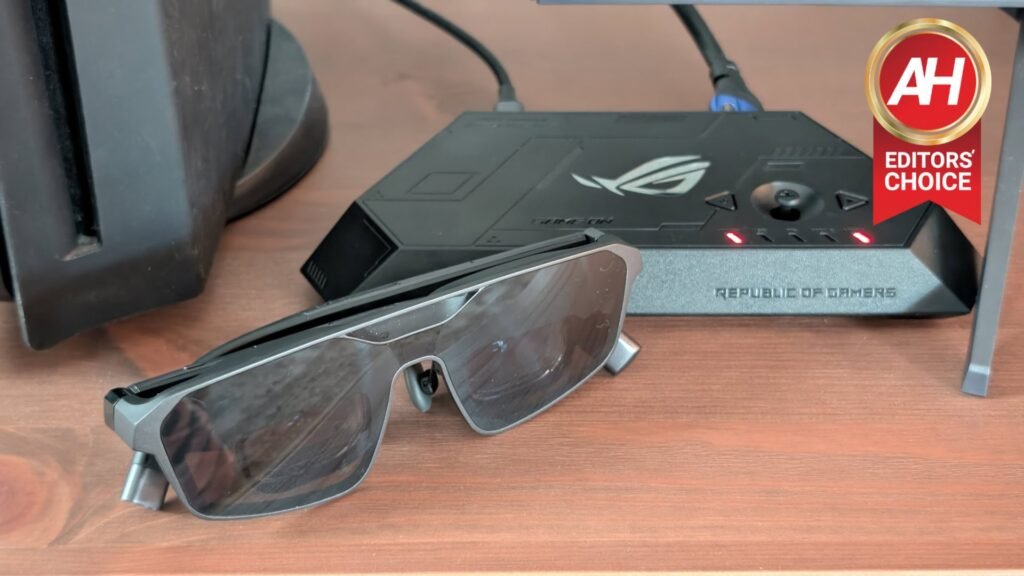

When ASUS announced the ROG XREAL R1 my first thought was “I have to review these things.” After hearing such good things about the XREAL 1S from Alex Maxham who reviewed them for Android Headlines, I knew I needed to experience what the ROG XREAL R1 would have to offer from the gaming side of things. With 240Hz micro OLED displays, sound by Bose, and several other gaming-related functions, these felt like they would take my PC gaming to the next level.
Gaming on a PC is typically tied to either a monitor or sometimes even a large screen TV, or, if you have a gaming laptop, on a smaller, roughly 14-inch to 18-inch display, wrapped up in a package you can stuff in your backpack and carry around with you. If you’re playing games on your PS5, then you generally need a similar setup. Either a monitor or a TV. Both of which are set up in front of you and vary in size from 24 inches all the way up to, realistically for the majority, about 75-85 inches if it’s a TV.
These can all be cool gaming experiences. In fact, I love gaming on essentially any platform. However, there’s something to be said for being able to take the equivalent of a 171-inch display and take it with you anywhere, whip it out, and start playing games just by plugging it into something like a laptop or a handheld. That’s what you’re getting with the ROG XREAL R1. While these do offer a lot to gamers, they’re quite expensive. Is the money worth it? Let’s dive into this review and find out.

ASUS and XREAL have come together to provide what appears to be the ultimate gaming experience for big-screen gaming entertainment. The glasses feature 240Hz micro OLED displays, sound by Bose for immersive audio, and a wide array of adjustable settings to fine-tune how your games look. Everything is wrapped up in a nice and neat little package that slides right into a small bag pocket. It’s gaming unlike anything you’ve ever experienced.
Pros
- Big-screen gaming that fits in your pocket
- The high refresh rate micro OLED displays are very smooth and crystal clear
- The electrochromic lenses do an excellent job at blocking peripheral vision
- Integrated Bose speakers get quite loud but without compromising too much on sound quality
- The included ROG Control Dock expands use for consoles with seamless switching
- You can anchor the display in place or have it follow your head movement
- A single button press lets you turn the display transparent so you can see what’s around you
- The will work with prescription lenses
Cons
- Quite expensive
- They don’t work with the Nintendo Switch 2 or the PlayStation Portal
- The controls can take some getting used to
- The audio isn’t private, so you have to adjust it accordingly
ASUS sent us over a pair of the ROG XREAL R1 to review. We’ve spent the past couple of weeks with them to see how they stack up. This is not a sponsored review, and neither ASUS nor XREAL saw this review before publishing.
ASUS ROG XREAL R1 Specs
ASUS ROG XREAL R1 Specs
| Display Technology | Sony Micro OLED with 3D Mode Support |
| Panel Size | 0.55 Inches |
| Resolution | 1,920 x 1,080 Per Eye |
| Frame Rate | 120Hz, 240Hz with Frame Boost Enabled |
| Panel Response Time | 0.01ms |
| Field of View | 57-Degrees |
| Virtual Display Size | Up to 171 Inches |
| Sensor | Capacitive Sensors |
| Environmental Understanding | 3DoF |
| Audio | Dual Speakers with Sound Tuned by Bose/Microphone Array with Noise Cancelling |
| I/O Ports | USB-C with DP Alt Mode |
| Dimensions | 15.3 x 4.9 x 16.6 cm |
| Weight | 0.09kg |
What’s In The Box
The ROG XREAL R1 glasses come packed with basically everything you need to jump right into gaming, short of the console or PC you’re going to plug these into. Inside you’ll find the glasses themselves, along with a prescription lens insert that you can take to your local optician to have them fitted for you. ASUS also lets you order a pair made specifically for you if you would rather do it that way, but the lens insert already comes in the box and it’s probably quicker to go to your local optician.
You’ll also find the connecting USB-C to USB-C cable that you’ll use to connect the glasses to your gaming hardware of choice. This is fairly long, but in my case it wasn’t quite long enough for plugging into my PC or my PS5. So I had to use an USB-C extender cable that had the plug on one end and the port on the other end. This gave me like an extra three feet of slack and it was perfect for any of my gaming situations.


Not everyone’s preferences for glasses are the same because everyone’s face is different. Thankfully, ASUS took this into consideration and gives you a few extra options for the nose pads. There’s a microfiber cloth inside as well so you can wipe the lenses down as necessary. This is really all you need to start gaming if your hardware is close enough and it supports the USB-C Display Port protocol. However, that’s not all that’s in the box. ASUS also packages in the ROG Dock.
The ASUS ROG Control Dock is necessary for some situations, and a must if you want to swap between platforms
For the most part I didn’t use the ROG Control Dock. As my PC supports USB-C DP, so I was able to just plug it into the glasses directly. However, if I wanted to plug my PS5 into them, the dock was a necessary attachment. The dock has two HDMI ports and one full-size DisplayPort connection on the back, along with two other USB-C ports. It also features buttons on top for swapping between connected platforms, and some for adjusting a few different settings.
Unfortunately these don’t work with the Switch 2 regardless of whether you’re trying to plug them directly into the Switch 2 in handheld mode, or the Switch 2 dock in Docked mode. Neither works, so you just can’t use these with the Switch 2 which is a shame.


ASUS ROG XREAL R1 Review: Setting Up The Glasses
Setting up the glasses is actually a pretty easy and seamless experience. As long as you don’t try to plug them into any unsupported devices first like I did, only to realize a few minutes later that they didn’t work because they didn’t support USB-C DP. Once I got past this problem of my own making, setup was a breeze.
For setup with devices that support USB-C DP, it’s a simple plug and play process. You plug the glasses into something like a laptop, desktop, smartphone, or a handheld like the ROG Xbox Ally X, and you’re good to go. From there it’s just tweaking the settings to your liking for screen size and adjusting the electrochromic dimming. You’ll also want to adjust the volume and whether or not you want Anchor Mode or Follow Mode for your display. I found that choosing the mode was best left until after you’re in a game. For me, Anchor Mode was more enjoyable for games like Forza Horizon 6. While games like Visions of Mana and The Witcher 3 were pretty cool with Follow Mode. And that’s basically all there is to it.
If you want to play on something like the PS5, you’ll need to use the ROG Control Dock. Setup is a little different here but still simple. Just plug the ROG Control Dock into your PS5 via HDMI, then plug the dock into a power source with USB-C, then plug the glasses into the front USB-C port on the dock and you’re set. Unfortunately the glasses do not work with the Switch 2 in handheld mode, and the Dock doesn’t work with it while the Switch 2 is in docked mode. So, no Switch 2 use at all which was a shame. All that said, there’s not a lot to the setup. It’s pretty straight forward.
There’s no internal battery, either. So the glasses stay powered by whatever it’s plugged into. Simple, and easy.
ASUS ROG XREAL R1 Review: Display
The display is one of the main selling points of these glasses and, having only tried one other pair of smart glasses like these, I have to say that I feel like the displays really do make a big difference. I’ve used a handful of different AR and VR headsets over the years, in addition to a pair from RayNeo, so I have some idea of what other display setups are like. In the smart glasses space, I don’t think there’s anything better than what’s offered on the ROG XREAL R1. For any content, let alone gaming.
For starters, these are micro OLED panels developed by Sony, and they offer up to a 240Hz refresh rate. Those two key details, mainly the refresh rate, are what set the ROG XREAL R1 glasses apart from other offerings on the market. They’re the best option for gaming because of these two things. During my time with them so far, I’ve noticed that the displays are very clear and crisp in terms of resolution. Even though it’s only 1080p, it looks better than that. But really it’s that capability to scale up to 240Hz for the refresh rate that makes gaming so, so satisfying on these glasses.

I have been playing a lot of Forza Horizon 6 on these things and I was quite surprised at how good everything looked as I was zipping through Tokyo city streets. Whether it was weaving in and out of cars during a high-stakes race or hustling to my next food delivery through the Raku Raku Express missions, the displays on the ROG XREAL R1 provided me ample screen space with nice visual fidelity and clarity to complete my tasks in-game efficiently, and without feeling like any of the in-game elements were hard to see. Something which was a small concern of mine before trying these for the first time.
These work equally well for games like Battlefield 6, which benefits greatly from having a higher refresh rate display to play the game on. After spending some time with these in a variety of different game types, I’m confident that these would work well no matter what game you play. Even games like Final Fantasy XIV felt larger than life and were quite enjoyable, even though it has several small elements on-screen that you would think would be a pain to deal with.
You’ll want to play around with the size and both modes to find the right balance
These glasses let you scale up the display size all the way to 171 inches which is absolutely massive. The problem with taking them to this size is that it can be a challenge to see certain things in the very corners of the in-game HUD when setting the display to Follow Mode. This depends on the game itself, and you can always adjust the screen boundaries in the in-game settings. However, I found my personal preference was to just make the virtual display on the glasses smaller.
The other option is keeping the display as large as you want, but changing to the Anchor Mode. In doing this, the display will stay anchored to wherever you were looking when you switched to it. This lets you turn your head slightly towards the corners of your game’s HUD to see things if you can’t see them as easily with your peripheral vision. Everyone will be different, so I highly recommend checking out both modes, testing different screen sizes, and finding the combination that you personally like the best. This will help you enjoy the experience of gaming with these glasses more.

ASUS ROG XREAL R1 Review: Sound
I’ll be honest, I thought the sound on these was going to be quite mediocre. That isn’t the case at all. Not only was the sound quality immersive and much clearer than I had expected, but it was booming when it needed to be. I found this to be particularly enjoyable in Battlefield 6 with all of the gunfire and explosions that can be happening around you at any given time. The speakers on either side of the glasses really did make the audio design of the game come alive. I wouldn’t say the audio was as good as a couple of different pairs of headphones that I use. However, it was close.
Then there’s the other element, which is that I’m not having to wear something over my ears or in my ears to get good sound. and I’m also not blasting audio through my speakers at a volume that would piss off the neighbors. The speakers sit above your ears, so you still get a mostly personal audio experience, while hearing things clearly.
That also ties into my one and only gripe with the sound. Which is that it’s not entirely personal. If you crank the volume, others near you will be able to hear it. So, this is something to take into account if you’re using these on a plane. Small confined spaces like that might make it a little harder to keep what you’re playing or watching personal. If you’re using these out in public, it’s the same thing if you’re in a more closed space. Though, it’s also worth noting that the hustle and bustle sounds of a busy cafe would probably drown out whatever these glasses put out.


ASUS ROG XREAL R1 Review: Features
There are more features on offer with these glasses than you would probably expect. For instance, the electrochromic dimming of the lenses is one of my favorite things about them. It makes playing games in a brighter setting more enjoyable as you can kind of block out your peripheral vision a bit. It doesn’t block it out completely, but it’s enough to make your eyes focus more on the game you’re playing and not what’s you can see in your peripherals. You can adjust this with a few different levels too.
Another really neat feature that I thought was pretty cool with these was the ability to essentially turn the display off so you can see through the lenses. As soon as you hit the button again, the displays come back on. This is nifty if you need to talk to someone who comes up to ask you something, as you can properly see them, and it just feels weird talking to them while looking at them if you don’t make the displays transparent.
All of the features are mostly accessible by clicking on the volume keys. This brings up a pop-up menu that lets you cycle through the different menu options and features, though you’ll use the shorter button in front of the volume keys for cycling through each menu, and the volume keys for adjusting the levels of each option. It takes a short amount of time to get used to which buttons do what. Once you spend an hour or two with these, however, you get the hang of things. You can adjust the screen size from this menu, the aspect ration, the volume of the speakers, and the electrochromic dimming. Plus a few other things. The button on top of the glasses turns the screen transparent, while a quick click of the button on the bottom cycles through the Follow and Anchor modes.

ASUS ROG XREAL R1 Review: Comfort
Without mincing words, these are comfortable as hell. I have spent hours racing around in Forza Horizon 6 using these and not felt like I had to take them off by the end of my session. Part of this is really helped by the adjustable temples. They bend on multi-directional hinges that move both up and down as well as inward and outward. So you can find the right fit for your face specifically.
I thought my eyes would end up hurting or that I might end up with headaches after wearing these over longer periods of time, but that wasn’t really the case for me. I can’t say whether or not that would be the case for everyone, but I honestly don’t think it would be an issue.
To add to the comfort, ASUS packs in different nose pads that you can swap out if you don’t like the ones that come on the glasses out of the box. Though I found the default ones to be perfectly fine. If you wear prescription lenses, you will definitely want to get the lens inserts set up with your prescription so that you can wear these properly. I had a friend who wear prescription lenses try these on and they basically it wasn’t very playable as things were harder to see without the glasses on (an obvious result), and wearing them over the glasses just felt awkward.
Outside of that, you should be able to wear these for even a few hours with no discomfort. I’ve never really worn them more than a few hours at a time, so I’m not sure if the comfort would old up after say, 7 hours, but I imagine it wouldn’t be much different. I’d still recommend taking them off now and again for short breaks. More so to take breaks from the activity than from the glasses themselves.
Should you buy the ASUS ROG XREAL R1?
Look, these are exceptionally cool. Playing games with these things is a truly incredible and extremely fun experience. Like I said in the title of this review, playing games with the ASUS ROG XREAL R1 is the coolest gaming experience I’ve had in years. I mean that and I stand by it. These are awesome. However, they’re also not compatible with Nintendo Switch 2, which I’d have loved to see. That’s probably more Nintendo’s fault than ASUS’s though.
These are also $850. That is far from cheap and with today’s economy how it is, and main gaming hardware already at a premium, these will be a tough sell for a lot of gamers. Then again it really depends on how you plan to play games. I’d say these are perfect for compatible handhelds like the ROG Xbox Ally X, the Steam Deck, and other Windows handhelds that support USB-C DP. The main reason is because those have small displays, and the ROG XREAL R1 is an excellent way to bring that big screen feel to those devices. Yes, you could just plug them into a TV as well through a dock. However, chances are, you aren’t going to be plugging your handheld into a TV as large as 171 inches.
So, if you plan to primarily play games on a handheld, one that’s compatible that is, these are a wonderful companion to those devices. It’s even quite nice if you’re hooking them up to a PC or a PS5 like I did. That being said, these, like other gaming hardware these days, are a luxury item. While I do think these are super cool, they are not a must have to enjoy games, especially with the cost of consoles and gaming PCs being what they are now. BUT, and this is a big but, IF you have the cash floating around to toss at something like this, absolutely add them to your setup because these are great. You can spend hours playing games on a virtual big screen then lean back and relax and watch some movies on that same screen. And let me tell you, laying down in bed to watch movies through the glasses is amazing.
The post ASUS ROG XREAL R1 Review: The Coolest Gaming Experience I’ve Had In Years appeared first on Android Headlines.