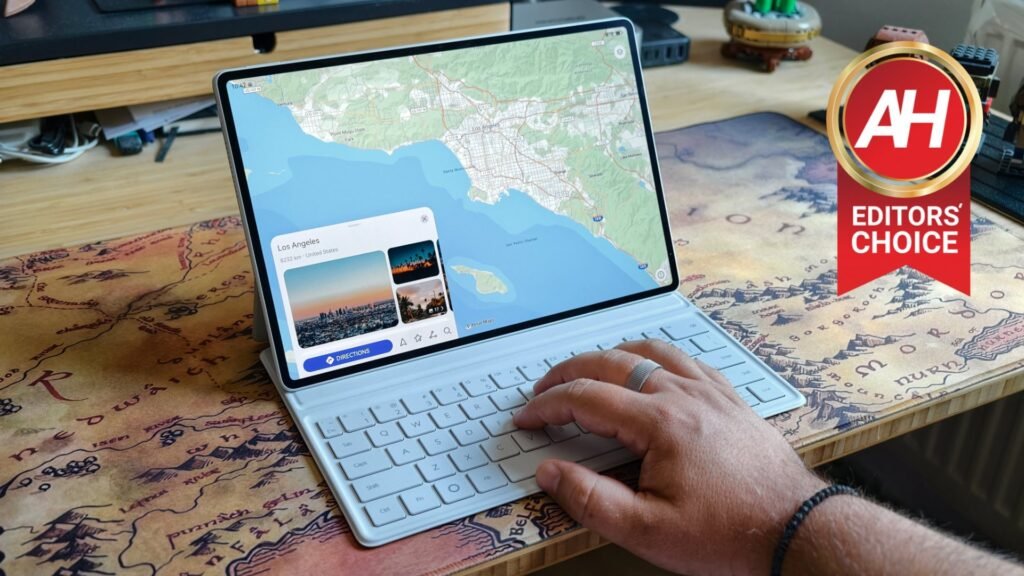

The Huawei MatePad Air (2026) is the company’s latest tablet in its ‘Air’ lineup. This tablet is made to be thin and light, and yet offer a large canvas for you to work with, anti-glare tech, and more. There’s plenty to go over here. This is also a yearly upgrade for Huawei, so the ‘2026’ part in its name is kind of important. Huawei doesn’t always use it, but keep in mind this is the latest version, not the 2025 model.
Having said that, I’ve been using this tablet for a while now, and I have plenty of thoughts to share. This is our Huawei MatePad Air (2026) after over two weeks of use. Huawei also sent a very useful accessory we’ll talk about. With that being said, let’s see what Huawei’s latest tablet has to offer, shall we?

With a fantastic display, premium construction, excellent endurance, and a useful keyboard accessory, Huawei gets most things right—provided you can live without Google services or are willing to use a couple of third-party apps to bring them to life (kind of).
Pros
- Great build quality
- Thin and light
- Excellent glare-resistant display
- Solid real-life performance despite inferior chip
- Great battery life
- Rather fast charging
- Charger included
- Harmony OS is getting better and better
- Oustanding keyboard accessory
Cons
- The app situation is not the best
- Notably less powerful chip than the competition offers
Huawei supplied us with a review unit of the Huawei MatePad Air (2026), but didn’t have a say in our opinion, nor did they see this review before you. We’ve been using the device for about two weeks before forming an opinion.
Specs
Huawei MatePad Air (2026) Specs
| Display Size | 12 inches |
| Display Resolution | 2800 x 1840 |
| Refresh Rate | Up to 144Hz |
| Dimensions | 182.9 x 271.6 x 5.3 mm |
| Weight | 509 grams |
| Chipset | Huawei Kirin T93C |
| RAM | 8GB/12GB |
| Storage | 256GB (non-expandable) |
| Battery | 10,100mAh |
| Charging | 66W wired, 25W wireless (charger included) |
| OS | HarmonyOS 4.3 |
| Main Camera | 50MP (f/1.8 aperture, PDAF) |
| Front-Facing Camera | 12MP (f/2.4 aperture) |
| Network and Connectivity | Wi-Fi, GPS, Bluetooth 5.2, NFC |
| Colors | Airy Blue, Sakura Pink, White |
Huawei MatePad Air (2026) Review: Design
Huawei is well-known for its build quality, and this tablet is no different. It feels outstanding. Every single detail of its outer shell both looks and feels great. The tablet has very minimal bezels, but they’re thick enough for you to grab onto it. They’re also uniform, by the way, which is very nice to see. You do get the entire display for content, as the camera is placed within the aforementioned bezel, so you don’t have to worry about that.
The frame of the phone is made out of aluminum, and it curves ever so slightly so that the device is comfortable to use. There are no sharp corners or anything that would cut into your hand or make it uncomfortable to use in any way. The back side is completely flat. There’s a power button at the top (when the tablet is in portrait mode), while the volume rocker buttons are placed on the right-hand side.

It’s very thin and lighter than you’d think
The device is only 5.3mm thick, which is impressive to say the least. It’s also quite light for a 12-inch tablet at 509 grams. Huawei also said that it’s more bend-resistant than the Huawei MatePad 12X, by 17%. It really feels very solid, and even despite me trying to bend it for basic test purposes, it did not budge at all. There are also 6 speakers included on the inside, and you’ll easily notice speaker grilles, which fit nicely with this design.
Many of you will also notice that this is a matte display, not a glossy one. That’s because Huawei used its OLED PaperMatte Display here to battle glare, and I’ve loved those panels for a while now. Not only is it great for glare purposes, but it also makes your finger slide around even more than on regular displays. We’ll talk more about that in the next section, though.
Three colors are available
You’ll also notice a camera island on the back of this thing, which is rather small. That’s not surprising considering that Huawei is using a single camera here. Even that camera module fits well with the overall design. The Huawei MatePad Air (2026) comes in three colors: Airy Blue, Sakura Pink, and White. The one we received for review is the last one, of course.
Huawei MatePad Air (2026) Review: Accessories
The Huawei MatePad Air (2026) does come with a charger in the box, along with a charging cable. You’ll also get Huawei’s keyboard accessory (Smart Magnetic Keyboard) with this model, which is a must-have for this tablet, I’d say. Just to be clear, the 12GB RAM model of the tablet comes with the included keyboard or the M-Pencil Pro stylus and a PaperMatte display. There’s also a third option where you get both accessories and 12GB of RAM. On top of that, there is also an 8GB RAM model of the tablet without both of those perks. That’s not the model that we received, though, so… I just wanted to make sure you’re aware of the differences. You can also purchase the company’s M-Pencil Pro stylus if you need it.

Now, I said that the keyboard is a must-have accessory. That will, of course, depend on your usage, but I’d argue it’s well worth it. That keyboard serves as not only a keyboard, but a case for the tablet as well. You simply close it when you’re not using it. It is also a stand for the tablet, as the tablet magnetizes to it in two positions, based on your needs. The outer parts of the keyboard are soft-touch and add grip. It feels so nice to hold. The keyboard itself offers solid chicklet keys, which can serve for typing. It’s not as good as a keyboard with a bit more travel, but it’s a quality keyboard, and I managed to have long typing sessions on it.
Huawei MatePad Air (2026) Review: Display
The Huawei MatePad Air (2026) is equipped with a 12-inch OLED PaperMatte Display. Well, our model is the 8GB RAM variant, which comes with a regular OLED panel. This display is flat, and it does not have a display camera hole on it or anything like that. It offers a resolution of 2800 x 1840, which comes down to 275 PPI for those of you who are keeping score. The screen-to-body ratio is extremely high at 92%. The display brightness goes up to 1,200 nits if your battery level is above 20%.
The display is fantastic
Let me just say that I realistically have no complaints about this display. If I absolutely had to say something, it’s that smudges are visible when it’s off, but that’s the case with every single panel out there. They do tend to be a bit more visible here because of the fact that this is a matte display. The benefits of it outweigh that “problem,” though. This is an anti-glare display, and it does well in cutting down screen reflections. The surface is also very smooth; your fingers will easily glide across it. If you plan on using Huawei’s stylus, this display is made to mimic the tactile feel of writing on a piece of paper.

It’s sharp, fights off glare, and has good viewing angles
Other than that, it’s a great display. It’s extremely sharp, while it’s also quite vivid. The viewing angles are great, and the colors are spot on. This is one of the best OLED panels I’ve used on a tablet. The display is also plenty responsive, and it does get more than bright enough. I don’t have a single complaint here.
Huawei MatePad Air (2026) Review: Performance
As is the case with other Huawei devices these days, the performance is their weakest point. Huawei, due to the US ban, cannot use the most powerful chips on the market. While the company does make its own chips, it’s still behind on the technology to compete with the best. While the best chips are based on 2-3nm architectures these days, the Kirin T93C that Huawei uses here is based on a 7nm architecture. It’s on the same playing field as old Qualcomm flagships, like the Snapdragon 888.
It offers good performance, despite an inferior chip
That won’t make this tablet impress in terms of performance, especially in benchmarks. In fact, I couldn’t even run the multi-core benchmark for the GPU on Geekbench 7, as the process kept crashing right when it was about to finish. I don’t know if that’s due to app compatibility, but it’s possible. Geekbench is not available via Huawei’s official app store, so I had to sideload it via Aurora Store. Either way. you can see some benchmark results in the next section.
What most of you are probably interested in, though, is how this tablet performs in actual use. For day-to-day use, it’s very smooth. Yes, I did notice more stutters than on some considerably more powerful devices, but that’s really not all that important or annoying. I’m not talking about lag, just stutters here and there. The tablet usually offers very smooth performance, even when you’re multitasking. I could use it with ease, even though I’ve been spoiled on the performance side of things.
If you’re a gamer, this one is not for you
Where things get notably more complicated, however, is in gaming. If you’re planning to play games on this tablet, you should know its limits. Very demanding games will have issues, and you may be annoyed by them. If your plan is to fire up some less demanding games, that’s not an issue at all; the tablet does great with those. It’s definitely not the best tablet for gaming, though, not even close.
Benchmarks:
Geekbench:
| Device | Single-Core | Multi-Core | GPU |
| Huawei MatePad Air (2026) | 913 | 3,575 | N/A (crashed 3 times) |
| HONOR MagicPad 3 | 2,206 | 6,790 | 14,464 |
| HONOR Pad V9 | 1380 | 4128 | 8065 |
3D Mark (Wildlife Extreme Stress Test):
| Device | Best Loop | Lowest Loop | Stability |
| Huawei MatePad Air (2026) | 1,971 | 1,768 | 89.7% |
| HONOR MagicPad 3 | 5,163 | 3,705 | 71.8% |
| HONOR Pad V9 | 2987 | 2539 | 85% |
Thermals:
3D Mark (Wildlife Extreme Stress Test) thermals:
| Device | Temperature (F) |
| Huawei MatePad Air (2026) | 97.9 |
| HONOR MagicPad 3 | 93 |
| HONOR Pad V9 | 98.4 |
Genshin Impact thermals:
| Device | Temperature (F) |
| Huawei MatePad Air (2026) | N/A (kept crashing) |
| HONOR MagicPad 3 | 96 |
| HONOR Pad V9 | N/A |
Huawei MatePad Air (2026) Review: Battery Life
The Huawei MatePad Air (2026) includes a 10,100mAh battery on the inside. Considering the tablet’s size, that’s per course, an expected battery capacity. What you care about, though, is whether it actually offers good battery life. Not only does it offer good battery life, it offers great battery life. Huawei officially claims the tablet can provide up to 16 hours of local HDR video playback, and around 10 hours of online video playback. So, if true, this is great. Well, I can attest that at least the second claim is accurate. The Huawei MatePad Air (2026) managed to go above Huawei’s claim when it comes to online video playback, at least as far as our YouTube test is concerned.
The battery life is great
When it comes to normal use, sporadic use, the device lasted for about a week and a half for me. I wanted to test things out in that manner as well, as that’s how you’ll use the thing, of course. Your usage will differ from mine, though, so keep that in mind. I used it for some light content creation, YouTube videos, scrolling through social media, commenting on Reddit, typing some messages, going through my email, and some light gaming. That’s about it. It managed to last around a week and a half with over 8 hours of screen-on time in that span.
It can be fully charged in less than an hour and a half
What about charging? Well, you’ll be glad to hear that a 66W charger is included in the box. With that charger, I was able to fully charge the device in about an hour and 24 minutes. Just to be clear, I allowed it to die completely, and then I plugged it in. That’s not bad at all considering the battery size and charging speed.
| Device | Battery life | Charging |
| HONOR MatePad Air (2026) | 16:29:13 | 1:24:11 |
| HONOR MagicPad 3 | 17:52:12 | 1:29:55 |
| HONOR Pad V9 | 15:20:01 | 2:38:56 |
Huawei MatePad Air (2026) Review: Camera
The Huawei MatePad Air (2026) has one camera on the back and one on the front. The one on the back is a 50-megapixel unit with an f/1.8 aperture and autofocus. The selfie camera is a 12-megapixel unit with an f/2.4 aperture and fixed focus. I’m a strong advocate against taking pictures with tablets, as your phone will have a better camera in 99.9% of cases, basically. Still, if you are planning to do it, there are way worse cameras than the ones on this tablet.

The cameras are fine… for a tablet
The main camera on the back is usable in good lighting, but don’t go shooting photos in low light. In daytime, the photos do look fine. They’re vibrant and decently sharp. The colors are not the most accurate, but they’re alright. The main problem is in HDR situations, as the white balance is not the best, and highlights get blown out often. That’s per course for tablet cameras; however, you have to manage your expectations. The focusing distance is also not the best, so don’t expect to take great macro photos.
The selfie camera is good enough. It’s nothing to write home about, but it does a fine job for an occasional selfie and video call. Once again, that’s per course when it comes to tablet cameras. You won’t find an amazing selfie camera on a tablet, basically. This one is better than many I’ve used, though, so that’s something.
Main camera samples (daytime):


Huawei MatePad Air (2026) Review: Software
Huawei included HarmonyOS 2 on this tablet. It’s its own version of Android, and it’s based on Huawei’s mobile services, not Google’s. In other words, you don’t get Google Play Store out of the box, or anything like that. That’s due to the US ban on Huawei, which was issued a long, long time ago. It’s an old story at this point. Huawei has improved its Android-based offering since then, and it’s really good at this point.
The lack of apps is still present, but there’s a solution for that
This does come with a notable asterisk, though. If you’re not at least a bit tech-savvy, you may have issues getting apps that are not included in Huawei’s AppGallery. Quite a few apps are missing from there, but you can easily amend that with the help of MicroG and third-party app stores like Aurora Store. Those two in combination can not only bring you a ton of apps that are not accessible via AppGallery, but you can also get Google’s apps on this tablet. I installed a bunch of them, and they all worked fine. That includes YouTube, Google Maps, Google Drive, Google Keep, and Google Chrome. Do note that some apps will not work. A very small number of them, but still. I was having issues with X, for example.

Having said that, the apps work fine in general on this tablet. We’ve talked a bit about that in the performance section, but it’s worth emphasizing it once again. The animations are nice and smooth, and everything runs really well. The apps load fast, and you can also easily jump between them. You’d never guess that the SoC is not nearly as powerful as it is on tablets from the competition. If you’re not gaming, that’s not something you should worry about, as this thing performs admirably day-in, day-out.
The general UI will be familiar to everyone
The general UI you’re getting here will be familiar if you’ve used an Android device in general. On top of that, Huawei does offer some AI features and a decent level of customization. There are a bunch of pre-installed apps that you probably won’t use, but luckily you can remove the vast majority of them. Some of Huawei’s apps are not removable, of course, but that’s perfectly fine. Huawei also made sure you have some gestures available here, a side panel with apps and shortcuts, and so on. You can really tweak it a certain amount. It’s on par with the competition in terms of UI.

Huawei MatePad Air (2026) Review: Audio
The Huawei MatePad Air (2026) comes with a six-speaker setup. There are speaker grilles on each side, and the audio is better than you’d think considering how thin the tablet is. It’s not only louder than basically any phone, but the output is also rich. The vocals are portrayed nicely, and the audio is well-balanced in general. I really don’t have a single complaint when it comes to this.
There is no audio jack here, though, which some people may complain about considering this is a tablet. It’s per course these days, and quite frankly you can always use the Type-C port if you need a wired audio connection. Bluetooth 5.2 is also on board for wireless audio connectivity.
Huawei MatePad Air (2026) Review: Should you buy it?
The main obstacle when it comes to buying this tablet is the same as with any other Huawei smartphone and tablet these days: the lack of GMS. If you’re willing to fire up MicroG and Aurora Store, which is immensely easy, you’ll get a similar experience. Just note that a very small number of apps may give you headaches. Its chip is also not the best, but unless you’re a power gamer, that shouldn’t bother you. Everything else is outstanding on this tablet. Its build quality is great, the design as well, as is the display, battery life, charging, audio output, and so on. It’s an outstanding package, and the only problems come from issues that are not Huawei’s fault, basically.

You should buy the Huawei MatePad Air (2026) if you:
- Want one of the best-built tablets around
- Need a keyboard/case with your tablet
- Don’t mind installing a third-party app store to access more apps (including Google’s)
- Want a tablet that is very thin and light but has a large display
- Appreciate good audio quality
You shouldn’t buy the Huawei MatePad Air (2026) if you:
- Want Google Play Services without additional steps
- Play demanding games on your tablets
The post Huawei MatePad Air (2026) Review: Almost Everything You’ll Want From a Tablet appeared first on Android Headlines.