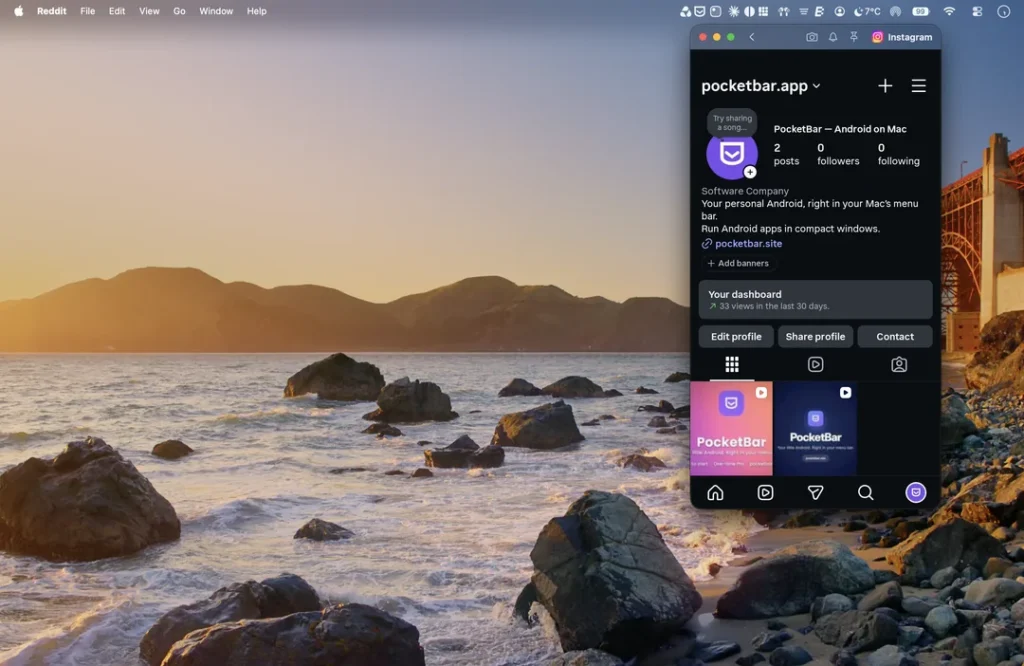

If you use an Android phone and a Mac, you’ve probably been jealous of iPhone Mirroring at some point. A new Mac app called PocketBar gets you something close. It lets you run Android apps right on your Mac, each in its own window, without dealing with a full emulator. It’s a nice add-on for anyone pairing a Mac with an Android phone.
Digital Trends spotted PocketBar this week. PocketBar does use an emulator, but it keeps it out of sight. You click the menu bar icon or press Option + Space, pick an app, and it opens in its own window next to your Mac apps.
It supports Android 11 through Android 16. You can install apps from F-Droid, IzzyOnDroid, and Aurora Store, or sideload an APK you already have. If you want Google Play, there’s an optional image, but it takes up about 2GB of storage.
It also has a few extras. You can lock private apps behind Touch ID, give your favorite app its own menu bar shortcut, and flip a switch in settings to block ads and trackers inside your Android apps.
Not every Android app works yet
The developer says YouTube, Instagram, Signal, and Telegram all run fine. Signing in to X and WhatsApp doesn’t work right now, though, since both apps don’t play well with emulators. Banking and payment apps may not work at all, which is pretty common for emulators. And if you’re hoping to play Android games on your Mac, this isn’t the app for that.
PocketBar is free to try on Apple Silicon Macs running macOS 14 Sonoma or later. A one-time €9.99 upgrade to PocketBar Pro adds screen recording, app backups, and unlimited menu bar pins. There’s no subscription, and Pro covers every update in the 1.x series.
I like that this fills a real gap. Apple built iPhone Mirroring into macOS, but there’s no official way to get Android apps on a Mac. Google has its own tools for Windows and Chromebooks, so Mac users with Android phones have been left out.
One word of caution. Sideloading APKs from sites you don’t trust is how a lot of malware spreads, so stick to the app stores PocketBar supports. If you’re shopping for a new Mac to run it on, the new M6 and OLED MacBook Pro models are out now, and Samsung Galaxy owners have plenty of reasons to keep a Mac in the mix too.
The post This Mac App Puts Android Apps in Your Menu Bar appeared first on Android Headlines.