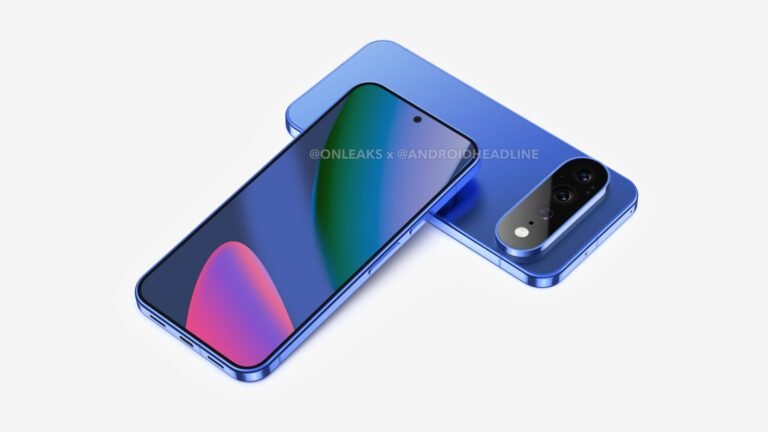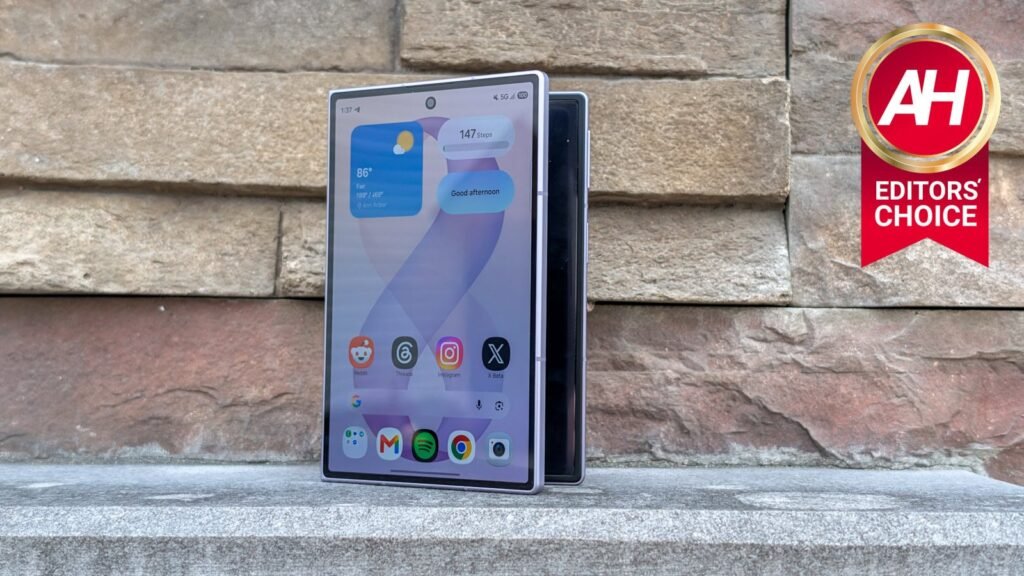

After seven generations of the Galaxy Z Fold, Samsung has finally released a new shape in the Galaxy Z Fold 8. While this could be reactionary, seeing as Apple is rumored to launch its own foldable with this same shape in just a couple of months, it’s likely only part of the story. You see, when Samsung invited a number of us to Korea for Unpacked back in 2023, we were shown prototypes of this foldable style. With the short and wide cover display, this isn’t something Samsung threw together to beat the iPhone.
Now, after using the Galaxy Z Fold 8 for the past week, I have to say, you really need to try out this form factor before you dismiss it. Sure, the front display is wider and shorter, but that’s a good thing. This is a “small” foldable, something that a lot of us have been wanting.
The Galaxy Z Fold 8 solves one of my biggest complaints with foldables: the inner display. While the outer display on most of them is pretty good. They’re essentially a bar phone that opens up to a larger display. But that larger display is generally a square or almost a square. Which is great for running apps side-by-side, but not great for watching media. You instead get some pretty large black borders around content on that inner display, and you’re actually getting about the same viewing area as the front display.
So, after a week with the Galaxy Z Fold 8, am I still in love with this phone? Let’s find out in our full review.

Samsung finally cracked the foldable formula I’ve been waiting years for, and after a week with the Galaxy Z Fold 8, I’m not sure I want to go back to a regular phone. This is the foldable that makes the case for the entire category.
Pros
- Extremely light at 201g
- New 16:10 cover display (5.5″, 1972×1248, ~428 ppi) is bright and much better suited to typing/scrolling than previous narrow cover screens
- 4:3 inner display (7.6″) is a big step up for watching video vs. the near-square 1.11:1 ratio on the Fold 8 Ultra — “zoom to fill” barely crops content
- Crease is noticeably improved over the Galaxy Z Fold 7, even though not eliminated
- Boxy design with beveled Armor Aluminum 2 frame gives more usable screen than rounded-corner rivals (OPPO Find N6, Pixel 10 Pro Fold) and springs open easily
- Well-placed power/volume buttons on the upper third of the frame
- One UI 9 (Android 17) with 7 years of promised software updates
Cons
- Cameras are the weakest part
- Only one bottom-firing speaker (using the earpiece as a secondary), resulting in less loud/full sound than expected
- Phone wobbles on flat surfaces due to the rear camera bump
- Thick bezels around the cover display (though less noticeable after a couple days)
- No Flex Mode (a tradeoff of the easy-opening hinge design)
Samsung Galaxy Z Fold 8 Specs
Network
| Types | GSM / HSPA / LTE / 5G |
Display
| Type | Dynamic AMOLED 2X |
| Size | 7.6-inch, 120Hz adaptive |
| Cover Display | 5.5″ FHD+, 16:10, 120Hz adaptive |
Body
| Dimensions | Folded: 123.9 x 81.9 x 9.7 mm; Unfolded: 123.9 x 161.4 x 4.5 mm |
| Weight | 201g |
| Build | Corning® Gorilla® Glass Ceramic 3 (Cover), Corning® Gorilla® Glass Victus® 2 (Rear), Advanced Armor Aluminum |
| SIM | Nano-SIM and eSIM |
| Protection | IP48 certified |
Platform
| OS | Android 17, One UI 9 |
| SoC | Qualcomm Snapdragon 8 Elite Gen 5 for Galaxy |
| GPU | Adreno 840 |
Memory
| RAM | 12GB RAM (16GB on 1TB model only) |
| Storage | 256GB, 512GB, 1TB |
Cameras
| Main | 50MP, AF, OIS |
| Ultrawide | 50MP, AF |
| Telephoto | N/A |
| Selfie | 10MP |
Sound
| Speaker(s) | Dual Stereo speakers with Dolby Atmos |
| Audio jack | No |
Battery
| Capacity | 4,800mAh |
| Charging | 45W wired, 20W wireless, 4.5W reverse wireless |
| Charger | Not included |
Network Bands
| 3G | GSM850/900/1800/1900; W1/2/4/5/8 |
| 4G | B1/2/3/4/5/7/8/12/13/14/17/18/19/20/2 5/26/28/29/30/32/34/38/39/40/41/4 2/43/48/66/71 |
| 5G sub-6 | N1/2/3/5/7/8/12/14/20/25/26/28/29/3 0/38/40/41/48/66/70/71/75/77/78 |
Connectivity
| Sensors | Fingerprint reader, Approach IR sensor, Proximity sensor, Ambient light sensor, Accelerometer, Gyroscope, eCompass, Hall sensor, Barometer |
| Location Services | GPS, Glonass, Galileo, QZSS, Beidou |
Samsung Galaxy Z Fold 8 Review: Design and Build Quality
The first thing I need to mention when it comes to the build quality on the Galaxy Z Fold 8 is the weight. It weighs in at just 201g. That is incredibly light, not just for a foldable, but for a phone period. Here’s how it stacks up to a bunch of other phones currently available.
| Phone | Weight |
|---|---|
| Samsung Galaxy Z Fold 8 | 201g |
| Samsung Galaxy Z Fold 8 Ultra | 215g |
| Google Pixel 10 | 204g |
| Google Pixel 10 Pro | 207g |
| Apple iPhone 17 | 177g |
| Apple iPhone 17 Pro | 206g |
| Apple iPhone 17 Pro Max | 233g |
| Samsung Galaxy S26 Ultra | 214g |
| Samsung Galaxy S26 | 167g |
| Motorola Razr Fold | 243g |
Most of these phones I’ve used extensively over the past year (except for the base iPhone 17, iPhone 17 Pro and Galaxy S26), and the weight does really make a big difference. In fact, there have been a handful of times that the Galaxy Z Fold 8 has been in my pocket and I’ve forgotten it was in there. Keep in mind, I’m used to carrying the 233g iPhone 17 Pro Max, with a case, so it’s likely closer to 250g.
The weight of a phone is something I typically don’t worry about, but now Samsung has made it hard to go back.

Let’s move on to the rest of the design here. Samsung is continuing to use the boxy look on its foldables, which I think is the way to go. The Galaxy Z Fold 8 has no sharp corners, but boxy corners. This actually gives you more screen versus something like the OPPO Find N6 or Google Pixel 10 Pro Fold, which use those rounded corners, specifically on the hinge side.
On the side, the power button and volume rocker are on the upper third of the frame, which is actually the perfect spot for me. I don’t need to shimmy my hand up to the power button to unlock the phone, and it’s a small adjustment to change the volume too. Now, speaking of the frame, it is using Armor Aluminum 2, another way that Samsung was able to trim down the weight. Like with the Galaxy Z Fold 8 Ultra, Samsung also beveled the edge here, making it easier to open. The Galaxy Z Fold 8 springs open so easily, which is likely why Flex Mode is not here. But more on that in the software section.
On the back, there’s a dual-50MP camera setup that sits vertically on the back. These cameras are not quite as thick as the Ultra’s, but the phone does wobble on a table still. One of my big pet peeves with Samsung devices, unfortunately.
I do have the Galaxy Z Fold 8 in the Lavender color, which I quite like. But if you are ordering a Galaxy Z Fold 8, you should definitely take a look at the Pistachio color. It also looks amazing.
One of the downsides of the Galaxy Z Fold 8 is that there is only one speaker, at the bottom. It’s using the earpiece as the second speaker, and not the speaker grille that is shown at the top. This is quite common with bar-style phones but not foldables. And it means that the sound is not quite as good as you’d expect. I had no real complaints with it, other than it not being as loud as I’d like.
There are only a couple of things I’d like to see Samsung change for the Galaxy Z Fold 9. This includes narrower bezels on the outer display, as well as a redesigned camera module. Almost every other foldable has zero issues with wobbling on a table; now it’s time for Samsung to figure it out. And as a bonus, please add magnets!
Samsung Galaxy Z Fold 8 Review: Display
This is the big talking point of the Galaxy Z Fold 8, that 16:10 cover display and 4:3 inner display. I will say, it takes some getting used to, but after a few minutes, you’re going to love these aspect ratios. Why? Because it’s amazing for watching content.

The cover display is a 16:10 aspect ratio 5.5-inch display with a resolution of 1972×1248. That gives you about 428 pixels per inch. And it also gets insanely bright, great for using outdoors. The bezels around the cover display are kind of thick, unfortunately. But after a day or two, I didn’t even think about how thick those bezels really were.
It’s great for scrolling social media, watching some content, and everything else you’d do on a phone. Now, because of how wide it is, the keyboard does take up a good chunk of the display, but to be honest? I didn’t care. It was easier to type on, which is more important to me.
Then when you unfold the Galaxy Z Fold 8, you’re looking at a 7.6-inch 4:3 aspect ratio, which is still not perfect for watching content, but way better than the 1.11:1 aspect ratio on the Galaxy Z Fold 8 Ultra. You can “zoom to fill” without losing a lot of the content. And that’s what really matters. I found myself unfolding the phone a lot more than with any other foldable, solely to watch a video. Whether that was on YouTube, Netflix, Disney+ or elsewhere.

Of course, that main display is still great for multitasking and getting work done. As you can now run three apps side-by-side-by-side. Similar to what you’ve been able to do on OPPO and OnePlus foldables for a few years now, but not quite the same. Because the display is so wide, you can use three apps and not feel cramped, and that’s a big deal.
These displays look great, and while the inner display does still have a crease, it is a huge improvement over the Galaxy Z Fold 7’s crease from last year. Keep in mind that nowhere did Samsung say the crease was gone; they said it was drastically improved from its predecessor, which is true.
Samsung Galaxy Z Fold 8 Review: Performance
On the performance side of things, Samsung did not nerf the Galaxy Z Fold 8 to make the Galaxy Z Fold 8 Ultra look better, surprisingly. It has the same Snapdragon 8 Elite Gen 5 for Galaxy as the Galaxy Z Fold 8 Ultra and Galaxy S26 family, along with 12GB of RAM. It does have a 16GB model if you opt for 1TB of storage, which costs a whopping $2500.
Because of this, the Galaxy Z Fold 8 zips through everything you can throw at it. From editing videos in CapCut to playing MLBB and even just general doomscrolling, the Galaxy Z Fold 8 did not slow down one bit.
I will say, however, that it does tend to get quite warm if you use the camera quite a bit. This is also the case for the Galaxy Z Fold 8 Ultra, unfortunately. But it doesn’t overheat; it’s just warm. Of course, if you’re in a hotter climate, it may overheat, but here in the US it’s been in the 80s for the past few weeks. So hot, but not crazy hot.
Benchmarks
As we always do with the phones we’re reviewing, we have run a few benchmarks including Geekbench. Now that Primate Labs has launched Geekbench 7, that is the benchmark we are using and comparing to other phones we have reviewed. Geekbench 7 is a pretty big upgrade, with smarter multi-core scoring, new media and AI workloads, and a shifted GPU focus. So scores are lower, which is why we are re-testing older phones too.
| Device | Geekbench 7 Single-Core CPU | Geekbench 7 Multi-Core CPU | Geekbench 7 GPU |
|---|---|---|---|
| Samsung Galaxy Z Fold 8 | 3,049 | 9,991 | 17,574 |
| Samsung Galaxy Z Fold 7 | 2,130 | 8,374 | 11,925 |
| Motorola Razr Fold | 1,070 | 5,783 | 12,633 |
| OPPO Find N6 | 1,586 | 6,605 | 15,447 |
So, what do these scores tell us? Well, the Galaxy Z Fold 8 has the best performance of the current-gen foldables, in every part of the Geekbench 7 test. And it also shows us that the Galaxy Z Fold 8 is better for AI features and workloads. Though it is a tad surprising to see the Motorola Razr Fold and OPPO Find N6 score so low – particularly the OPPO since it’s the same chip with one less performance core.
Next up is AnTuTu. So, the Galaxy Z Fold 8 did score pretty well here. Still behind the OPPO Find N6, but that is likely due to the more RAM and storage that it has. Keep in mind that AnTuTu tests every aspect of the phone: CPU, GPU, Memory, and the UX. So it also comes down to One UI vs Color OS.
| Device | AnTuTu Score |
|---|---|
| Samsung Galaxy Z Fold 8 | 3,476,324 |
| Samsung Galaxy Z Fold 7 | 2,060,275 |
| Motorola Razr Fold | 2,892,571 |
| OPPO Find N6 | 3,705,564 |
The final benchmark we run is 3D Mark Wildlife Extreme Stress Test. This is a very intensive benchmark that doubles as a thermal test for us. It essentially runs the same 60-second benchmark 20x, giving us a score for each loop, and showing us how well performance was sustained. For this test, we do not run it back-to-back after AnTuTu or Geekbench, we wait for the phone to get back down to room temperature before running another benchmark. Here’s how it did:
- Best loop score: 7,019
- Lowest loop score: 2,845
- Stability: 40.5%
This shows that Samsung is not throttling the Galaxy Z Fold 8 as heavily as you might think. Which is similar to what we saw with the Galaxy Z Fold 7 and Galaxy S26 Ultra previously.
Samsung Galaxy Z Fold 8 Review: Battery life and charging
This year, Samsung has finally decided to adopt Silicon Carbon for its batteries. But don’t get too excited. Samsung is not going all-in on sica just yet. The silicon content, while undisclosed, is quite low in this battery. So low that it is actually classified as a lithium-ion battery still. But this does mean we have a bigger 4,800mAh capacity battery here, and it does last quite a long time.
In my testing, I was typically able to get through a full day on a single charge, with around 20-30% remaining at the end of the day. On a day that I really pushed it, I was able to hit over 9 hours of screen on time. On a heavier day, which included some gameplay and transferring files from my DJI Osmo Pocket 3 to edit, that was closer to around 6 hours of screen on time. Needless to say, battery life is quite good here. Not quite on par with the OPPO Find N6 and definitely not on par with the Razr Fold (though, to be fair, the Razr Fold does have liquid cooling and a slower, more efficient processor along with a 25% larger battery).

On the charging front, it is still a bit on the slow side at 45W, but it is a great upgrade from the 25W on the Galaxy Z Fold 7 last year. It does still take roughly an hour to fully charge the Galaxy Z Fold 8, which isn’t bad – especially since it does last me a full day, most of the time.
Benchmarks
We also run benchmarks for the battery life and charging. For battery life, we charge the phone to 100% and keep it plugged in while we adjust the display to around 200nits (this is usually around 50-60% brightness, depending on the device), turning off adaptive brightness and eye comfort settings. Also open up a YouTube video and set it to play nonstop before we unplug the phone. Then let the video play over WiFi until the phone dies. Typically, anything over 24 hours is quite good; very few bar phones have even hit that point.
Then for charging, we plug the phone into a charger that is capable of maxing out the charging speed, if one was not included in the box. So in this instance, we used a 45W charger that Samsung actually provided with its Magnetic Charger with the Galaxy S26 earlier this year. And we timed how long it takes to go from around 1% to 100%. Here’s how it stacked up against other foldables.
| Device | Battery life | Charging |
|---|---|---|
| Samsung Galaxy Z Fold 8 | 23 hrs, 1 min | 1 hr, 6 mins |
| Samsung Galaxy Z Fold 7 | 20 hrs, 2 mins | 1 hr, 16 mins |
| Motorola Razr Fold | 19 hrs, 58 mins | 42 mins |
| OPPO Find N6 | 19 hrs, 45 mins | 58 mins |
These numbers show that the Galaxy Z Fold 8 (and the Fold 7) were better optimized for video playback. Samsung quotes around 25 or 26 hours of video playback, but that number is from local storage, not over WiFi, which is why our number is a bit lower. But this is still very respectable. One of the best numbers we’ve seen from a foldable, and definitely in the top 10 for phones (out of the over 100 we’ve reviewed in the past 3 years).
Overall, battery life and charging are not the absolute best on the Galaxy Z Fold 8, but they are good enough. For most people, this is going to be perfectly fine. For the heavy users out there, you might need a bit more juice, and for that, we’d recommend the Razr Fold.
Samsung Galaxy Z Fold 8 Review: Software
The Galaxy Z Fold 8 ships with One UI 9, based on Android 17, and it gets seven years of updates. Just like all of the recent Samsung flagship devices. Which means it’s going to be supported for a long time. When it comes to One UI 9, there’s not a ton of changes here; it’s another evolution of One UI, and that’s perfectly fine.
One nice change Samsung has brought is the ability to run three apps side-by-side-by-side, similar to what OPPO and OnePlus have been doing on their foldables for the past few years. This isn’t on the Fold 8 Ultra, unfortunately, likely due to the inner screen size. But you can run three apps, with two in the upper half of the screen and one in the lower half of the screen on Fold 8 Ultra. Having them side-by-side-by-side is so much better, though. It really feels great having multi-window on a screen of this dimension. The apps feel a little cramped when using three, but when you’re using two apps, it feels very comfortable to use them all.

Of course, AI is here more than ever on the Galaxy Z Fold 8. It’s actually the first device to launch with a few new Gemini Intelligence features, like the ability to automatically order food from DoorDash or a ride from Uber using agents. We expect to see a full launch of Gemini Intelligence later this month with the Pixel 11 series launch. Gemini Notebook (recently rebranded from NotebookLM) is also pre-installed now.
But the good thing about Samsung’s devices is that you can just let the AI do its own thing and not even use most of the AI features, as I’ve done. Though I did need to use them to test out the features, for the most part I didn’t use many of them, other than Gemini Notebook, naturally. It was more about using them for testing purposes.
Now, let’s talk about that elephant in the room, Flex Mode. It’s true, Flex Mode is not available on the Galaxy Z Fold 8, and we really don’t understand why. Seeing as the cheaper Flip 8 and more expensive Fold 8 Ultra both have it. But essentially, when the Galaxy Z Fold 8 is pushed to 90 degrees, it automatically snaps open to the full 180 degrees. Which means Flex Mode wouldn’t work. So the software has been removed here as well. Hopefully this is something Samsung adds with the Galaxy Z Fold 9 next year.
Overall, the software is quite good. It’s well tuned for these new aspect ratios, as are a lot of the apps. Though, if you do want to switch up the aspect ratio of an app, there is a new button in the task switcher that allows you to switch to the App Default, Full Screen, or 16:9. And honestly, I didn’t really need to use this at all. The apps I used all pretty much worked as intended.
Samsung Galaxy Z Fold 8 Review: Camera
Truly the only complaint I have about the Galaxy Z Fold 8, is the cameras. Let’s face it, they are pretty mid. And I fully believe that Samsung ‘nerfed’ these cameras to make the Fold 8 Ultra look better.

Here are the camera specs in case you need a refresher:
| Camera | Specs |
|---|---|
| Main | 50 MP, f/1.8, 23mm, 1/1.56″, 1.0µm, dual pixel PDAF, OIS |
| Ultrawide | 50 MP, f/1.9, 120˚, 1/2.51″, 0.7µm, multi-directional PDAF |
So we’re stuck with just a main camera and an ultrawide. Still weird that phones that can only have two cameras always get stuck with an ultrawide, when a telephoto would be far more useful. Then again, we don’t need that crappy 10MP 3x telephoto from the Ultra here; it’s kind of useless anyway.
The cameras do take some pretty decent photos outdoors in natural light, as you would expect from a sensor that is fairly large at 1/1.56″. But it does tend to fall apart in less-than-stellar lighting, unfortunately. However, I do think that it is going to be good enough for most people.


The Galaxy Z Fold 8 also made me realize how much I don’t use the cameras on phones, unless I’m traveling or taking photos for reviews – which I usually bring my vivo X300 Ultra for anyway. So I could actually use the Fold 8 as my daily driver.

Should you buy the Samsung Galaxy Z Fold 8?
Recommending foldables is still quite difficult for me. Most people take one look at the price and say “never mind,” and I totally get that. The Galaxy Z Fold 8 is $1,899 before taxes; that’s going to be over $2,000 when taxes and shipping are included. That’s not cheap, especially in today’s economy. And there are some real downsides here, like the smaller battery, only two cameras, among other things.
However, I do think if this is going to be your first foldable, this is a really great option. If you want a foldable that can go from a small phone to a large tablet, with a tablet aspect ratio, then this is a really good foldable to pick up.
After over a week of using the Fold 8, it’s become one of my favorite phones of the year. Now, yes, I’m still in the honeymoon phase a bit, so we’ll have to see how this changes in a month or so, but right now, I absolutely love this phone.
The post Samsung Galaxy Z Fold 8 Review: I Wasn’t Ready for How Good This Foldable Actually Is appeared first on Android Headlines.