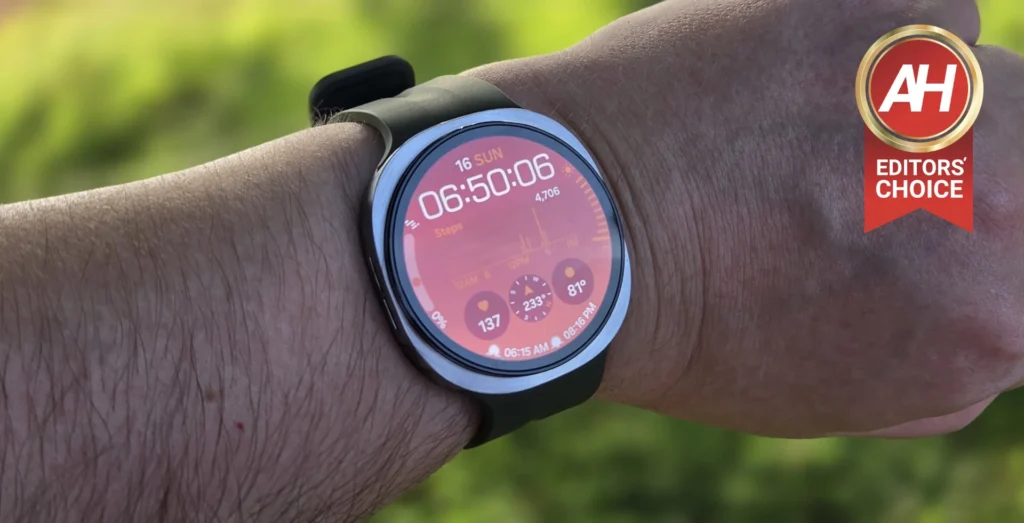

Although I primarily use the Pixel Watch 4 as my main device, I’ve used Galaxy Watch smartwatches for years, so the Galaxy Watch 9 has felt right at home for me with that familiar Samsung spin on Wear OS. That being said there was a not insignificant amount of new things I wasn’t used to, such as the new squircle shape which Samsung introduced with the Galaxy Watch 8 last year, and the raise to talk feature powered by Gemini, which, I’ve used on the Pixel Watch 4 but this is its first time on a Galaxy Watch smartwatch.
This is also the snappiest I’ve ever felt the Galaxy Watch line be thanks to Qualcomm’s Snapdragon Wear Elite chip, which also powers the Galaxy Watch Ultra 2, and this really helped the watch feel nice and zippy anytime I was flinging my finger around the display to look at notifications or scroll through apps. This is also the slimmest the Galaxy Watch smartwatches have ever been, and that adds to the comfort. So much so, that I was actually able to wear it all day and night without feeling that there was a chunky piece of hardware strapped to my wrist. That slim design does come at a cost though that some might not be willing to pay.
After spending the past few weeks with this device, it’s time to figure out of this watch is worth it. Is the Galaxy Watch 9 worth your hard-earned cash? Let’s dive into this review and find out.

Samsung has once again shown why its Galaxy Watch lineup is among the best smartwatches you can invest your money into. Having spent the past few weeks with the Galaxy Watch 9 as my daily watch, it excels in comfort and performance, but also lacks in a couple of areas that hold it back from being the best watch on the market. That being said, its starting price of $379.99 means it’s more accessible to consumers.
Pros
- Slim, light, and comfortable to wear all day and through the night
- Snappy performance that feels responsive and fast
- Very bright display that was easy to see in direct sunlight
- Samsung guarantees software updates for 5 years
- Watch setup was quick and effortless
Cons
- Disappointing battery life
- Charging is incredibly slow, nearly 2 hours from 0% to 100%
- Raise to talk did not want to work for the majority of my time with the watch
Samsung sent over the 44mm Galaxy Watch 9 for us to review, and I’ve spent the past few weeks with it to see how it holds up. This is not a sponsored review, and Samsung did not see this review before publishing.
Samsung Galaxy Watch 9 Specs
Samsung Galaxy Watch 9 Specs
| Colors | Graphite, Silver, Cream |
| Dimensions | 40mm: 42.7 x 40.4 x 8.6mm / 44mm: 46.0 x 43.7 x 8.6mm |
| Weight | 40mm: 31.5g / 44mm: 34g |
| Display Type | Super AMOLED, Full Color, Always On |
| Display Size | 40mm: 1.3 Inches / 44mm: 1.5 Inches |
| Display Brightness | 3,000 nits (Peak) |
| Processor | Qualcomm Snapdragon Wear Elite |
| Memory | 2GB |
| Storage | 32GB |
| Battery | 40mm: 390mAh / 44mm: 445mAh |
| Charging | 10W Wireless |
| OS | Wear OS 7 Powered by Samsung |
| UI | One UI 9 Watch |
| Sensors | Accelerometer, Barometer, Bioelectrical Impedance Analysis Sensor, Electrical Heart Sensor, Gyro Sensor, Geomagnetic Sensor, Light Sensor, Optical Heart Rate Sensor, Temperature Sensor |
| Connectivity | Bluetooth, LTE, Wi-Fi, NFC, GPS (L1 + L5 Dual Frequency GPS) |
| Durability and Water Resistance | IP68, 5ATM, MIL-STD-810H |
| Compatibility | Android 13 Or Higher With More Than 1.5GB Of Memory |
Samsung Galaxy Watch 9 Review: Build Quality and Design
The Galaxy Watch 9 may look the same as the Galaxy Watch 8 did last year, but Samsung did make a couple of tiny changes that are easy to miss because you’d never notice unless you were looking at a spec sheet. I am of course referring to the weight, which is slightly heavier than last year’s model, with the weight going from 33.8g to a flat 34g. It’s a very minor difference, but it is there. That being said, the dimensions are actually the same so the watch is still pretty thin, and 34g is still pretty lightweight, making this a very comfortable watch to wear all the time, though i would personally swap out the band for something that felt softer against my skin, like the Fabric Band. The watch I reviewed came with the Sport Band.


Design-wise, the squircle shape actually looks quite nice and this is my first time actually wearing this design. I have to say, I didn’t think I was going to like it as much as the round watch cases Samsung used to use, but I prefer it really. At least on Samsung’s watches. With the sapphire crystal glass over the display I never had to worry about damaging the panel or scratching it up, though i never really brush the watch display up against things when I’m wearing the watch, and when I’m not wearing it, the watch sifts face up on my desk, so there’s no real chance of it being scratched by anything. Regardless, I like that I don’t have to worry about it as much.
While I wasn’t as fond of the Sport Band as I have been in the past, I did like the weight of the watch and the thin design. This easily made the Galaxy Watch 9 the most comfortable Galaxy Watch model to wear all day and then wear to sleep at the end of the day. I actually audibly gasped a little when I woke up the first morning after having worn the watch to bed and wasn’t complaining to myself about the discomfort. So, a big win there in my book from Samsung. I also felt like the buttons were really easy to press and overall they mesh well with the design.
My favorite part, of course, is the band latch design, which is a simple button-press to latch on the band or detach it. It’s the simplest system of any smartwatch. Samsung’s Dynamic Lug System isn’t completely new, but it’s just nice to see the company is sticking with it because it’s so, so easy to swap bands out. Overall, great design and build quality definitely feels top-tier, as is usually the case with premium Samsung devices.
Samsung Galaxy Watch 9 Review: Performance
Smartwatch performance is a bit different from phones or tablets in that you aren’t running any incredibly resource-intensive apps on it like high-end games, or benchmarks, but you are still using apps, stuff is running in the background, and you’re jumping between menus a lot. So you still want the performance to be quick and responsive.
The performance on the Galaxy Watch 9 is exactly that. Super quick, and super responsive. This is partially due to the Qualcomm Snapdragon Wear Elite, but also due to Wear OS 7 which is the snappiest version of Wear OS yet. I remember using this watch for the first day and my first thoughts after about 10 minutes of messing with it were “damn this watch performance is fast.”
Raise to Talk, once I finally got it working, was an almost instantaneous interaction and getting responses to my questions was just as quick. Simply scrolling through menus or the different tiles was nice and buttery-smooth too. I do feel like performance is just ever so slightly better, or at least it appears that way visually, when you use the touch bezel as opposed to swiping and scrolling like you would on a phone, but overall the Galaxy Watch 9 is fast and performance is definitely a non-issue here.
Samsung Galaxy Watch 9 Review: Battery Life and Charging
Battery life is one of those things that I always feel is one of the most important things about a smartwatch, if not the most important thing, from my perspective, because I want to have to charge it as little as possible. The only time where charging the watch more doesn’t bother me as much is if the watch charges up fast. Unfortunately, the Galaxy watch 9 doesn’t really excel in either of these areas. Despite having a slightly larger capacity battery this year compared to the Galaxy Watch 8, and we’re talking 390mAh compared to 325mAh, the battery life isn’t great.

For me, it was probably a little bit better than it has been for others, and I say this because I was at least able t wear it through till the next morning and then I wouldn’t have to slap it on the charger till late morning (I’m usually up and walking around by 6:30am). The downside here is that if I use the watch more throughout the day then I usually do with smartwatches, and I mean actively interacting with apps and the display and the different features, the Galaxy Watch 9 can make it through the day but I will definitely have to put it on the charger as soon as I get up in the morning as opposed to having to wait closer to noon. During my time with the Galaxy Watch 9, I was getting up around 6:30am, I’d take it off before I shower, put it back on after getting dressed, and then wear it while I work and move around until around 11 or so when it would be nearly dead.
To make matters worse, the watch charges so, so very slow. Maybe Google has spoiled me here, because the Pixel Watch 4 is what I have been using for the past year, and it can charge pretty rapidly. I usually toss the watch on when it’s down to about 20%, and in less than 45 minutes the battery is already full. The Galaxy Watch 9, however, takes almost 1 hour and 50 minutes to charge completely from 0% to 100%, while the Pixel Watch 4 is barely an hour. This is the one main gripe I have with the Galaxy Watch 9 and I think it’s the one thing that will probably hold some people back from buying it. But, if you can look past the battery life and don’t mind charging it daily, or that it will take longer to do so, then there’s a lot of other excellent traits.
Samsung Galaxy Watch 9 Review: Wear OS 7 and Health Features
Wear OS 7 has been around for a few months thanks to Google rolling it out to the Pixel Watch 4 a few months ago, but the Galaxy Watch 9 is one of the first watches to get it out of the box and launch with it, alongside the Galaxy Watch Ultra 2. This new software has helped with performance some because it’s more snappy than previous versions, but it also introduces what has been one of my favorite watch features for a while: Raise to Talk, which is powered by Gemini. That being said, this did NOT work at all for about the first week of my review time with the Galaxy Watch 9. Anytime I would try to enable it, the watch would tell me to set up Digital Assistant. Only, the thing is, this was already set up. I had already done everything with this setup, so the only remaining step should have been to enable the toggle for Raise to Talk. I had confirmed multiple times that the watch didn’t have any updates available either.

This was frustrating to me because, I use Raise to Talk a lot. Definitely on a daily basis and definitely multiple times a day. It’s a super simple way to ask Gemini questions about store hours or really any random thing I need more information about. I also use it sometimes to set up navigation when I’m going somewhere out of town. So, it was quite annoying that I couldn’t get it to work on the Galaxy Watch 9 right away. Thankfully, for the remainder of my time with the watch it was working fine and it was glorious to have it back.
The bigger changes with the watch features comes down to the new health stuff that Samsung added in this year. Things like Vitals, which is designed to look at a series of five different health metrics during your sleep. So, you wear the watch overnight, and it can track Heart Rate, HRV, Respiratory Rate, Skin Temperature, and Blood Oxygen, and then it scans for irregularities in any of those metrics and will alert you the next morning if any of those were off. The aim here is to help you improve those metrics, much like the Sleep Score is designed to help improve your sleep. During my use with this, I had vitals tell me that my skin temperature was higher than normal as it’s been really warm here the past week, and something has been wrong with the AC so my bedroom has been warmer overnight compared to when I first started using the watch. Which meant I was waking up warmer.
In addition to Vitals, the Daily Cardio Load is a new feature that Samsung implemented to give users a better look at how much stress they’re putting on their hearts during a workout. My workout routines have been lackluster lately and have consisted mainly of some light jogging or walking with a tiny bit of light weight training. Nothing super strenuous, so I was looking pretty good hear with this feature. Other features in there, like Body Composition can be a helpful tool in becoming more familiar with your body stats like skeletal muscle, fat mass, and bod water. I didn’t really use this much since I wasn’t using this watch over a very extended period of time like several months, where I could more easily track changes after exercise, but I could see it being a great companion feature for this specifically. Overall the features on offer are functional and I think Samsung has the best health metrics available. If the health and fitness features are your main focus on a smartwatch, Samsung will be hard to beat.
Should you buy the Samsung Galaxy Watch 9?
After reviewing the Galaxy Watch over a few weeks, I have come to love and hate certain aspects of it. For instance, I’m not thrilled that Raise to Talk didn’t work right away despite me having done everything that was a requirement for it to be active, but I think this was more of a fluke than anything else. Battery life and charging, however, are persistent traits that users will have to deal with. If you want a watch that lasts about two days and charges up quicker, then it might not be worth the $379.99 to buy this watch.
However, if you can look past the battery life and charging speeds, then I think this is one of the best smartwatches available. The health features, in conjunction with the Wear OS 7 feature like Raise to Talk with Gemini and the snappy performance, not to mention the comfortable all-day wear and the comfort during sleep, it’s hard to overlook this watch.
At the end of the day I would definitely recommend the Galaxy Watch 9 to anyone as long as battery life and charging isn’t a concern for them. I do hope that Samsung can improve these things next year, though.
The post Samsung Galaxy Watch 9 Review: It Has Almost Everything I Want appeared first on Android Headlines.
