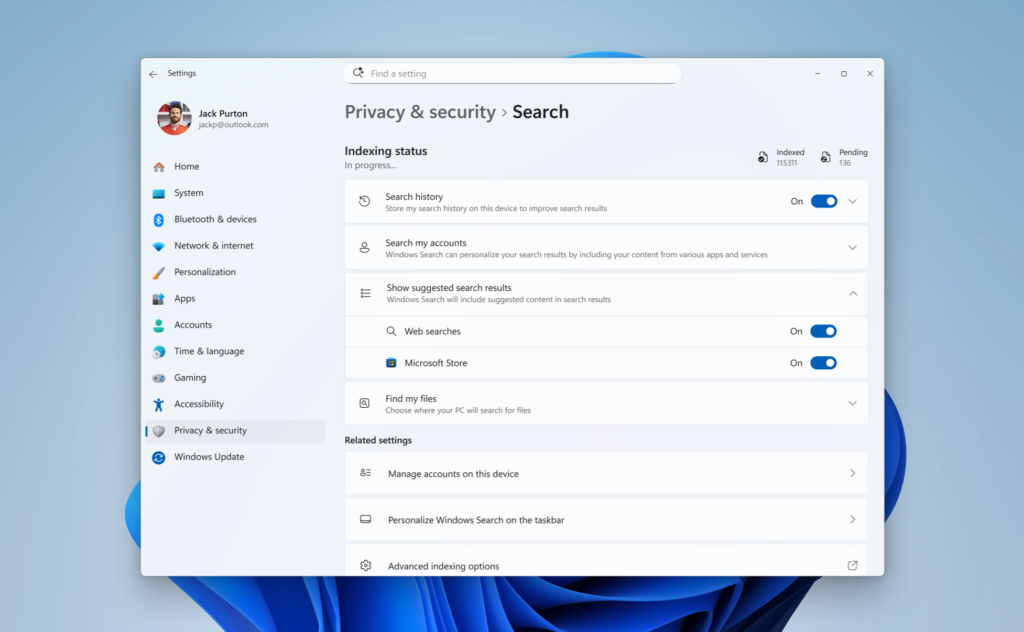

Microsoft is officially overhauling the Windows 11 search experience to prioritize local files, eliminate ad clutter, and deliver the clean, snappy performance users have wanted for years. According to the company blog, this layout shift focuses directly on making the desktop Search Box a dependable, functional utility rather than a messy portal for web advertisements.
The update represents a core component of Microsoft’s broader “Windows K2” engineering initiative. As product design leaders like March Rogers have previously noted, this internal project aims to fix the most glaring issues plaguing Windows 11. It gives the OS the visual polish and technical reliability needed to confidently compete against macOS and Linux variants.
Ditching the web advertisements
For years, the built-in search bar has been the punchline of endless tech jokes due to high CPU usage bugs, loading freezes, and an aggressive reliance on feeding users promotional content from MSN and Bing. The new Experimental Channel update addresses these criticisms. It completely wipes sponsored product recommendations and distracting external news feeds from the search results window.
Instead of treating the interface like a monetization platform, the system now implements a local-first indexing approach. When you look for something on your machine, local apps, system configurations, and desktop documents reliably surface ahead of generic web suggestions. Plus, Microsoft added a dedicated toggle inside the Privacy & Security settings menu. This gives users absolute authority to block Microsoft Store and web matches from showing up next to their local storage drives entirely (via Neowin).


Clearer paths and better typo handling
Beyond the welcome reduction in visual bloat, the actual under-the-hood search logic received a massive upgrade. The interface now explicitly labels the exact origin of every single result—clearly categorizing icons as local settings, cloud files, or web pages. This way, you know exactly what you are clicking before launching a new window.
The update also introduces much higher tolerance for human error. The engine easily deciphers messy typing, missing letters, and random character drops; typing something fractured like “utlook” will still instantly pull up the official Outlook app. File hunting gets an added boost with native support for rapid two-character file queries alongside a substantial framework fix that minimizes system crashes.

The features are currently undergoing phased deployment for Windows Insiders enrolled in the Experimental Channel. In other words, users might need to toggle specific developer flags to test the new layout before Microsoft deploys the final version to the global public later this year.
The post Microsoft Finally Fixes Windows 11 Search: Local First and Zero Ads appeared first on Android Headlines.