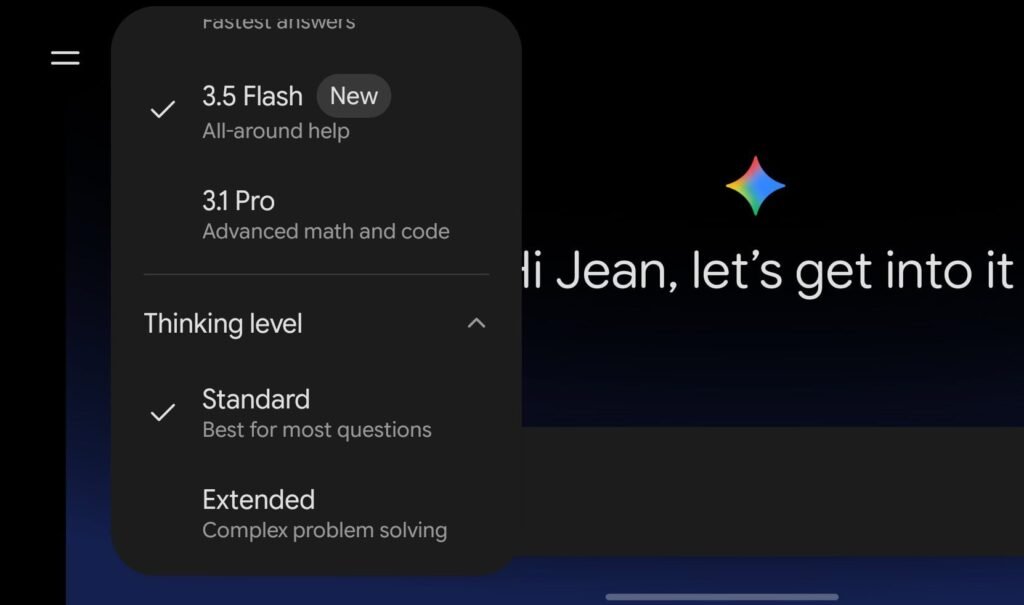

Google is giving its AI assistant a bit more time to process tough questions. Josh Woodward, Google’s VP of Gemini and AI Studio, recently announced on X that the company is widely rolling out new “thinking levels” across the web interface and mobile apps for both Android and iOS. The update introduces specific controls that let you dictate how deeply the AI analyzes a prompt before spitting out an answer.
Choosing how Gemini AI reasons
Traditionally, the Gemini app treated every single prompt the exact same way. Now, it features up to three distinct thinking levels depending on the specific model you are using. Under the hood, these controls are rolling out to the Gemini 3.1 Flash-Lite, Gemini 3.5 Flash, and Gemini 3.1 Pro models. For most everyday activities, the “Standard” thinking level remains the default choice, which Google says is perfectly capable of handling routine, low-impact questions quickly.
The real star of the update is Gemini’s “Extended Thinking” mode, which is completely free and available to all users without a subscription. When you toggle this option on, Gemini intentionally takes more time to weigh its response. During this time it’s running through step-by-step reasoning to deliver a more profound, in-depth analysis for complex problem-solving. While the quality is expected to improve, a better answer is not strictly guaranteed. Meanwhile, a third tier called “Deep Think” offers maximum parallel reasoning on the Gemini 3.1 Pro model. Google is keeping that one exclusive to paid Google AI Ultra subscribers, though.
The catch with thinking too hard
While having an AI that stops to think sounds great on paper, there is a clear strategic caveat you should keep in mind before using it for trivial queries. Turning on the Extended Thinking mode will likely burn through your daily usage limits much faster. Google recently faced criticism from users over a credit system that charges tokens based on prompt complexity, making it easy to accidentally drain your limits.
To avoid “tokenmaxxing” on simple tasks, it is smartest to leave the app on standard mode for basic prompts and save the heavy-thinking tiers for genuine coding, math, or logic puzzles. You can find and tweak these options right now by diving into the model settings inside your Gemini app.
The post Google Rolls Out Gemini Thinking Levels to All Users, No Subscription Needed appeared first on Android Headlines.