
The process to set up a meeting could often be notoriously slow. People have to check their own calendars, guess when their coworkers are free, and send each other “Does this work for you?” emails. To tackle this, Google is expanding its “Help Me Schedule” feature within Gmail and Google Calendar to support group meetings with multiple participants.
Previously, this Gemini-powered tool only worked for one-on-one appointments. According to Google, the expansion now allows the AI to analyze the schedules of everyone included in an email thread to find common availability. The goal is to eliminate the back-and-forth entirely, whether you are planning a quick team sync or a complex meeting with external clients.
Google’s “Help Me Schedule” automates group meetings in Gmail using your Calendar
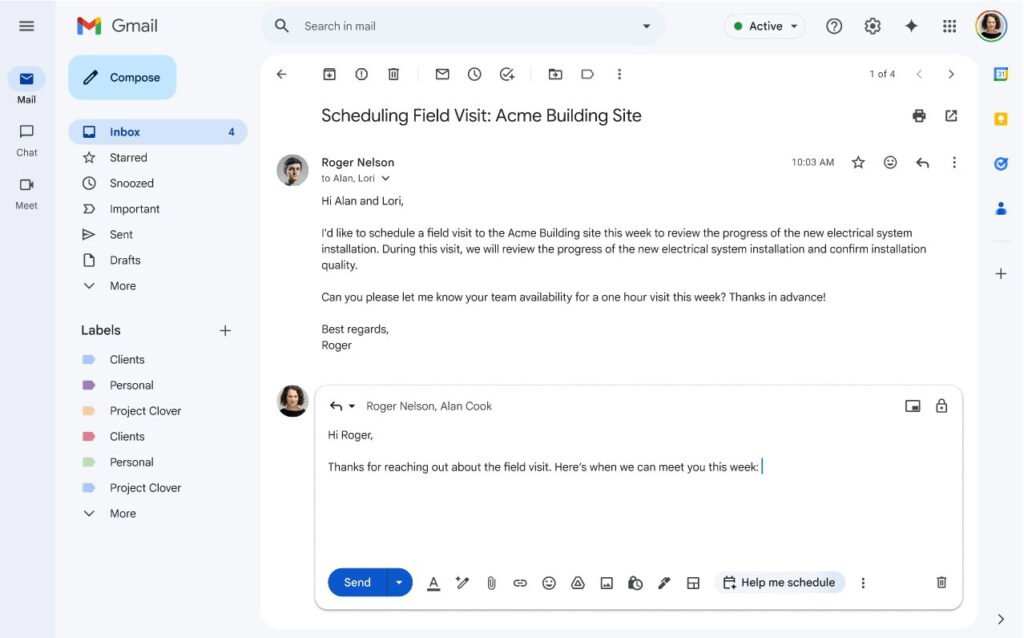
The process starts in the Gmail compose window. A “Help me schedule” button appears in the toolbar when the system detects that you are trying to coordinate a time. Once clicked, Gemini automatically pulls the guest list from the email recipients.
If you have visibility into your colleagues’ calendars, the AI evaluates their working hours and existing appointments to propose the best possible time slots. A significant benefit of this update is how it handles recipients. While it suggests times based on internal availability, it also allows external guests to select from those options. Once someone chooses a slot, the system automatically sends a Calendar invitation to every person on the list.
Despite the automation, users still hold the reins. You can manually edit the guest list before sending the suggestions. This lets you make sure that only the right people are included. Recipients also have the flexibility to cross-reference the proposed times with their own team’s schedules before committing.

Rollout and access
This update is rolling out in stages. According to Google, Rapid Release domains began seeing the feature on February 25, 2026. On the other hand, Scheduled Release domains will see a gradual rollout starting March 16.
It’s noteworthy that the feature is not available for all users just yet. It is currently aimed at professional and educational tiers, including Google Workspace Business Standard and Plus, various Enterprise editions, and the Google AI Pro for Education add-on.
The post Google Gemini AI Now Handles Group Scheduling in Gmail for You appeared first on Android Headlines.