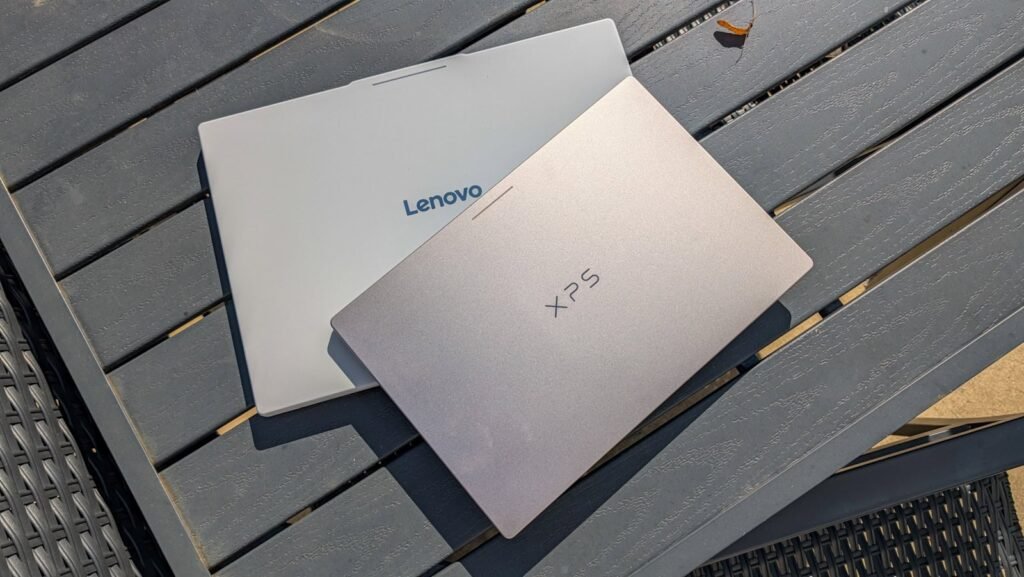

The first crop of Googlebooks arrived this week, and Lenovo and Dell were kind enough to send over their models for us to test. This is a good pairing, actually, because we have an Intel-based Googlebook and a Snapdragon-based Googlebook to check out.
So what’s the first thing we decided to do with these two laptops? Benchmarks. Of course, benchmarks don’t equal real-world usage, but it is nice to put the performance into numbers to compare with other laptops and even phones.
We ran two of the three benchmarks that we normally run on devices that we review. Those are Geekbench 7 and 3DMark. For 3DMark, we used the Wildlife Extreme Test, not the stress test we normally use on all the phones we review. You can learn more about how we test here. This test is great because it measures the device’s GPU performance. It uses Intel Graphics on the Lenovo and Qualcomm’s Adreno graphics on the Dell. The difference is quite large here as well, even more so than on Geekbench 7.
Both of these Googlebooks run on 16GB of LPDDR5X RAM and 512GB of SSD storage, so the only differences are the chipset and the physical size of the laptop. Because the Lenovo Googlebook 15 has a larger chassis, it should theoretically run cooler.
The Lenovo Googlebook 15 runs the Intel Core Ultra 5 325, which is an 8-core chip. Using four efficiency cores at 3.4GHz and four performance cores at 4.4GHz. One of those performance cores can jump up to 4.5GHz. The Snapdragon X Elite has four cores at 3.42GHz and eight cores at 4.01GHz. The other major difference is that Intel uses x86, while Snapdragon uses ARM. Android apps are built to run on ARM-based chips, so Snapdragon X Elite models will have fewer compatibility issues.
Geekbench 7
With Geekbench 7, the difference between the two is small, but it’s not as big as it is in graphics performance. While other sites still use Geekbench 6, we’re using the newer version, so our results might be lower than other numbers you’ve seen.
| Device | Single-Core | Multi-Core |
|---|---|---|
| Lenovo Googlebook 15 (Intel) | 2,396 | 10,077 |
| Dell XPS Googlebook (Snapdragon) | 2,572 | 12,083 |
That is about a 7% and a 19% lead, respectively, for the Snapdragon X Elite over the Intel Core Ultra 5. That’s pretty impressive. The Intel Core Ultra 5 is a mid-range chip that launched earlier this year, but the Snapdragon X Elite is quite a bit older; after all, Qualcomm launched the Snapdragon X2 Elite over a year ago.
While the Intel Core Ultra 5 325 does have higher clock speeds, the Snapdragon X Elite does have more cores at 12 vs. Intel’s 8. This is likely making up the difference. Also, keep in mind that the Snapdragon X Elite is ARM while Intel is x86.
3DMark Wildlife Extreme
Moving on to the 3DMark Wildlife Extreme test, this cross-platform test compares the graphics performance of mobile computing devices. It’s a short, one-minute test that measures the device’s ability to deliver high performance for short periods. So here’s how the two laptops fared.
| Device | Overall score | Avg Frame Rate |
|---|---|---|
| Lenovo Googlebook 15 (Intel) | 3,525 | 21.11 |
| Dell XPS Googlebook (Snapdragon) | 6,018 | 36.04 |
This is a pretty massive difference, to be quite honest. That’s a 71% improvement over the Intel chip, which is very impressive considering the Snapdragon X Elite is an older chip. But it also shows just how bad Intel’s integrated graphics are compared with what Qualcomm offers.
How does this translate to real-world use?
We always say benchmarks don’t always translate to real-world use, and most of the time that is true. After using these two laptops for a few days, I haven’t noticed any major performance differences between them. The one thing I have noticed is that the fan spins up much faster on the Lenovo Googlebook 15 than on the Dell XPS Googlebook. This leads me to believe the Intel chip runs hotter despite the fact that it is in a larger chassis than the Snapdragon chip in the XPS Googlebook.
So which one should you buy? As always, this comes down to preference; for me, I would prefer the Lenovo Googlebook 15. I prefer the size and keyboard over what Dell is offering right now. Unless you’re planning to use this laptop for the next ten years, the performance difference won’t matter that much. But if you do want the best performance for your money and the best app compatibility, then the Dell XPS Googlebook is definitely the one to get. Currently, Dell is selling it for $999, which is a really good deal.
Stay tuned as we do more testing and render our final verdict on both Googlebooks in the next week or two. We’ll also put together a comparison between the two, as I feel like these two represent the differences in the five available Googlebooks quite nicely.
The post I Tested the Lenovo and Dell Googlebooks Side by Side, and the Snapdragon Model Pulled Way Ahead appeared first on Android Headlines.