
The Vivo X Fold 6 is one of the phones I was most excited to test out this year. There are three main reasons why. First, I didn’t get to check out the Vivo X Fold 5. The second one is the camera setup on the back of this thing; it looked very promising when the Chinese variant launched back in June. The last reason is OriginOS 6 Fold, the all-new custom UI by Vivo, which includes some really neat features for the main display.
At this point, I’ve spent around two weeks with the device, and I can safely say that it lives up to the hype. I immensely enjoyed using it, and quite frankly it’ll probably stay in my pocket for the foreseeable future. We’ll get into the specifics below, but I wanted to give you a taste of what’s coming. Of course, the device is not perfect; nothing is, so we’ll get into all that here. This is a global variant of the phone, by the way. Having said that, let’s see what the Vivo X Fold 6 has to offer.

The best camera setup on any foldable, paired with OriginOS 7 Fold’s powerful multitasking.
Pros
- Comfortable to hold and use
- Sturdy build
- Great displays
- Strong day-to-day performance
- The best cameras on any foldable
- Very good battery life
- Fast charging
- OriginOS 7 Fold is very, very good
- Multitasking heaven
- Great case included
- Charger included
Cons
- Display crease is just okay
- Not the latest MediaTek chip
Vivo supplied us with a review unit of the Vivo X Fold 6, but didn’t have a say in our opinion, nor did they see this review before you. We’ve been using the device for about two weeks before forming an opinion.
Specs
Vivo X Fold 6 Specs (global variant)
| Main Display Size | 8.02 inches |
| Cover Display Size | 6.51 inches |
| Main Display Resolution | 2312 x 2504 |
| Cover Display Resolution | 2528 x 1120 |
| Main Display Refresh Rate | 1-120Hz (adaptive) |
| Cover Display Refresh Rate | 1-120Hz (adaptive) |
| Folded Dimensions | 157.2 x 74.3 x 9.4mm (Black) / 9.9mm (Blue) |
| Unfolded Dimensions | 157.2 x 145.7 x 4.4mm (Black) / 4.8mm (Blue) |
| Weight | 228 grams (Black) / 235 grams (Blue) |
| Chipset | MediaTek Dimensity 9500 Super Edition |
| RAM | 12GB RAM |
| Storage | 512GB (non-expandable) |
| Main Camera | 200MP (Samsung HPB sensor, 1/1.4-inch sensor, f/1.68 aperture) |
| Ultrawide Camera | 50MP (Samsung JN1 sensor, 1/2.76-inch sensor size, f/2.05 aperture) |
| Telephoto Camera | 50MP (Sony LYTIA 602 sensor, 1/1.95-inch sensor, f/2.57 aperture) |
| Main Display Camera | 20MP (CMOS, 1/3.6-inch sensor, f/2.4 aperture) |
| Cover Display Camera | 20MP (CMOS, 1/3.6-inch sensor, f/2.4 aperture) |
| Battery | 6,900mAh |
| Charging | 80W wired charging, 40W wireless, reverse wireless |
| OS | Android 17 with OriginOS 7 Fold |
| Network & Connectivity | 5G, LTE, Wi-Fi 7, Wi-Fi Direct, Bluetooth 6.0 |
| Water Resistance | IPX5, IPX8, IPX9 |
| Colors | Black, Blue |
Vivo X Fold 6 Review: Design
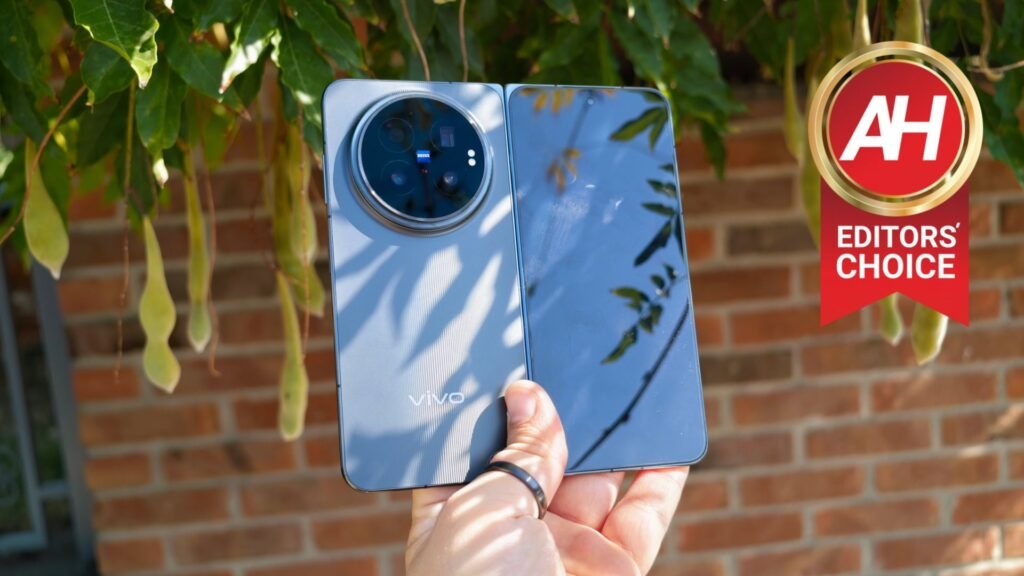
I was expecting the Vivo X Fold 6 to be a per-course device when the design is concerned. To be almost the same as the OPPO Find N6, for example. That’s not the case, however. The moment I grabbed it, I noticed a major difference. This handset is considerably curvier, and I love that. The frame around the device is still flat, but it curves towards the edges. That goes for the frame towards the hinge as well, so it seamlessly connects to it. That, combined with a glossy finish on the frame and hinge, makes this thing a joy to use.
It’s glossy, but I didn’t mind that this time around
You may wonder what’s the situation with smudges and fingerprints, considering the glossy frame. Well, I received the black version of the phone, which is actually more of a dark gray color. Considering that color, and the fact that the backplate is not glossy, smudges are not an issue, not at all. The back side of the phone is plastic, or as Vivo calls it, glass-fiber reinforced plastic. It feels really nice, actually, not quite like glass, but I don’t really have a complaint here. I’m actually glad it’s not glass, as Vivo saved on some weight, plus it won’t shatter. There’s also a nice addition to the design of the backplate, with a bunch of vertical lines in the middle of it, subtle ones.

The volume up and down buttons are located on the right side, along with a power/lock key, which doubles as a fingerprint scanner. The finish on these buttons is different, so it’s very easy to differentiate between them. The volume up and down keys have a glossy finish, while the power/lock button does not. I didn’t mistake them once during my use. There’s another button on this side when the phone is folded, but it jumps to the left side when unfolded. It’s the action key, which you can customize for long-press and double-tap. It’s quite useful, actually.
It’s very comfortable to use thanks to smooth curved edges
The device is very similar to the competitors in terms of the design and weight. It did not feel heavy at all, and it was very comfortable to use, albeit a bit slippery. I’m used to foldable devices of this size, though. It’s not a small phone, that’s for sure. There’s a nice case included in the box, which helps with the slippery factor; more on that soon. The camera bump on the back is quite considerable, but it’s centered, and the phone does not wobble on the table because of it. Samsung could learn a thing or two from this, as the Galaxy Z Fold 8 series wobbles all over the place.
It’s also worth noting that the phone is IP58 and IP59 certified, which is not quite the IP68 rating, but it’s better than what Samsung offers with the Galaxy Z Fold 8 Ultra. Overall, I quite like what Vivo did with the design here. There’s not much to complain about, other than the slippery factor, perhaps. It would be a great idea to place vegan leather on the back, but… the company decided to go a different route.


Vivo X Fold 6 Review: Accessories
Unlike many of the competitors, Vivo actually includes everything you need in the retail box for the Vivo X Fold 6. In addition to the phone itself, you’re getting a Type-C to Type-C cable and an 80W charger. That’s not all, though; there’s also a really nice case included inside. It’s a hard plastic case, but on top of that plastic, Vivo included a grippy material much like vegan leather. Not quite, but almost. It’s not the grippiest case out there, but it does add quite a bit of grip compared to not having it. Also, it offers really nice hinge protection. It only covers the back and the hinge, though. A SIM tray ejector tool is also included, along with some paperwork, of course.


Vivo X Fold 6 Review: Display
The Vivo X Fold 6 is a regular book-style foldable, so it has two rather large panels. It’s not one of the wide foldables that have been hyped up lately. The main display on the phone is an 8.02-inch ZEISS Master Color Display 8T. This is an LTPO panel with an adaptive refresh rate (1-120Hz) and a resolution of 2504 x 2312. The inner display is a 6.51-inch panel, but it’s also the ZEISS Master Color Display 8T. It’s also an LTPO panel with the same adaptive refresh rate. It offers a resolution of 2528 x 1120.
Both displays are on the same level, and they’re great
Both of these displays are flat, and both of them include a display camera hole, as you can see. HDR10+ and HDR Vivid are supported on both of them, and the same goes for Dolby Vision and Netflix HDR. These are also SGS Low Blue Light certified panels. Both displays are big and beautiful, basically. They’re vivid, bright, and have excellent viewing angles. Touch response is also quite good. There’s not much to complain about here. The cover display also has a plastic screen protector on top, pre-installed, which is always a nice touch.
You do have plenty of eye comfort and protection options in the settings as well. Anti-fatigue brightness, for example, is built-in, as are the Adaptive color options. I’m only scratching the surface here; an overwhelming number of options are included, so you can fine-tune everything when it comes to the displays, basically. Yes, they’re also more than bright enough, with a theoretical max brightness of 5,000 nits. It’s also worth noting that the screen-to-body ratio of the main panel is over 90%. The bezels are thin and uniform on both panels.

The display crease is not the best in the industry, but it’s… fine
Some of you may be wondering about the crease on the main display. Well, it’s minimal, that’s for sure, but it’s not on the same level as the one on the OPPO Find N6. That one is slightly less noticeable, and it’s also almost impossible to feel under your finger. Don’t get me wrong, the crease here is a non-issue, and I stopped noticing it almost instantly, but I wanted to give you an idea of what you’ll be dealing with. Display creases haven’t really been an issue for me for years, as OEMs got really good at minimizing them. Just keep in mind it’s a level below the best-controlled display creases out there.
Vivo X Fold 6 Review: Performance
The Vivo X Fold 6 may not have the current-best chip from Qualcomm or MediaTek, but it has one of MediaTek’s best… the Dimensity 9500 Super. This is essentially a chip jointly developed by MediaTek and Vivo for this phone. It is obviously an adapted variant of the Dimensity 9500, MediaTek’s flagship chip until the Dimensity 9600 Pro arrived recently. The thing is, I was expecting similar benchmarking results as the ones the Dimensity 9500 was offering, but that’s not how it worked out.
The phone is buttery smooth to use
I expected somewhat higher benchmarking results, but I don’t usually pay much attention to benchmarks. I got 1,865 points in the single-core test and 6,748 in the multi-core test on this phone. I ran the test two more times, but got similar results. The GPU test showed 13,564 points. 3DMark WildLife Extreme Stress Test also scored lower than expected. You can check out those scores below this section.
The thing is, I don’t really care about benchmarks, and I do them only so that you can see what’s going on, for review purposes. This phone was as smooth as butter while in use. That goes for both general use and gaming. To make things even better, Vivo improved fluidity with the new OriginOS 7 Fold skin (which is based on Android 17) quite a bit. Those odd jitters at times that were present on some previous devices, well, they’re not present here. The animations are buttery smooth.
Origin Workbench is my favorite software feature
Even when I put five apps on the screen at once, as part of the Origin Workbench feature, the phone performed like a champ while I was jumping between them. I had a hard time bogging down the phone. Gaming is no issue either. You can easily play games like Genshin Impact, or something along those lines. In other words, games that are truly graphically intensive. The phone did get warm after heavier gaming sessions, but never went over the top or overheated.
Benchmarks:
Geekbench:
| Device | Single-Core | Multi-Core | GPU |
| Vivo X Fold 6 | 1,865 | 6,748 | 13,564 |
| Samsung Galaxy Z Fold 8 Ultra | 2,615 | 7,507 | 15,719 |
| Google Pixel 10 Pro Fold | 1,812 | 5,369 | 3,688 |
NOTE: The Vivo X Fold 6 and Galaxy Z Fold 8 Ultra results are from Geekbench 7, while the Pixel 10 Pro Fold results are from Geekbench 6.
3D Mark (Wildlife Extreme Stress Test):
| Device | Best Loop | Lowest Loop | Stability |
| Vivo X Fold 6 | 6,630 | 2,283 | 34.4% |
| Samsung Galaxy Z Fold 8 Ultra | 7,135 | 3,601 | 50,5% |
| Google Pixel 10 Pro Fold | 2,995 | 1,993 | 64.5% |
Thermals:
3DMark (Wildlife Extreme Stress Test) thermals:
| Device | Temperature (F) |
| Vivo X Fold 6 | 99.7 |
| Samsung Galaxy Z Fold 8 Ultra | 113.1 |
| Google Pixel 10 Pro Fold | 109.7 |
Genshin Impact thermals:
| Device | Temperature (F) |
| Vivo X Fold 6 | 95.9 |
| Samsung Galaxy Z Fold 8 Ultra | 96.2 |
| Google Pixel 10 Pro Fold | 106.8 |
Vivo X Fold 6 Review: Battery Life
The Vivo X Fold 6 comes with a 6,900mAh BlueVolt battery. That is quite a beefy battery pack and should be more than enough for this phone to offer great battery life. Does it, though? Yes, very much so. The Vivo X Fold 6 can last the entire day even with heavy use, with no problem. On most days I didn’t even charge it at night, but did a quick top-up at some point during the afternoon of the second day. From that point, I had plenty of juice until the end of the following day.
If you’re a power user and you really push the device, as I did for several days for testing purposes, it can last through a day without a problem. I was able to get around 9 hours of screen-on time with around 20% left in the tank on one day. On several other days, I hit 7 hours of screen-on time with around 40% left in the tank. I don’t know what Vivo and MediaTek did with that chip, but it sure does work in combination with that battery and OriginOS 7 Fold.
What about charging? Well, it’s fast, really fast. The phone supports 80W wired charging, and you do get a charger in the box. It also supports 40W wireless charging and reverse wireless charging. I was able to get to a full charge in less than an hour with this phone. It takes around 55 minutes to get there from 0%, which is quite good considering the battery capacity.
| Device | Battery life | Charging |
| Vivo X Fold 6 | 26:41:13 | 0:55:07 |
| Samsung Galaxy Z Fold 8 Ultra | 25:12:36 | 1:01:12 |
| Google Pixel 10 Pro Fold | 16:49:21 | 1:35:31 |
Vivo X Fold 6 Review: Camera
I already talked about this phone’s camera performance in an editorial, in case you’re interested in checking that out. I wrote that prior to the review on purpose. The Vivo X Fold 6 offers the best camera performance out of any foldable on the market thus far. I had to emphasize that. This phone’s camera setup does look great on paper, and more importantly, it actually delivers in practice. I’m a stickler for details in photos and always want to have the best camera phone with me. At the same time, I always have a book-style foldable with me. This phone can serve as both, actually.
Camera performance doesn’t get better than this… on a foldable
No, it’s not the best camera smartphone out there, but it’s the best foldable camera smartphone out there, and that says a lot. It has three very capable cameras on the back. A 200-megapixel main camera uses Samsung’s HPB 1/1.4-inch sensor and has an f/1.68 aperture. There’s also a 50-megapixel ultrawide camera with Samsung’s JN1 sensor, which is a 1/2.76-inch sensor. The aperture here is f/2.05. The third camera is a 50-megapixel periscope telephoto camera with Sony’s LYTIA 60 1/1.95-inch sensor. The lens aperture here is f/2.57. ZEISS optics and expertise are part of the package.

As you can see in the gallery below, the phone’s camera does a great job. During the day, the images are detailed and balanced, while during the night there’s plenty of light, and the photos are well-controlled. ZEISS T* coating does a great job of keeping street flares in check, while noise is basically non-existent. I did stumble upon issues with overexposing during certain HDR shots, but taping on the subject to put it in focus solves that problem. So it’s a non-issue really. While I still believe that the Vivo X300 Ultra is the best camera smartphone on the market, this phone does a great job for a foldable.
Photography styles are included, and they’re immensely useful
Do note that the images you’ll see in the gallery below have been taken using different photography styles. I’ve used mostly Vivid and ZEISS Natural styles, which are the two main offerings on the phone. I’ve also created a custom style to use, so a couple of shots have been taken with that one as well. You can easily adapt the end result to your preferences, as the same photography styles that were available on the Vivo X300 Ultra are available here, and you can create custom ones or import them. That’s easily the best camera feature this phone offers, in my opinion. The default ones are great, but if you prefer something a bit more subtle, or want to go the complete opposite way, you can easily do that.
Camera samples:
4K video recording thermals:
| Device | 5 minutes | 10 minutes |
| Vivo X Fold 6 | 89.6 | 94.3 |
| Samsung Galaxy Z Fold 8 Ultra | 96.7 | 98.6 |
| Google Pixel 10 Pro Fold | 84.6 | 85.4 |
Vivo X Fold 6 Review: Software
Android 17 comes pre-installed on the Vivo X Fold 6, along with the company’s OriginOS 7 Fold. That software does make a notable difference compared to OriginOS 6, that’s for sure. I’ve noticed considerable fluidity improvements, not to mention that animations are more fluid as well. The UI is also more consistent now. It does take some inspiration from Liquid Glass, but Vivo managed to make it its own. It combines various design elements, and in my opinion, that works really well. I quite like how the UI looks.
OriginOS 7 Fold is very fluid and packed with useful features
In addition to notable fluidity improvements, Vivo also made sure you have plenty of useful features here. My favorite feature from OriginOS 7 Fold is the Origin Workbench, easily. That feature allows you to run 5 apps on the main screen at the same time, and the way Vivo achieved this is really impressive. You have one app in focus on the screen, and four of them on the left side in the form of small squares. When you tap one of them, they become the main app. You can easily multitask this way, and it works like a charm.

In case you’re wondering, yes, you can throw multiple apps on the screen at the same time in a different layout. You can separate the screen into different sections, and resize those windows to suit your needs. In case you prefer that to the multitasking mentioned in the previous paragraph. This also worked really well. Then there are mini windows, which you can easily create and use, not to mention Flex mode that many people seem to love. It allows you to half-fold your phone to split some apps into two different sections. For example, you can have a keyboard on the bottom part of the screen, and the message body on the upper one.
There is some customization thrown in there
You do get some customization as part of OriginOS 7 Fold as well, by the way. Third-party icons from the Google Play Store are not supported by the default launcher; unfortunately, Vivo does offer some options when it comes to customizing icons. You can also change color palettes of the UI, control the always-on screen, some effects throughout the UI, and more. Do note that third-party launchers can be set up, but Quick Switch (for apps) won’t work; at least it did not for me. I found a way around by installing third-party navigation gestures and dedicating a part of the screen to activate Quick Switch. Other than that, third-party launchers worked fine for me. I wouldn’t recommend using them, however, as you’ll lose the bottom taskbar, which is very useful on the main screen.


Vivo X Fold 6 Review: Audio
The Vivo X Fold 5 offered compelling audio output, and the Vivo X Fold 6 continues down that road. When it comes to sheer loudness, it easily beats the competition from Samsung and OPPO, for example. The Galaxy Z Fold 8 Ultra and OPPO Find N6 are not close in that regard. Its stereo speakers also offer really pleasant and well-balanced sound. I was very pleased with the output.
There is no audio jack on the device, but that’s what you can expect these days, so that’s not a surprise. You can always utilize Type-C earbuds or a dongle to connect wired headphones here. Bluetooth 6.0 is supported, though, so wireless audio connectivity will probably be a preference for many of you. I noticed no issues with Bluetooth disconnecting or anything like that.
Vivo X Fold 6 Review: Should you buy it?
The Vivo X Fold 6 is easy to recommend, actually. It’s not a cheap phone, by any stretch of the imagination, but you cannot expect it to be, considering it’s a flagship foldable device. The Vivo X Fold 6 comes with notable software improvements, outstanding multitasking, and the best camera performance of any foldable. It offers great performance in general, has great displays, and excellent battery life, amongst other things. It’s not perfect, but nothing is. The point is, I can easily recommend this one if cameras on a foldable matter to you, and you multitask a lot.

You should buy the Vivo X Fold 6 if you:
- Want the absolute best camera performance on a foldable
- Need excellent multitasking
- Appreciate a quality case in the box
- Appreciate a charger being included
- Need your phone to last the whole day easily
- Need proper fast charging
You shouldn’t buy the Vivo X Fold 6 if you:
- Are bothered by display creases
The post Vivo X Fold 6 Review: The Best Camera on a Foldable Phone appeared first on Android Headlines.