
Back in July, leaked images of Lenovo’s upcoming AI Mouse made it pretty clear that hardware makers weren’t going to treat Googlebooks like basic Chromebooks. With dedicated Gemini buttons and flashy RGB light strips built right into the mouse, Lenovo was obviously cooking up a dedicated accessory lineup. The big missing piece of the puzzle was how users were supposed to control any of it. Thanks to store listings spotted by GbookHub, we finally have our answer: Lenovo just dropped its official Lenovo Vantage app onto the Google Play Store, tailored specifically for Googlebook OS.
Real hardware tuning comes to Googlebook OS
If you’ve owned a Lenovo PC in the past, Vantage is a familiar sight. On Windows, it acts as the control center for system updates, hardware diagnostics, and device profiles. Bringing a rebuilt Android version over to Googlebook OS means OEMs are finally getting the system-level access needed to make external accessories feel like a natural extension of the laptop.
Inside the app, you get a clean view of your machine’s baseline stats. This includes installed RAM, onboard storage, serial numbers, and OS builds. It also doubles as a service hub where you can track warranty coverage, request repair tickets, or grab bundled promos like a 90-day trial for 100GB of Dropbox cloud storage.


Hands-on controls for the Lenovo AI Mouse
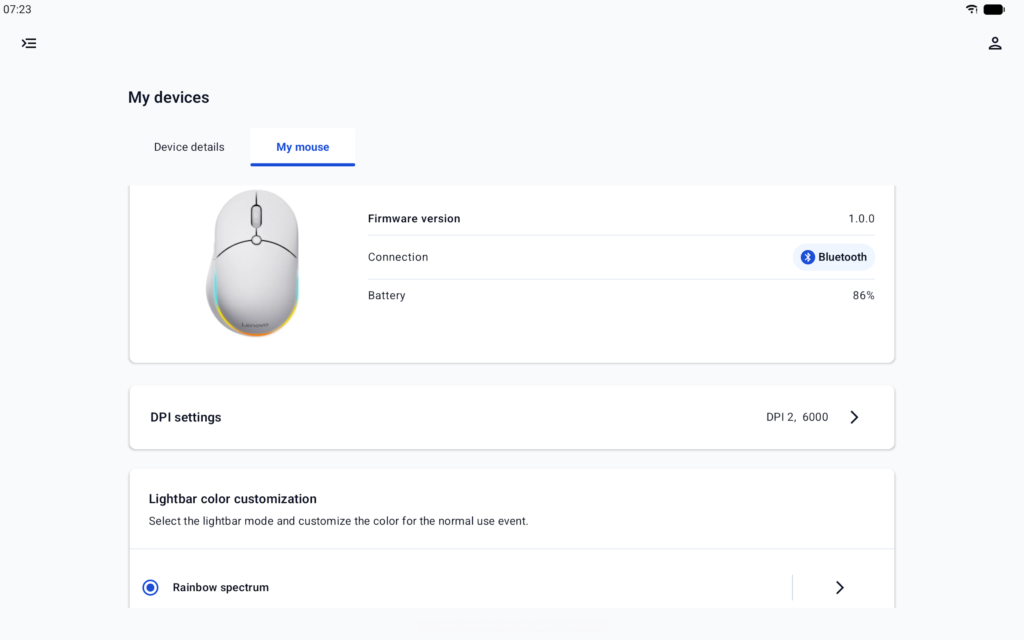
The main reason to install Vantage, though, is tucked under the device management tab for the new Lenovo AI Mouse. ChromeOS traditionally keeps mouse settings pretty bare-bones, but Vantage gives you proper desktop-style tweaking:
- DPI Profiles: Adjust sensor sensitivity levels for creative work or general browsing.
- RGB Accent Lighting: Pick custom light strip effects, including a dynamic “Rainbow spectrum” preset.
- Battery Stats: Check exact charge percentages for connected Bluetooth devices.

Dedicated AI shortcuts and light shows
What stands out most is how Lenovo handles the mouse’s center AI Key. A quick tap instantly pulls up the on-screen Gemini Chatbox. Hold the button down, and it fires up Gemini Voice dictation along with the new Magic Pointer cursor tool.
Lenovo even linked the mouse triggers back to the laptop chassis itself. Activating an AI shortcut on the mouse triggers a synchronized light effect across the laptop’s outer lid. That kind of visual and functional synergy between software, peripherals, and host hardware is brand new for this platform. With pre-orders for the Lenovo Googlebook i 15 right around the corner, Vantage lands at just the right time to give power users a mature desktop experience on day one.
The post Lenovo Vantage App Hits Play Store to Power Up Ultra-Customizable Googlebook Accessories appeared first on Android Headlines.