
Book-style foldables have had the same form factor since they arrived. Tall and narrow when folded, a square when unfolded. The OPPO Find N and Find N2 brought something a bit different with a smaller cover display, but the main display was still a square. After those two phones, for years, we didn’t have anything. It was the same thing over and over again, but thinner, with bigger batteries, and better display crease control. Those are all welcome additions, but the point is, we didn’t see any innovation in terms of form factor.
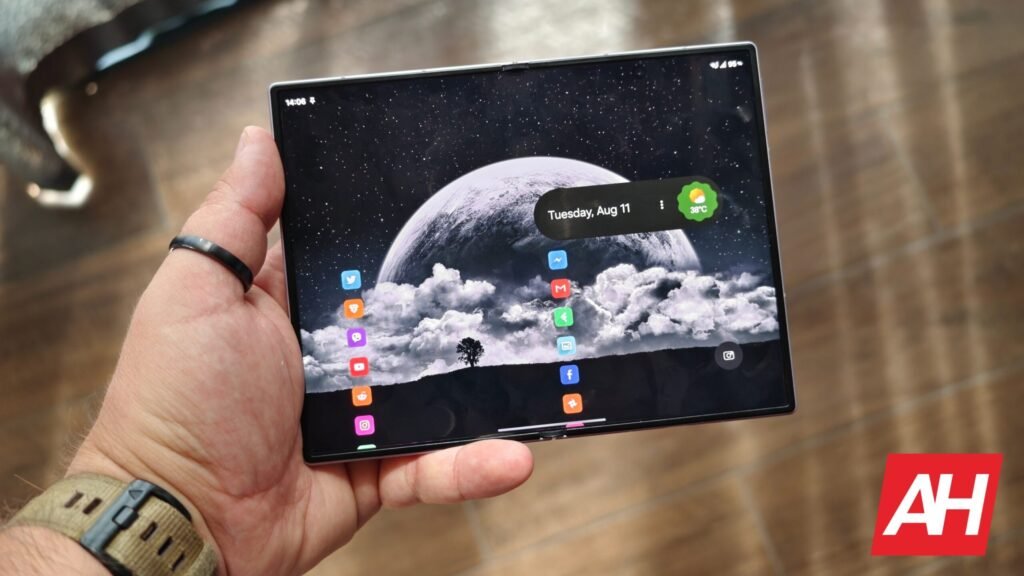
I was aware, since using the OPPO Find N and Find N2, that a tall phone when folded is not the answer. The same goes for square main displays. So I was waiting for 4:3 main displays, and that’s exactly what wide foldables brought to the table. I wrote about the Galaxy Z Fold 8 at length at this point, as I’ve been using it for weeks at this point. It really does feel like a refresh for book-style foldalbes, and a very positive refresh. It’s not perfect, of course, but it does improve upon the previous form factor, in my opinion, in several important ways. That’s what I’m here to talk about.
I’ll try to list the things that made the difference most for me personally, and in order of importance. Once again, importance for me. Your preferences may differ; in fact, you may even prefer the square format more, of course. Let’s get to it.
Content consumption
Content consumption is a wide term, but it’s the right one. The Galaxy Z Fold 8 improved both horizontal and vertical content consumption for me, personally. When I’m watching a YouTube video, Netflix, or any other horizontal video, that 4:3 aspect ratio is great. 16:9 would be ideal for that, of course, but that’s basically not doable in the way we’d want, and 4:3 is much better than near 1:1; that’s for sure. You get a bigger image and fewer black bars. I noticed a huge difference here, for horizontal video content especially.

Something similar can be said for vertical videos. Granted, folded tall foldables are great for those as well, but so are wide foldables like the Samsung Galaxy Z Fold 8; all you have to do is rotate them to a vertical position when unfolded. You get a larger image than you’d get on a cover display of a different type of book-style foldable. Considering how comfortable (and light) the Galaxy Z Fold 8 is… it’s great, actually. I really enjoy doomscrolling on Instagram and TikTok because of this, which is not exactly a good thing, now that I think about it.
One-handed use (for the most part)
I simply love the fact that the Galaxy Z Fold 8 is as short as it is, and that goes for other wide foldables. Reaching things in the upper portion of the display on tall and wide foldables is… a chore. You need to do some serious hand gymnastics, even though the opposite side (left or right, depending on your hand preference) is easy to reach. I can personally reach basically any part of the Galaxy Z Fold 8’s cover display with one hand with minimal hand gymnastics; it’s not as bad as with tall and wide foldables.

Typing is also easier on this display, as even that smaller cover display is wide, notably wider than the one on the Galaxy Z Fold 8 Ultra or OPPO Find N6, for example. Now, when it comes to one-hand typing, things get a bit tricky if you have less than average hand size. You will struggle to comfortably reach things on the opposite side or press something by accident with your palm. You can always use a smaller Gboard option from the settings (for one-handed use). I didn’t have such issues. Yes, I did press things several times with my palm, but I got used to it, and I have above-average hand size, so that’s not a problem for me personally.
Side-by-side apps
Running side-by-side apps feels just right on the Galaxy Z Fold 8. I prefer running two of them, but the phone and its software allow you to have up to three apps opened side-by-side. Do note that if you’re running a third-party launcher, as I do, you won’t be able to open three, as you won’t have a bottom bar on the display. That’s just my preference, but with Samsung’s default launcher, you’re good to go.

Now, I’m talking about running apps horizontally; doing the same vertically when the phone is in a portrait orientation feels quite weird to me. Still, you can do it if that’s something you have use of in specific situations. The point is, this aspect ratio is great for running apps side-by-side.
Pocketability
Pocketability is also one benefit of the wide form factor, well… at least for the Galaxy Z Fold 8. Yes, the phone is wider than most other book-style foldables, but it’s also a lot shorter. Its width is not much of a problem, at least for male jeans and shorts that I’ve been rocking, with relatively normal pockets. The phone disappears in a pocket, and it’s arguably less of a burden on your pocket than something like the Galaxy Z Fold 8 Ultra.
This phone, thanks to its short and wide dimensions, can also fit in some shirt pockets, which is not something you can say for regular smartphones or other types of book-style foldables.
The post I’ve Used Every Book-Style Foldable Shape — Here’s Why Wide Is Best appeared first on Android Headlines.