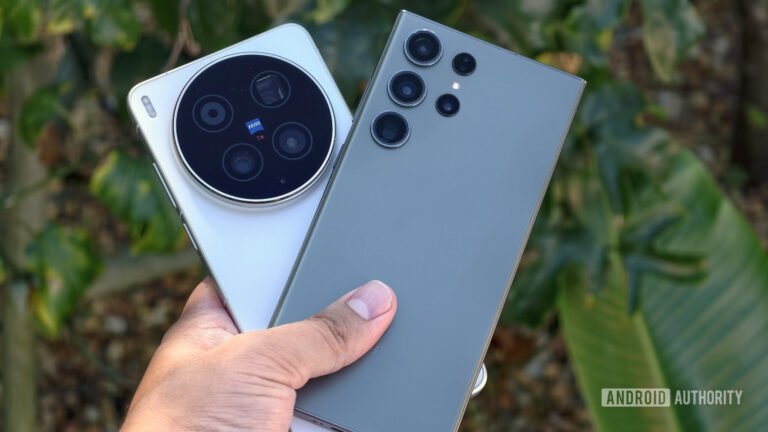

The Vivo X300 Ultra was one of the most anticipated flagship smartphones of the year, at least in the tech circles. The main reason for that is its camera prowess. When the Chinese model launched at the end of March, the hype for the global variant only grew bigger. The fact that the Vivo X300 Ultra is the first global ‘Ultra’ phone from the company only fortified that feeling. Well, the phone is now official, and I’ve spent quite some time with both Chinese and global versions at this point. Needless to say, I have a lot of thoughts.
My expectations for this phone were… high, very high. I’ve enjoyed previous flagships from Vivo very much, and up until this phone’s arrival, the Vivo X200 Ultra was still one of the best, if not the best camera smartphone around. This phone only emphasizes that. Vivo included even better hardware in the Vivo X300 Ultra, and improved its processing as well. Not to spoil the camera section, but this is an outstanding camera smartphone. As for the rest, let’s see…

If you’ve ever wanted a professional camera in your pocket, the wait is finally over.
Pros
- Great, streamlined design
- Excellent screen, vivid and sharp
- Flagship-worthy performance
- Outstanding camera hardware & performance
- Good battery life
- Fast charging, both wired & wireless
- Great ingress protection
- Solid audio output
- Fast and accurate fingerprint scanner
- Good and accurate facial scanning
- Case included in the retail box
- Charger & charging cable included
- Much improved video recording
Cons
- Truly huge camera bump
- Slippery
Vivo supplied us with review units of the Vivo X300 Ultra, but didn’t have a say in our opinion, nor did they see this review before you. We’ve been using the Chinese variant of the device for well over two weeks, while we’ve had less time with the global variant. The opinion here is mostly based on the global unit, but we do mention the Chinese variant quite a few times as well.
Specs
Vivo X300 Ultra Specs
| Display Size | 6.82 inches |
| Display Resolution | 3168 x 1440 |
| Refresh Rate | 144Hz |
| Dimensions | 163 x 76.8 x 8.5mm |
| Weight | 232/237 grams |
| Chipset | Qualcomm Snapdragon 8 Elite Gen 5 |
| RAM | 16GB (LPDDR5X) |
| Storage | 256GB/512GB/1TB (UFS 4.1) |
| Battery | 6,400mAh (Europe) / 6,600mAh (everywhere else) |
| Charging | 100W wired, 40W wireless, reverse wired, reverse wireless (charger included) |
| OS | Android 16 with OriginOS 6 |
| Main Camera | 200MP (f/1.9 aperture, 1/1.12-inch sensor size, 0.7um pixel size, gimbal OIS, PDAF) |
| Ultrawide Camera | 50MP (f/2.0 aperture, 1/1.28-inch sensor size, 116-degree FoV, 1.22um pixel size, OIS, dual pixel PDAF) |
| Telephoto Camera | N/A |
| Periscope Telephoto Camera | 200MP (f/2.7 aperture, 1/1.4-inch sensor size, 0.56um pixel size, multi-directional PDAF, OIS, 3.7x optical zoom, macro) |
| Front-Facing Camera | 50MP (f/2.5 aperture, 1/2.76-inch sensor size, 0.64um pixel size) |
| Network and Connectivity | Wi-Fi 7, GPS, Bluetooth 5.4, NFC |
| Water Resistance | IP68/IP69 |
| Colors | Black, Silver, Green |
Vivo X300 Ultra Review: Design
The design of the Vivo X300 Ultra did not change all that much compared to the Vivo X200 Ultra. Yes, there are changes, but you can still see they’re brothers. The most notable changes are the more pronounced camera bump on the back… yes, it’s huge, and the two-tone design on the back of some models. The rest is basically the same as it is on the Vivo X200 Ultra. That’s not a bad thing, though, not at all.
Thin, uniform bezels and a familiar design
There is a flat display included on the front of the phone, with a centered display camera hole up top. The bezels around the panel are very thin, and they’re also uniform, as expected. The phone does come with a pre-installed screen protector, by the way, which is something many of you will appreciate. The frame around the phone is flat, though it curves a bit towards the edges. Those curves greatly improve in-hand feel. The Vivo X300 Ultra has only the standard set of buttons, and they’re located on the right side. The power/lock key sits below the volume up and down buttons. Vivo opted to ditch the camera key that was included on the Vivo X200 Ultra.

The phone’s frame is made out of metal, by the way, it’s aluminum. On the back, you’ll find glass. The model that we used has a two-tone finish, and even though it may look like two different materials are used, that’s not the case. It’s one panel of glass across the back side. There is a huge camera oreo on the back, which contains three cameras. Vivo used very large sensors here, which is why it’s not only large, but it does protrude quite a bit.
The camera bump is huge… but useful
Some users will definitely not like how much this camera sticks out on the back. It is quite considerable, and the renders don’t really show it all that much, as Vivo did a nice job design-wise to mask it. I, personally, don’t mind that protrusion at all, for several reasons. I use my phone caseless, and that camera oreo is a great finger anchor. It helps me both hold and balance the phone. Not only is it in the perfect spot, but it also has a ribbed metal finish all around, which helps with the grip even more. I actually liked how much it protrudes for both that reason and the fact that the phone is slightly more angled towards me when sitting on a tabletop. There’s a price to pay for such large camera sensors; you can’t have it both ways.

The in-hand feel with the Vivo X300 Ultra was great. Yes, the phone is slippery, but not as slippery as many other glass + metal phones I’ve used over the years. The matte finish on the sides is great, and that camera protrusion helps with the in-hand comfort quite a bit. You can always slap a case on it and add more grip that way, which is what the vast majority of you will do. The device weighs around 230 grams, so it’s not too heavy, though it is quite large. If you’re used to large phones, though, you’ll be right at home here. It feels premium in the hand as well, and comes with both IP68 and IP69 certifications for water and dust resistance. In all honesty, I’d personally prefer if Vivo used vegan leather on the back or something of the sort, but that’s just my preference.
Vivo X300 Ultra Review: Accessories
I’ll need to separate this section into two sections, actually. In the first one, we’ll talk about what comes in the box, while in the second, we’ll talk about OPPO’s photography kit, which I received with the device. Some of you probably want to know more about the contents of that package as well, so… that’s what we’ll talk about.
What’s in the retail box?
Vivo decided not to skimp out on the contents of the Vivo X300 Ultra retail box. Unlike many of the competitors, Vivo actually offers both a case and a charger in this box. You’ll be getting a 90W charging brick, along with a charging cable. On top of that, a regular soft silicone case is included on the inside as well, to both protect your phone and give you more grip. You can always buy another, but this is great to have straight out of the box. Regular paperwork is also included, along with a SIM card removal tool, of course.
Photography Kit (sold separately)
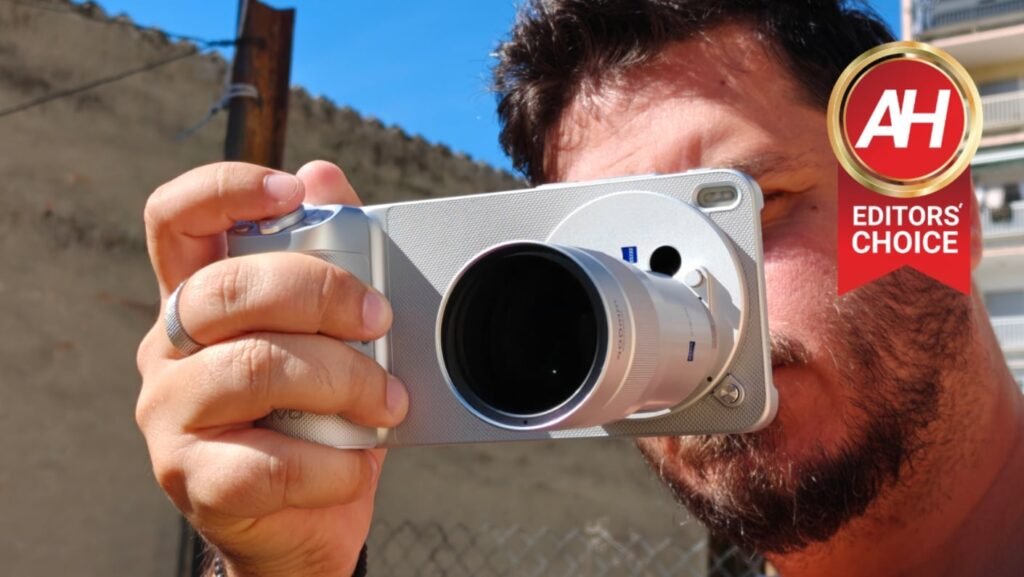
The Vivo X300 Ultra’s photography kit can be purchased separately, but Vivo shipped it our way along with a Chinese variant of the phone, not the global one. That doesn’t really matter, as it’s compatible with both editions of the phone. You can buy it for your global unit, if you want. In any case, there are plenty of things included in this box.


200mm & 400mm telephoto lenses are included in the Photography Kit
You’ll be getting two lenses (200mm and 400mm ones), a case for the phone onto which you’ll be placing those lenses, some additional camera covers for that case, a strap for the case so that you can carry the phone as a proper camera, and some additional tiny additions, but no camera filters. There’s also a bag sold separately that you can store all those lenses and equipment in. It’s a part of a special edition of the phone that ships with both a photography kit and the device itself, at least in China.
Vivo also has a camera bag for photography kit accessories
We’ll talk more about the lenses themselves in the camera section, but everything listed here actually feels high quality. The lenses fit much better on the case than it was the case with the Vivo X200 Ultra. Vivo redesigned this, thankfully. The bag that Vivo shipped is nice, but it’s white in my case, and it looks a lot like a woman’s handbag. So, just a word of advice, if you’re planning on getting that, get it in black color, it looks so much more like an actual camera bag.


Vivo X300 Ultra Review: Display
The Vivo X300 Ultra is equipped with a 6.82-inch LTPO AMOLED display. That panel is flat, and it supports up to 1 billion colors, while it also has Dolby Vision, HDR10+, and HDR Vivid support. On top of that, the refresh rate here goes from 1 to 144Hz, higher than the Vivo X200 Ultra offered. Vivo also made sure that the display supports high-frequency PWM dimming up to 2160Hz. The resolution is also flagship-grade at 3168 x 1440, while the screen-to-body ratio is around 90%. Armor Glass protects the panel, in case you’re wondering.
The display is big, bright, and beautiful
This display looks great on paper. Is that the case in actual use as well? Well… yes, very much so! There’s literally not a single thing I can complain about when it comes to this panel. It is sharp, vivid, and has outstanding viewing angles. The touch response is great, and that 144Hz refresh rate comes in handy for games that support it. Everything is very smooth, and the panel does get more than bright enough when you need it to. I never had a problem with screen visibility, not even in direct sunlight.

There are a lot of display customization options, including ‘eye care’ ones
By default, the screen colors are set to ‘Natural’, but you can easily tweak that to your liking. You can set them to ‘Professional’ or ‘Bright’, while manual color temperature adjustments are also possible. There’s also an entire Eye comfort and protection menu in the Display section of the settings. There, you can schedule eye protection and adjust it. There’s also the AI Sleep Comfort Mode, if you don’t want to tweak anything manually, and so on. There’s a bevy of display settings that you can delve into, should you choose to do so.
Vivo X300 Ultra Review: Performance
The Vivo X300 Ultra is a very powerful smartphone. It has high-end specs, and that includes those related to sheer performance. It’s fueled by the Snapdragon 8 Elite Gen 5 processor, which is a 3nm chip from Qualcomm. That is the company’s most powerful processor for smartphones, and one of the most powerful in the market, if not the best. That chip is backed by up to 16GB of LPDDR5X RAM (our model includes 16GB), and UFS 4.1 flash storage. Vivo really didn’t skimp out on the hardware here. Do note that the storage is not expandable, though.
The performance on both Chinese & global models is outstanding
Specs are never telling the full story, of course. So, does the actual performance reflect these powerful specs? Yes, very much so. I had absolutely no problems while using the Vivo X300 Ultra, none at all. That goes for both the Chinese and global models. The phone was extremely snappy day-to-day, regardless of what I threw at it. It opened apps really fast, the same goes for multitasking, and even photo and video processing. There was no lag of any kind; even hiccups were very hard to replicate, as the phone flew through everything.
Games are not a problem at all

Extremely fluid performance was to be expected, though. Gaming can be an entirely different beast, though, as it can cause thermal issues, amongst other problems. Well, you’ll be glad to know that wasn’t the case here. Once again, the same goes for both Chinese and global variants. The performance was basically the same between them. I usually test three completely different games on the phones I review. First is a non-demanding title, the second is usually a 3D platformer of some sort, and the third is a rather demanding game (or multiple games). In this case, I played 8 Ball Pool, Subway Surfers City, Genshin Impact, and Call of Duty: Mobile. I had zero issues with each of those games, and the Vivo X300 Ultra did not get hot at any point. Yes, it did get warm after a prolonged Genshin Impact session, but only barely. The phone seems to be handling thermals without a problem during usage. Vivo’s Ice Pulse Fluid VC cooling is doing its job well here.
Benchmarks:
Geekbench:
| Device | Single-Core | Multi-Core | GPU |
| Vivo X300 Ultra | 3,584 | 11,182 | 23,525 |
| Apple iPhone 17 Pro Max | 3,638 | 9,462 | 45,836 |
| Samsung Galaxy S26 Ultra | 3,675 | 11,241 | 25,275 |
3D Mark (Wildlife Extreme Stress Test):
| Device | Best Loop | Lowest Loop | Stability |
| Vivo X300 Ultra | 6,541 | 3,655 | 55.9% |
| Apple iPhone 17 Pro Max | 5,577 | 3,330 | 59.7% |
| Samsung Galaxy S26 Ultra | 7,115 | 4,056 | 57% |
AnTuTU:
| Device | Score |
| Vivo X300 Ultra | 3,717,822 |
| Apple iPhone 17 Pro Max | 2,332,390 |
| Samsung Galaxy S26 Ultra | 3,824,993 |
Capcut video export:
| Device | Time to export (seconds) |
| Vivo X300 Ultra | 5.74 |
| Apple iPhone 17 Pro Max | N/A |
| Samsung Galaxy S26 Ultra | N/A |
Thermals:
3D Mark (Wildlife Extreme Stress Test) thermals:
| Device | Temperature (F) |
| Vivo X300 Ultra | 101.7 |
| Apple iPhone 17 Pro Max | 103.8 |
| Samsung Galaxy S26 Ultra | 102.9 |
Genshin Impact thermals:
| Device | Temperature (F) |
| Vivo X300 Ultra | 95.2 |
| Apple iPhone 17 Pro Max | N/A |
| Samsung Galaxy S26 Ultra | 95.1 |
Vivo X300 Ultra Review: Battery Life
The Vivo X300 Ultra actually comes in two battery options. All the models out there, both global and Chinese ones, have a 6,600mAh silicon-carbon battery… save for one. The European model of the device comes with a 6,400mAh battery. That’ll sting European users a bit, though the difference is only 200mAh, and trust me when I say that’s not something to worry about. A 6,400mAh battery is still a lot bigger than what some of the competitors offer in similarly-sized devices, much bigger, so… there’s really no reason to worry.
The battery life is great, albeit not the best around
Granted, I didn’t get a chance to use that version, but I’ve used two 6,600mAh versions (Chinese and global ones), and the battery life was excellent. There’s no way 200mAh will make a significant difference that you should be worried about. The battery life the Vivo X300 Ultra offered was great, to say the least. No, it’s not the best we’ve seen, but it’s more than enough for basically any type of user, even power users. I’ve been able to get truly high screen-on times with both Chinese and global models (without major differences, even though the Chinese one did last a bit longer due to software differences, I reckon).
Even power users will have little to complain about
I finished most of my days with 6-7 hours of screen-on time, and was left with over 30% of battery life at that point most of the time. Those days were filled with emails, messaging, browsing, YouTube, Instagram, image editing, and taking photos. At times, it was closer to 30%, at other times, I still had closer to 40% left in the tank. The Chinese model did slightly better, but the difference is not that big, so… there’s really nothing to worry about there. I’d expect slightly worse battery life from the European model.
Blazing-fast charging is a part of the package, too
When it comes to charging… the Vivo X300 Ultra is fast, very fast. If you end up using an official charger, which is included in the box, you’ll get 90W charging. The phone can be fully charged (from dead) in only 48 minutes. The device also supports wireless charging at 40W, so as long as you have a compatible wireless charger, you’re good to go. Do note that the device does not have magnets on the inside, though.

We have a standardized benchmark for battery life, that we go through. We charge the phone to full, then load up a YouTube video and play it non-stop at around 100nits. The video plays until the phone drops down to 1% of battery.
| Device | Battery life | Charging |
| Vivo X300 Ultra | 23:41:09 | 0:48:13 |
| Apple iPhone 17 Pro Max | N/A | N/A |
| Samsung Galaxy S26 Ultra | 23:45:00 | 0:58:38 |
Vivo X300 Ultra Review: Camera
The Vivo X300 Ultra arguably has the best camera hardware on the market now. The phone is equipped with a ZEISS-backed triple camera setup on the back, and all three of those sensors are outstanding. The main camera is a 200-megapixel unit, as Vivo opted for Sony’s best camera sensors, the LYTIA 900. That is a 1/1.12-inch camera sensor, and we’re looking at an f/1.85 aperture lens here.
The Vivo X300 Ultra has top-notch camera hardware
That main camera is boosted by another 200-megapixel unit, a 1/1.4-inch periscope telephoto camera. Vivo is using a custom ISOCELL HP0 sensor here, with an f/2.67 aperture lens. It’s a gimbal-grade APO telephoto camera. The third camera is a 50-megapixel LYTIA-818 unit, a 1/1.28-inch camera sensor. That’s the largest ultrawide camera sensor out there, at least ot our knowledge. There is an f/2.0 aperture lens included here.

That hardware, plus Vivo’s ISP and processing, not to mention ZEISS hardware and exprtise result in incredible results. I thoroughly enjoyed using the cameras here, and in my opinion, this is the best and most complete camera setup out there at the moment. It’s literally the only phone that doesn’t make you think how much worse a photo will be if you use an ultrawide camera, for example, yes, even in low light. The color profile remains close regardless of the camera, and the photo quality is on par across these cameras.
The images it can take are great, class-leading
No, they won’t provide the most realistic shots out there, but that doesn’t really matter. The images pop, have a cooler temperature to them, and are filled with details. In any scenario, literally any, they impress. I’ve been trying to get the cameras to fall apart, but I was unable to. In daytime, there’s a ton of detail, and the images are vivid and rich with details. The white balance is great, and so is the dynamic range. Do note that I shot some images via ZEISS Vivid and some via ZEISS Authentic color profile. The vidid profile is the default one, but both are great; it all depends on what you’re aiming for. The vivid setup definitely gives more punch to images.
Several focal length options are available on every preset
Do note that the phone, by default, shoots in 35mm (1.5x) with the main sensor. You can change that by tapping on the sensor, but to get close to 1x, you’ll need to switch to the first setting in the camera UI, the one dedicated to the ultrawide camera, as that one is split between 0.6x and 1.2x. You also get 3.7x, 7.4x, and 10x presets on the camera. Each of them has 2-3 different options. So, for example, on the 3.7x preset, you can get to 5.9x by tapping that preset. I love this, and it makes the camera UI much more versatile. Vivo has been doing this for quite some time. You can also choose whether you want those presets to be presented as zoom equivalents or focal length equivalents.
Low-light presents no issue for this phone
What about low light? Well, the Vivo X300 Ultra impresses in that setting as well, and yes, with all three cameras. The main one is technically the best one to use in a low-light setting, as it is the largest one, allows for the most light to enter the frame, and has the widest aperture. However, I never thought to myself, “don’t use an ultrawide camera, it’s low light,“ or anything like that. That’s something I always do on phones, in all honesty, as secondary cameras are usually notably worse in low light. That’s really not the case here, and the samples show it.
There’s plenty of detail in low-light shots, plenty. The phone doesn’t suffer from light flares or anything like that, and the colors are rich as well. Just like with the main camera, I mostly used the ‘ZEISS Vivid’ setting here. On the Chinese model, the sky tends to be a bit lighter than normal in low light, but there’s a setting to change that in the camera. On the global unit, there’s no setting, but the sky looks more natural, aka very dark in low-light conditions. I really don’t have a single complaint about low-light shots with this phone, not one.
The periscope telephoto camera is great as well
There’s also an immensely capable periscope telephoto camera used here. It’s great for shooting in both day and night, and it keeps up with the other two cameras in terms of colors and quality. This is also a telemacro camera, so you can shoot some really nice macro photos here. That’s the only right way to do a macro camera, in my opinion. Ultrawide cameras that double as macro shooters are nowhere near as good as this. The main reason is that you don’t have to come extremely close to a subject.
A Photography Kit is very useful, but sold separately
Vivo also shipped us a photography kit for the device, which fits both global and Chinese variants of the phone. That photography kit includes a camera grip with controls such as a dual-stage shutter, zoom button, video record button, and so on. It needs to be paired with the included case in order to actually work. You slide it from the bottom of the case until it locks on. It connects via the Type-C port. On top of those two accessories, some camera attachments are also included (no filters, though) for the two physical telephoto lenses that are also a part of the kit. 200mm and 400mm lenses are included, and provide 2.35x and 4.7x optical magnifications. Those lenses can be attached to the phone’s periscope telephoto camera. They’re called the G2 and G2 Ultra lenses, in case you’re wondering. The photography kit is a separate purchase, or you can get it together with the phone; it’s up to you. It will also be region-based, so it all depends.

We have a bunch of camera samples for you
You can check out a bunch of camera samples in the gallery below. Some have been taken with the global model, some with the Chinese one. The vast majority have been taken with the ZEISS Vivid setting, as that’s the default setting. All the other settings are on default as well, as that’s how we usually test cameras. Testing every single setting separately is simply not doable. Watermarks are included on images to show you the exact camera that was used to take them. Camera samples shot with Vivo’s 200mm or 400mm lenses are shared in a separate, recently published article. One more thing, I’ve taken these photos over a period of 2+ weeks, so updates did arrive in the meantime, with improvements. Just keep that in mind. In its final form, at the time of writing this review, both camera setups are outstanding, and the vast majority of samples are after the last update.
Main camera samples (daytime):


Videography benefits are undeniable
Vivo actually focused quite a bit on video this time around. In fact, the company talked more about videography than photography. If you’re into video, you’ll be glad to know that there are quite a few improvements here. LOG video recording has improved significantly, and many of you who are planning to use this phone for recording will be glad to hear that. It has a higher bitrate, and all three rear cameras can now shoot 10-bit LOG video. You can get 4K video at 120 FPS from all those rear cameras, and we’re talking Dolby Vision video here.
To top it all off, Vivo also implemented a ‘Pro Video’ mode, which changes the camera UI to cater to videographers. The video itself looks better now, and it looks really good regardless of the camera you’re using. The stabilization is better than ever, and the color profiles are now better and cater to video content much better. I’ve focused a lot more on photography, but videography benefits/improvements here are undeniable.
Vivo has one of the best camera UIs in the business
We don’t always talk about camera UIs, but this one is worth mentioning. Not much changed compared to how things were before, but only because there was no need to. Vivo has an outstanding camera UI, to say the least. It allows you to customize a lot, including your preferred shooting modes. The zoom ranges are abundant and right above the shutter key. Each zoom range (accessible via tapping) has 2 or 3 additional zoom ranges/focal lengths at your disposal. You can also tune it manually by moving your finger left/right. Shooting styles are towards the bottom of the screen as well, while less important tweaks are available at the top. You can also swipe up above the shutter key to get even more options and to edit shooting styles. The positioning of options on the screen is great, and everything important is at your fingertips. That’s quite important as this is not a small phone. It simply makes using the camera that much more enjoyable.
Camera UI:
4K video recording thermals:
| Device | 5 minutes (F) | 10 minutes (F) |
| Vivo X300 Ultra | 97.9 | 98.7 |
| Apple iPhone 17 Pro Max | N/A | N/A |
| Samsung Galaxy S26 Ultra | 94.5 | 97.8 |
Vivo X300 Ultra Review: Software
The Vivo X300 Ultra comes with Android 16 out of the box, and on top of it, Vivo placed its OriginOS 6 skin. Do note that OriginOS 6 comes on both Chinese and global models, but it does differ between those two models. We’ll show you the global one below, but there are quite a few differences. Even simple settings menus differ in the order of options. The Chinese menus usually have more options, which are not available on the global version, as they’re mostly China-specific. Then again, there are some global options on the global unit that are not included on the Chinese model, and so on. You get the picture. The core OS is the same, but with a lot of differences between versions.
OriginOS 6 is one of the most compelling Android skins
With that being said, let’s focus on the global OriginOS 6, as that’s the one that the vast majority of you care about. This is one of my favorite skins on Android, as it gives you a lot of freedom and a lot of customizability, while it is not trying to limit stock Android at the same time. You do get the automated wallpaper-based customization, just like you do on Android, but you can also tune things manually. You can set a swipe-down gesture to lower the notification bar, call up system search, and so on. Double-tap to wake and turn off the screen feature is also available, while you can also tweak the grid of the home screen.

It does some things a bit differently, but it mostly sticks to a standard formula
OPPO has a different one-handed mode, in which you swipe inwards from the right edge of the display, and then immediately to the right without raising your finger. That way, you get a smaller replica of your screen in the bottom-right corner. That’s entirely different than what most OEMs offer. Split-screen and windowed modes are available, along with a side panel mode. You can customize icons, have access to themes, and the Always-On Display is also available and customizable. Fingerprint unlock icons are customizable, as is the facial recognition animation. There are a ton of other options, such as Super Dragging, Super Screenshot, Smart Motion, and so on. There’s even a ‘Simple Mode’ included, which simplifies the home screen layout.
There are a ton of useful features built in
We’re only scratching the surface here. OriginOS 6 is packed with features and options, and it works great. It’s very smooth and responsive, one of the best in the business. The animations are also very good; they’re not too slow or anything like that. I didn’t have any issues with notifications or anything like that. As I said already, this is one of my favorite iterations of Android, for a good reason, and if you’re on the fence whether you should give it a go or not, I can recommend it. That doesn’t mean it’ll suit you, of course, but… generally speaking, it’s quite good. You can see parts of the UI below.


Vivo X300 Ultra Review: Audio
The Vivo X300 Ultra does come with stereo speakers, as you’d expect. This phone is also Hi-Res certified. It does not have a 3.5mm headphone jack, though, which is also in line with the 2026 flagship smartphone. The speakers that are included are quite good, on par with the competition. They’re not only loud enough, but the sound quality coming from them is quite good.
Now, if you want to connect your wired headphones, you can always use the phone’s Type-C port. Just remember that you’ll need a dongle, in case you don’t have Type-C wired headphones, of course. Alternatively, Bluetooth 5.4 is available on the phone in case you prefer wireless headphones, as most people seem to these days.
Vivo X300 Ultra Review: Should you buy it?
Is the Vivo X300 Ultra worth your hard-earned cash? That’s a question only you can answer. However, I can say, with utmost certainty, that this is one of the best Android smartphones on the market at the moment. I can also say that it has one of the best, if not the best, camera setups out there, and the same goes for camera performance. General performance is also top-notch, and the battery life won’t disappoint you; the same goes for charging. Vivo also further improved OriginOS, so that’s a huge plus as well. I loved my time with this phone, and will continue using it, mainly because of its cameras. If you’ve owned a Vivo phone before and loved it, you’ll love this one, that’s for sure. Even if you’re switching from another device, there’s much to love here, but do inform yourself beforehand, of course. It has all the standard Android features and then some. To sum up, the Vivo X300 Ultra is an outstanding smartphone, one of the best out there. It’s one of the easiest smartphone recommendations I’ve ever made, in all honesty.

You should buy the Vivo X300 Ultra if you:
- Want the very best camera smartphone there is, or close to it
- Like software customization
- Don’t have a problem splurging on one of the best phones on the market
- Want to buy and use a very capable photography kit
- Need powerful performance, for gaming or otherwise
- If you plan on shooting video content
You shouldn’t buy the Vivo X300 Ultra if you:
- Have a limited budget
- Don’t need all that camera prowess
The post Vivo X300 Ultra Review: The Camera King Has Arrived appeared first on Android Headlines.