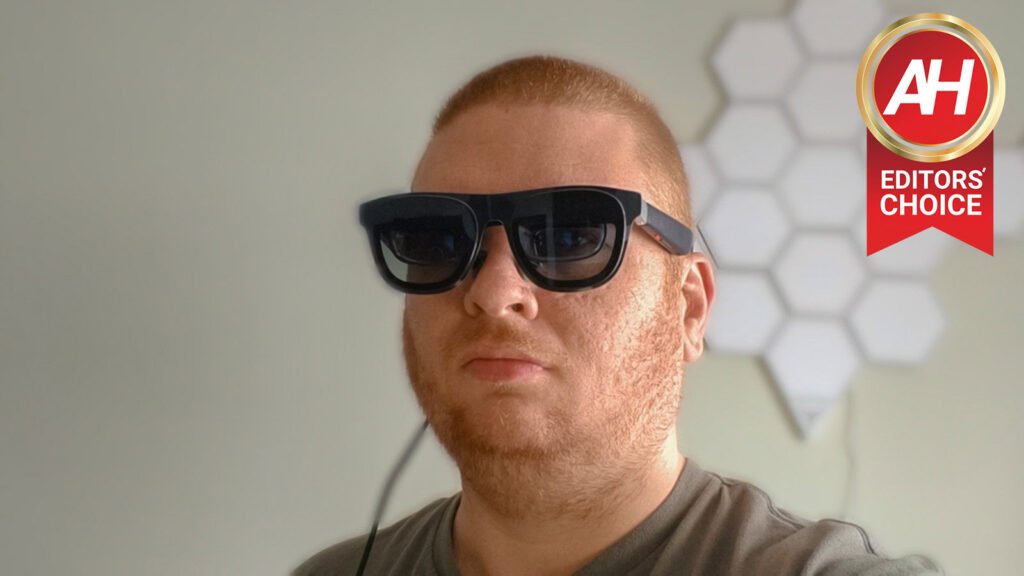

What if I said you could fit a 500″ Cinematic display in your pocket? You’d think I was crazy, right? Well, it’s true. With the new XREAL 1S, you are getting up to a 500-inch Cinematic display in a pair of glasses.
The XREAL 1S is the successor to the XREAL One, which was released in December 2024. The new 1S takes everything great about the One and upgrades it all, while lowering the price. It now starts at $449 instead of $499 like the One.
On top of this, XREAL has managed to make the 1S pretty lightweight at 82g. That’s a couple of grams lighter than the One, which was 84g. Still significantly heavier than something like the Meta RayBan Gen 2, which are the glasses that I usually wear, and only a couple of grams heavier than the Meta RayBan Display that was announced recently.
This makes them feel very lightweight, and it was super comfortable to wear for long periods of time.
At $449, these are not cheap glasses – however, not that much more expensive than the Meta RayBan glasses – so are they worth your money? Let’s find out in our XREAL 1S review.

The XREAL 1S delivers a cinema-sized 500-inch display in a pair of glasses that weighs less than your wallet. At $449 with Bose-tuned audio and dead-simple plug-and-play setup, these are the AR glasses that finally make sense for everyone.
Pros
- Lightweight, just 82g
- No app needed
- Upgraded 16:10 aspect ratio, Upgraded 1200p resolution
- Sound by Bose Speakers
- Cheaper than its predecessor despite the many upgrades
- Works on virtually every platform
Cons
- Gets warm during extended use
- Not compatible with Nintendo Switch 2 without $99 XREAL Neo accessory
- PlayStation Portal not supported
- REAL 3D drops framerate from 60fps to 30fps with some jitter
- Speakers aren’t private — others can hear your audio

What’s in the box
In the box, XREAL provides you with documentation, additional nose pads, a USB-C cable, the glasses, and a pretty nice case, actually. I picked these up at CES from XREAL and I also got a pair of RayNeo glasses at CES that aren’t yet official, and I have to say that XREAL has a much better case. It’s a hard case that is also soft on the outside. So it’s easy to hold onto, and I don’t have to worry about damaging them or getting crushed in my backpack. Because I do plan to travel with these a lot.
There is space in the case to keep the USB-C cable as well as a cloth to wipe the lenses when needed. Which makes these really useful. Throughout this review, I’m going to refer to the Meta RayBans a lot, even though they really aren’t competitors, but those are the only other pair of smart glasses that I’ve used and can talk about right now.
Setting up the XREAL 1S
This is actually my favorite aspect of the XREAL 1S, there’s no app needed. It’s like plugging your laptop into your monitor, or your PlayStation 5 into a TV, it’s just plug-and-play. Since most devices use USB-C for video out, you just plug it into your phone, laptop, tv, whatever, and start mirroring the display onto the XREAL 1S.
On iPhone, there’s nothing else to do, but on Android, it will ask if you want to mirror the display to the device you just plugged in.


Now there is a caveat here, and that’s the Nintendo Switch 2. It does not allow video out over USB-C, and that’s where the XREAL Neo comes into play. This is a MagSafe battery pack that does allow for video out to your XREAL 1S from the Switch 2. It’s $99, and I don’t have it yet, I do plan to pick one up. Another caveat is the PlayStation Portal; it does not support video out, in fact, its USB-C port is extremely basic. But this will work on virtually every other platform.
There are a few options on the glasses themselves that you can use for a better experience. There is a red Mode button towards the front of the right arm of the glasses. This will put you into anchor or follow mode. Essentially, Anchor mode allows the video to stay right where you pressed the button, while Follow mode will follow you around the room.
If you double-press that same button, you’ll jump into settings, which will let you adjust where the display is, how large it is, and much more. Including turning on 3D for REAL 3D (which just started to roll out to the XREAL One and One Pro.
Behind the Mode button is a volume rocker of sorts. Press it once, and you’ll see a pop-up for brightness, transparency, and volume. You can move back and forth through each of these three options and turn them up or down. I usually keep the brightness pretty high and have a little bit of transparency, so I can still see what’s going on around me.

And that’s about it for setting them up. XREAL has done a good job of making these extremely easy to use, no matter the platform.
A gorgeous 16:10 aspect ratio, 1200p resolution display in your pocket
A couple of the upgrades this year for the XREAL 1S is the aspect ratio has changed from 16:9 to 16:10, and the resolution has changed from 1080p to 1200p. Sure, 4K resolution would be nice, but that would also drain your device’s battery much quicker and make the XREAL 1S pretty warm. I do already notice that they get quite warm when wearing them for a longer period of time at just 1200p.
Brightness is also quite good here at 700nits. I know that doesn’t sound like a lot, but I rarely have these at max brightness, and it’s plenty bright for me, especially if I turn down the transparency.

I’ve watched quite a bit of content on these glasses, including a few basketball games, and it’s truly amazing. Now I have to wonder how I ever watched anything without them.
It’s not exactly as high res as my TCL QM6K that I watch a lot of content on, and especially with these being much closer to your eyes, it does make a big difference, but honestly I didn’t really care about seeing individual pixels. Of course, I’d love to see higher-res displays, but part of what makes XREAL unique is that everything is running off of your phone or whatever you have it plugged into. So the 1S has no battery, it does have a processor inside to run the glasses and for the 3D features, but that’s about it. That’s part of why they are so much lighter.
Prescription lenses are simple to get
XREAL does offer prescription lenses, well, sort of. You can purchase them on XREAL’s website, but they are actually made by HONSVR. This is a company that does prescription lenses for a lot of AI, AR, and VR products, including all of XREAL’s glasses, the Meta RayBans, Vive’s headset,s and much more.
I ordered my prescription lenses from XREAL and had them in a little over a week. They did ship from China, so it took a bit to get them here, but they were only about $65 with taxes included. Not too shabby to be honest.


They were pretty simple to slot into the XREAL 1S. Just take out the plastic pieces in the nose bridge, and they slide right in. And now I can watch content on the XREAL 1S and actually see it. That’s always important.
Sound by Bose is no joke
While the visuals are important on a pair of glasses like the XREAL 1S, so is the sound. XREAL has partnered with Bose for the 1S and used Bose to tune the speakers that sit above your ears in the arms of the frame. And they do sound amazing. Though be warned that because they are speakers, those around you will be able to hear what you’re listening to.

I’ve had no complaints with the sound on these glasses, whether the sound was low or maxed out. It sounded amazing watching YouTube, Netflix, and much more. Unfortunately, there’s no way to really fine-tune the bass or treble to your liking, so audiophiles may not be as impressed. But everyday users will love this sound quality.
Bose appears to be in quite literally everything these days, with partners like XREAL, Motorola, Xiaomi/Poco, and many more.
REAL 3D is what makes XREAL stand out
With the XREAL 1S, the company also introduced REAL 3D, essentially turning everything you watch into 3D. That includes videos, games, and even browsing. It’s using the X1 chip inside, which XREAL developed themselves, to transmit 2D content into 3D. It also just launched for the other One series glasses from XREAL just last week.
I honestly was not that interested in trying this aspect. As 3D content is usually not that impressive. But I did try it out, like a good reviewer should, and I was impressed. Now it does have some drawbacks, so you’re not getting the full 60fps anymore, it drops down to 30fps and there is some jitteriness. But I am confident that this will improve over time and with additional updates.
Now a feature that I really like is the Ultrawide Mode. You can choose to use 21:9 or 32:9 and really have a whole cinema right in front of your eyes. If you opt for 32:9 aspect ratio, you can have a nearly 700″ display in these glasses, which looks phenomenal.
Very comfortable to wear for long periods
I was not sure how comfortable the XREAL 1S would be to wear for long periods of time. Remember, this is really the first pair of AR Glasses that I’ve worn for more than a short demo at trade shows like CES, MWC, and IFA. But I did watch an entire basketball game – a little over 2 hours – on the 1S, and they never felt heavy like they were hurting my head. That’s a bit surprising to me, because the Meta RayBan Gen 2 does feel that way when I wear them all day.
XREAL has done a really nice job of spreading out the weight here, so it’s not all in the glasses or in the arms but throughout the unit.

Of course, the XREAL 1S do still look a bit goofy to wear, particularly from the sides of the glasses. But that will likely continue to be the case for the next few years. While they are getting thinner, lighter, and look way better than just a couple of years ago, there’s still a long way to go. Now I do really like these because they are in the blue color, and they are some of my favorites as far as the way they look. They definitely do not look like a regular pair of glasses.
Should you buy the XREAL 1S?
Without a doubt. But you should think about what you’d use these for. I’m going to take these with me anytime I jump on a plane, and watch movies, TV shows, play games, etc., throughout the entire flight. I’ll also watch other content when I’m not traveling. But if you are looking to get these for gaming specifically, I’d urge you to wait for the XREAL R1. These are glasses that are being made with ASUS, and will have even crazier specs like a 240Hz refresh rate. Those will launch later this Summer, but we don’t have pricing yet. I’d assume they are far more expensive than what the XREAL 1S are selling for.
If you’re one of those that wants to be on the bleeding edge of tech, then the XREAL 1S is definitely worth buying, especially at $449. That’s an incredibly low price for what you’re getting here.
The post XREAL 1S Review: A 500-Inch Cinema That Actually Fits in Your Pocket appeared first on Android Headlines.