
In the smartphone market there are dozens and dozens of excellent options which really hasn’t changed this year, and for those looking at the $500 or sub-$500 phone segment, the Google Pixel 10a is among your choices for a new device. Google’s A-series phones have typically been among the best phones you can buy around this price range. And while they start at $500, they often drop below this price through their lifecycle. Whether it’s a permanent price drop or a short sale, you will find it lower than $500 from time to time until Google stops selling the phone.
This is one of the reasons why the A-series is usually a really good option. Because they’re pretty good phones and they won’t cost a whole lot of money. Comparably, there just aren’t many other devices that are this good for the price. The same is true this year with the Google Pixel 10a. Despite Google’s minimal changes, that doesn’t make this a bad phone. It simply means it’s not the standout value device that was overshadowing every other option.
This might be the Pixel 9a Remaster, with a new coat of paint and a few soft touches to bring the device forward another generation, but it’s still a good phone. Is it worth your $500? That really is something that only you can ultimately decide. That being said, this review is all about helping the consumer come to that conclusion. So, let’s dive into this full review and figure that out.

The Google Pixel 10a isn’t reinventing the wheel, but that’s perfectly fine. Google takes the “if it ain’t broke don’t fix it” approach with this phone, sticking with what works while issuing a device that has a slightly (very slightly) upgraded set of changes and keeping it at the same great price.
Pros
- Still a good price point
- Very nice color options
- The flat camera means the phone actually lays flat
- Great user experience
- Decent camera
- 7 years of software updates and feature drops
Cons
- Still using the same processor as the previous model
- Not the best performance for high-end mobile gaming
- Charging isn’t very fast
- Poorly optimized battery life, but still manageable
Google Pixel 10a Specs
Google Pixel 10a Specs
| Display Size | 6.3-inch P-OLED |
| Display Resolution | 1,080 x 2,424 |
| Refresh Rate | 120Hz |
| Dimensions | 153.9 x 73 x 9 mm (6.06 x 2.87 x 0.35 in) |
| Weight | 183g |
| Chipset | Google Tensor G4 (4nm) |
| RAM | 8GB |
| Storage | 128GB, 256GB |
| Main Camera | 48MP, f/1.7, 25mm (wide), 1/2.0″, 0.8µm, dual pixel PDAF, OIS |
| Ultrawide Camera | 13MP, f/2.2, 1/3.1″, 1.12µm |
| Front Camera | 13 MP, f/2.2, 20mm (ultrawide), 1/3.1″, 1.12µm |
| Battery | 5,100mAh |
| Charging | 30W wired, 10W wireless |
| OS | Android 16 |
| Network & Connectivity | GSM/ HSPA/ LTE/ 5G |
| Water Resistance | IP68 |
| Colors | Obsidian, Fog, Berry, Lavender |
Google Pixel 10a Review: Hardware
Despite not being a premium flagship piece of hardware, the Google Pixel 10a feels like a premium flagship piece of hardware. Even with the plastic back, the Pixel 10a doesn’t feel any less high-quality. In fact, I think Google did a pretty good job at making the back of the Pixel 10a feel like the matte glass back of the Pixel 4. It’s clearly not made of glass, but one could be forgiven for thinking it is. This paired with a matte, almost satin finish for the aluminum frame makes for a really crisp, clean aesthetic that I truly wish more manufacturers would aspire to deliver for phones in this price range.
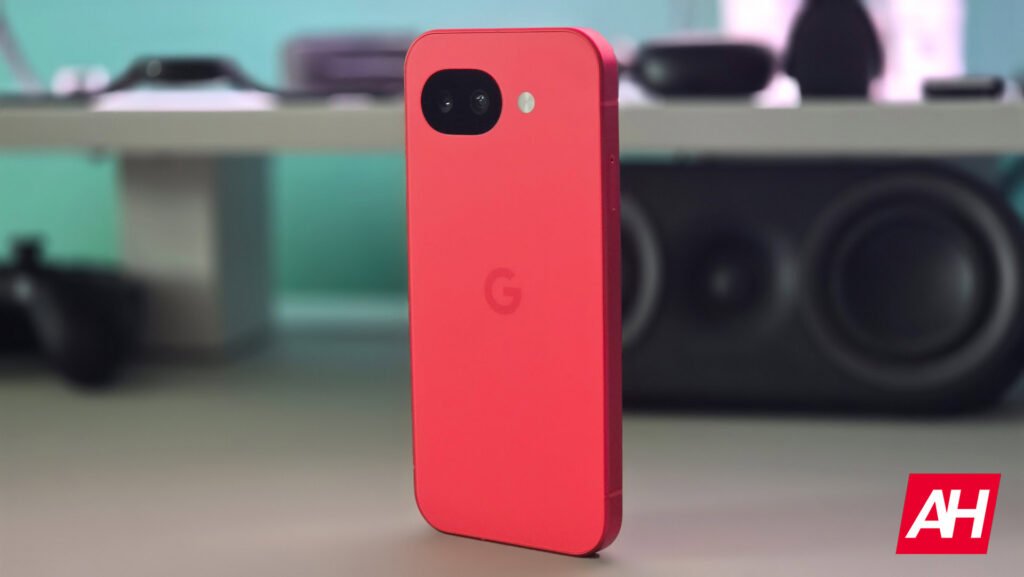
Design-wise, the phone looks basically identical to the Pixel 9a, save for the fact that the camera bump is no longer a bump, and is instead flat which I personally prefer. Now, it’s possible to lay the phone flat on its back without using a case, because the camera bump isn’t going to make the phone wobble. There are no other noticeable visual changes. Aside from the colors, of course.


Beyond the materials used to make up the phone’s design, the hardware is essentially the same as well. There are some differences. For instance, the glass on the Pixel 9a was Corning Gorilla Glass 3, and the glass on the Pixel 10a is Corning Gorilla Glass 7i. That being said, they both have Mohs level 4 when it comes to hardness. So expect the same type of protection. The display also has a slightly higher peak brightness at 3,000 nits, and a slightly higher high brightness mode at 2,000 nits. Lastly, the phone charges at 30W when plugged in, whereas the Pixel 9a capped at 27W.
All the other components are the same. It has the same cameras (front and back), the same capacity battery, the same RAM and storage, and the same chipset. And of course, the power and volume buttons are located in the same spot, as are the speakers and ports. All things considered, the hardware is perfectly fine and I think it suits this phone well. While I myself prefer a phone that’s more high-end, for $499, this is a pretty good value. I do think it was a better value with older models, as the hardware is getting a little long in the tooth at this point. But it’s still good hardware.
Google Pixel 10a Review: Display
If you’re used to and much prefer super high resolution displays on mobile devices, then you may not care for the display on the Pixel 10a, but with a resolution of 1,080 x 2,424, which is more or less FHD+, the Pixel 10a’s display is really pretty good. The brightness is good, the colors are good, and the refresh rate is great. What might bother some is the thicker bezels. This is a design trait that doesn’t bother me too much, but if I were to change one thing this would probably be it.
Despite the thicker bezels, the display still provides plenty of room to interact with and enjoy visual content. With a lower peak brightness then something like the Pixel 10 Pro or the Galaxy S26 I recently reviewed, it’s possible that the display could be harder to see in direct sunlight. However, this chance feels small as 2,000 nits is still pretty high for the high brightness mode.

As mentioned, the refresh rate is great at 120Hz, making for nice, smooth scrolling and visual motion anytime you’re doing something that includes a lot of animation. This might come out best in games, since there are some mobile games that support a 120Hz refresh rate, though you will be setting those games to a lower graphics setting given the phone’s Tensor G4 chipset inside. Which isn’t exactly known for its super high performance. The higher refresh rate is great for general use though, and great for videos and basically anything else.
For a mid-range phone that costs $499 and will undoubtedly be even cheaper before long, I think the display used for the Pixel 10a is quite nice. It’s not the most advanced display out there, but it certainly isn’t trying to be and nor does it need to be.
Google Pixel 10a Review: Performance
No one should kid themselves into thinking that this is a phone you buy for its outstanding performance. It’s not going to be anywhere near as good as something running a Snapdragon 8 Elite Gen 5. Heck, it won’t be as good as the Snapdragon 8 Elite or even the Snapdragon 8 Gen 3. That being said, the performance isn’t god awful like some might have you believe. It’s perfectly fine if you temper expectations in what the chipset is capable of. Simply don’t go in expecting this phone to produce super high frame rates with maxed out graphics in the most demanding mobile games, and you’ll be good to go.
For general everyday tasks, the Pixel 10a was pretty snappy and I didn’t really experience much of an issue in any of my time using the phone throughout the day, at least when it comes to the more standard stuff. Even with more casual mobile games, the performance was fine. Thankfully, the Pixel 10a comes with a newer modem than the one that was used in the Pixel 9a, so you don’t get as much of a temperature increase when using things like mobile data. This was a notable issue with the Pixel 9a. So it’s nice to see that Google made this improvement. Although I did tend to be on Wi-Fi a lot of the time while I was using this device, there were multiple occasions where I was outside away from home and on mobile data. And I didn’t notice a huge increase in the phone’s temps while I was out and about.
One caveat to this is when I would load up a more demanding mobile game. For our reviews, we benchmark every device using a few different things. We run the devices through benchmarks like AnTuTu, Geekbench 6, and 3DMark’s Wildlife Extreme Stress Test. We also benchmark the phone by playing a game like Genshin Impact for over an hour, while the graphics are as high as possible while still having a good frame rate. If possible we crank the graphics all the way, provided the frame rate is reasonable enough to play with. I wasn’t expecting to have that kind of experience with the Pixel 10a since it isn’t using a chipset that’s known for high performance mobile gaming. And I was pretty much spot on with my suspicions.
While gaming performance can be fine, you have to manage in-game graphics for certain games. Genshin Impact, Arknights Endfield, and similar titles are good examples. These games still looked ok on the Pixel 10a but it was clear that the graphics weren’t as sharp, as they had to be lowered to make sure that the performance was smooth enough. Still, the phone did better than I was anticipating for the most part. And chances are, if you’re buying a Pixel phone, even something like the Pixel 10 Pro, you aren’t buying the phone for the peak of high performance mobile gaming. So this is going to be a non-issue for many.
Benchmarks
As mentioned above, we put the Pixel 10a through a series of benchmarks to see how it holds up on paper with the scores. For these tests, we run the phone through Geekbench 6, 3DMark’s Wildlife Extreme Stress Test, and AnTuTu. And then we compare it to the scores of similar phones that were put through the same tests. Overall the Pixel 10a came out decent for phones in its price range, ending up with higher scores in the Geekbench single-core and GPU tests than two of the three phones we compared it to, which you can see from the results in the table below. There are a couple of exceptions, though.
| Device | Geekbench Single-Core | Geekbench Multi-Core | Geekbench GPU |
|---|---|---|---|
| Google Pixel 10a | 1,707 | 4,294 | 8,754 |
| Google Pixel 9a | 1,705 | 4,416 | 7,721 |
| Oppo Reno15 Pro 5G | 1,630 | 6,369 | 11,848 |
| Honor Magic8 Lite | 1,096 | 3,104 | 2,901 |
It did have lower scores in the multi-core and the GPU tests than the Oppo Reno15 Pro 5G, as well as a lower Best Loop score in 3DMark compared to the same device. All things considered, though, it scored ok.
| Device | AnTuTu Score |
|---|---|
| Google Pixel 10a | 1,353,348 |
| Google Pixel 9a | 1,253,414 |
| Oppo Reno15 Pro 5G | Wasn’t tested with AnTuTu |
| Honor Magic8 Lite | Wasn’t tested with AnTuTu |
Thermals
When it comes to thermals, I wasn’t expecting a whole lot in terms of good thermal management, but then again I wasn’t expecting the phone to get unnecessarily warm either. The Tensor G4 isn’t a super performance-heavy chip and with swapping the model from the one used in the Pixel 9a, the Pixel 10a didn’t get too warm in most situations. The thermals could certainly be a little better but I don’t think most users are going to be running it through a 3DMark Wildlife Extreme Stress Test very often if at all.
| Device | Genshin Impact | 3DMark Wildlife Extreme | Camera – 4K60 |
|---|---|---|---|
| Google Pixel 10a | 104.7 | 107.7 | 100.5 |
| Google Pixel 9a | 105.8 | 107.9 | 99.6 |
| Oppo Reno15 Pro 5G | 100.2 | 93.2 | 94.5 |
| Honor Magic8 Lite | 102.2 | 95 | 96.8 |
Google Pixel 10a Review: Battery Life and Charging
The battery life and charging can be two important aspects of a phone. Battery life you want to be long-lasting, and charging you want to be as fast as possible. This way, your phone will easily last you through a day and beyond, and when the battery does finally drain completely, you can charge it back up quickly. Both these points are probably the two weakest points of this phone, unfortunately.
For a device with a 5,100mAh capacity battery inside, I would have thought the phone would last longer on a single charge. And yet, it did worse in our battery life testing then the Galaxy S26 that Samsung launched in early March. Keep in mind, the Galaxy S26 has a 4,300mAh capacity battery. For all the Pixel 10a’s great features that make up its good value, the battery life causes it to stumble just a little bit. I wouldn’t say that this is enough to make this worth skipping if you’re looking for a phone in this price range. But it is important to know that you won’t be getting a phone with best battery life that phones have to offer.

In our test, the phone lasted 21 hours and 21 minutes, which is slightly lower than the 23 hours and 8 minutes on the Galaxy S26. While this isn’t terrible, it isn’t great considering the difference in battery capacity, not to mention the Galaxy S26’s much more powerful chipset. This is about on par with last year’s phone, Pixel 9a, though. Even the charging was slightly slower at 1 hour and 30 minutes. For testing of the battery life, we open up YouTube and start playing a 24-hour video of a fireplace burning in 4K, and let the video play until the battery reaches 1%.
In actual real-world testing of my day-to-day use, I could easily end the day with about 32% or more. As I said, the battery life is poorly optimized, but it’s manageable. I can turn the brightness down some to adjust for higher battery consumption, and simply use the phone less, and it certainly helps. However, this is a testament to the improvements to optimization that need to be made with future chipsets. Also worth noting is that while 1 hour and 30 minutes to charge the phone back up to 100% isn’t ideal, it could be a lot worse for a 5,100mAh battery. I also can just easily toss the phone on the wireless charger while working throughout the day. So in most cases, I personally am likely to always have enough battery life. Others, however, may not be in my situation and need it to last longer. If this is you, then it might not hurt to be prepared with a power bank or portable MagSafe charger.
Benchmarks
| Device | Battery Life | Charging Speed |
|---|---|---|
| Google Pixel 10a | 21 hours, 21 minutes | 1 hour, 30 minutes |
| Google Pixel 9a | 21 hours, 23 minutes | 1 hour, 32 minutes |
| Oppo Reno15 Pro 5G | 24 hours, 3 minutes | 55 minutes |
| Honor Magic8 Lite | 25 hours, 13 minutes | 1 hour, 10 minutes |
Google Pixel 10a Review: Software
One of the strongest points of this phone is that it has the stock Android experience that Google has done so well to craft for its Pixel devices. With Android 16 on board, the Pixel 10a comes with those lovely Gemini advancements and the best things that Android currently has to offer. This includes things like Pixel Screenshots, Pixel Studio, and the best part, updates that will be coming around for years. Like with all of its phones since the Pixel 8 series, the Google Pixel 10a will get seven years of updates for the Android OS, security patches, and Pixel Feature Drops.
Since it launches with Android 16 out of the box, that means you’ll be getting updates on this device until 2033. If you keep your devices for a while, then this is an excellent option because it means your device won’t be left behind when it comes to security updates or new features.

Of course, you’ll also get access to things like Camera Coach, Auto Best Take, and a few other AI-powered features, but none of these are exclusive to the Pixel 10a and are available on other Pixel phones. Still, it’s nice to see that they remain there even on Google’s A-series phones. Overall the software user experience is very smooth and that’s in large part due to the fact that you don’t have much extra UI stuff shoved in the software. This is a big reason why the Pixel phones are a favorite, because the software is clean without any extra fluff. Those extra features can be nice, of course, but if you just want a really clean UI it’s hard to beat the software on a Pixel phone.
One of the more useful features is Call Screening, which is one of the reasons I continue to use a Pixel phone as my daily driver. Call Screening is powered by AI and answers the phone for you when calls come in. It’ll tell the caller that it’s the Google Assistant for you and then ask what they’re calling about before pushing the call over to you. It’s a wonderful way to filter out the spam callers, because they will just about always hang up without leaving a message. Making it even more obvious that it was a spam call in the first place. This feature is invaluable. Mainly because you don’t end up getting call alerts coming in if it isn’t a trusted contact or if the call isn’t ruled as non-spam. Overall, the software is great as always.
Google Pixel 10a Review: Camera
To make things clear right from the start, the camera on the Google Pixel 10a isn’t going to match the quality of the Samsung Galaxy S26, or the Pixel 10 Pro. It is however, pretty close to the Pixel 10 and for the most part, the images look decent. It’s worth noting that this is a phone that costs $499. You can’t expect it to compete with the image quality on phones that are upwards of $900 or more. It just isn’t really possible given the difference in hardware and features.
That doesn’t mean the pictures are bad, though. For a phone that’s around $500, the Pixel 10a punches above its weight and produces images that are probably better than you would expect. This is mostly due to Google’s computational photography which has really been pretty good from the beginning. With this in play, Google’s Pixel 10a is capable of producing better images than it would if it was mostly just relying on the hardware.


This camera will do best in well-lit situations so keep that in mind. In my experience, pictures both outside and inside turned out decent when there was enough light around. That being said, this time of year in Oregon doesn’t result in a lot of well-lit days thanks to the rain and gray skies. So, it wasn’t always possible to show off the camera’s full potential. Luckily I was able to get some decent shots of stuff when there was good light around both outside and inside. In low-light situations the pictures can still turn out ok with the Night Sight feature but they aren’t going to be as good as they are with something like the Pixel 10 or Pixel 10 Pro.
Overall the camera quality is good for what Google is charging. And I think that should be one of the main takeaways. You’re paying $500 for this phone or perhaps less, and while it won’t be as good as more expensive options, the results are surprisingly decent for the price. It’s certainly a better value than phones around $500 a few years ago.
Should you buy the Google Pixel 10a?
Google tends to do a good job with its Pixel phones. Even though they are never really the top of the heap when it comes to performance, or even popularity in general, they’re always pretty solid phones. The Pixel 10a is really no different, providing a good user experience at a reasonable price for some solid value. That being said, even if I do think this is the best $500 phone available, it’s hard to recommend in certain situations.
For example, right at this very moment, the Pixel 10 is on sale for $599. Yes this is $100 more than the Pixel 10a, but the price is close enough, and it’s a better phone all around, that it’s worth the extra money. So, in the event that the Pixel 10 is full price, or more than $599, I think the Pixel 10a is the better buy. It’s still a good phone, but it’s a tougher sell when there are other better options that are close in price. If $500 is a hard limit for you, then you really can’t go wrong here. If you can stretch the budget a little further, you might be better served at least considering a few more options that cost more money.
You should buy the Google Pixel 10a if:
- $500 is your hard limit on the spending budget
- You want a good software experience
- You don’t care about having the best of the best camera
You shouldn’t buy the Google Pixel 10a if:
- The Google Pixel 10 is available for within $100 of its price point
- You want a better camera
- You want better battery life and performance
The post Google Pixel 10a Review: It’s Still The Best $500 Phone appeared first on Android Headlines.