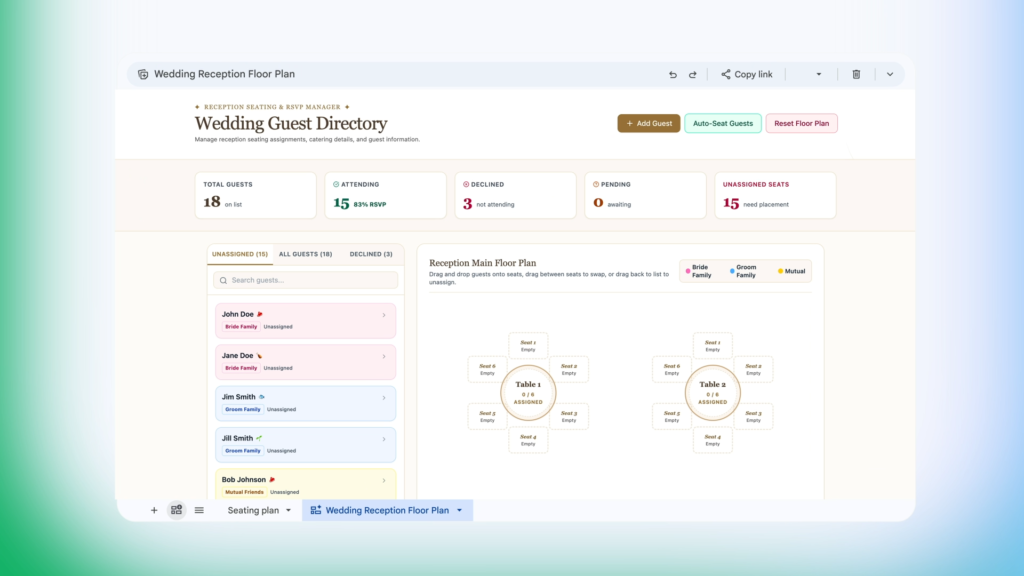

Managing dense spreadsheets packed with hundreds of rows and columns can quickly turn into a headache. To make navigating complex data much simpler, Google has officially introduced Sheets canvas, a new Gemini-powered feature inside Google Sheets that transforms raw spreadsheet data into custom, interactive mini-apps using plain-language prompts.
Sheets canvas wants to leave behind the approach of manually building dashboards using complex formulas. Instead, the feature creates a dynamic, read-write visual layer directly over existing spreadsheet data. Anyone can open a sheet, select “Create canvas” inside the Ask Gemini side panel, and describe the exact layout they need without touching a single line of code.
No-code visual dashboards with real-time sync
What makes Sheets canvas particularly useful is its seamless two-way synchronization. The mini-apps generated by Gemini are not static previews; any change made on the canvas layout—such as dragging task cards, moving guests on a floor plan, or editing entries—instantly updates the source sheet. Likewise, any manual edits made directly inside the raw spreadsheet cells immediately reflect on the visual canvas tab.
Because Gemini generates these interfaces conversationally, users can continuously refine their mini-apps with follow-up prompts. You can ask the AI assistant to tweak color schemes, adjust layout cards, or reorganize data categories on the fly, tailoring the view for specific projects or executive presentations.


Practical uses from project tracking to event planning
Google pointed out a number of common use cases where Sheets canvas speeds up day to day tasks. Students can convert assignment lists into visual study planners with progress trackers and upcoming deadlines. Operations leads and fantasy sports players can build custom command centers to compare performance metrics and rosters side by side. Even event planners can use the tool to convert guest lists into interactive, drag-and-drop seating charts.
Since Sheets canvas lives as an internal tab within the document, it inherits the document’s standard sharing settings, making real-time team collaboration straightforward. Alongside the feature launch, observant users may also notice a subtle design tweak to the Google Sheets brand identity, as Google has officially flipped the app’s familiar folded icon 180 degrees.
Availability and rollout details
Sheets canvas is available globally in English for web users subscribed to Google AI Pro and Ultra tiers. Google has also begun rolling out access to business clients on Google Workspace Business Standard and Plus, Enterprise Standard and Plus, and Google AI Pro for Education accounts. Users can access the feature today by opening the Gemini side panel in any active spreadsheet.
The post Google Launches Sheets Canvas: Turn Your Spreadsheets into Interactive Mini-Apps appeared first on Android Headlines.