Hello again and welcome back to Fast Company’s Plugged In.
Most obsolete technologies are gone forever, and thankfully so. I will never again buy a new computer with a floppy disk drive, CRT display, or FireWire, and neither will anyone else. We’re all better off for it.
But there’s something about tiny, plasticky, defiantly tactile keyboards that speaks to a dedicated minority of smartphone users. In theory, their countdown clock to irrelevance started the moment the iPhone arrived almost 20 years ago. But they’ve refused to die altogether. At any given moment, there have been a few Android phones with physical keyboards on the market, as well as various ways to retrofit them onto other models—even iPhones.
For the past couple of years, the most intriguing champion of physical phone keyboards has been a small company called Clicks. Its cofounders include two veteran tech journalists, Michael “MrMobile” Fisher and Kevin “CrackBerry Kevin” Michaluk. Both lived through the days when the BlackBerry was beloved precisely because its makers lavished so much attention on making physical QWERTY useful and usable. Clicks is keeping the flame alive for this once-mighty form of input, long after most of the world has moved on.
I was never a BlackBerry user myself, though I did adore my Palm Treo and its jellybean-like keys. Still, it’s tough not to admire Fisher and Michaluk’s pluck and ingenuity. It turns out that nostalgia for old-school phones can be a canvas for innovative new products.
Until this year, Clicks was focused on making keyboard-equipped cases for iPhones and other phones that made them look like the world’s tallest BlackBerrys. I didn’t want one myself. Even if I could get used to carrying a phone so statuesque that it stuck out of my pants pocket, I had reservations about buying a $139 case designed for a specific phone model—one unlikely to work with my next phone.
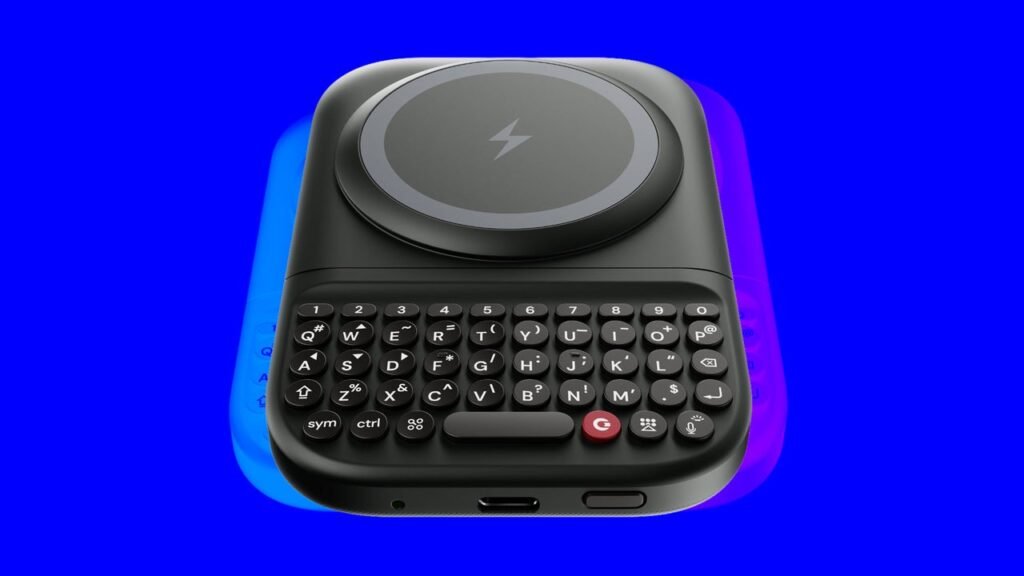
Enter Clicks’ new product, the Power Keyboard. Announced in January and now shipping for $99, it’s a self-contained, battery-powered Bluetooth keyboard that sticks magnetically to the back of iPhones equipped with MagSafe and Android phones that have the similar Qi2 technology. When you want to use the keyboard, you slide it out on rails, where it sits below and slightly behind your phone. The visual effect reminds me less of a BlackBerry than of HP’s ill-fated Pre 3, which is remembered, if at all, for being released on August 17, 2011, and discontinued the following day.
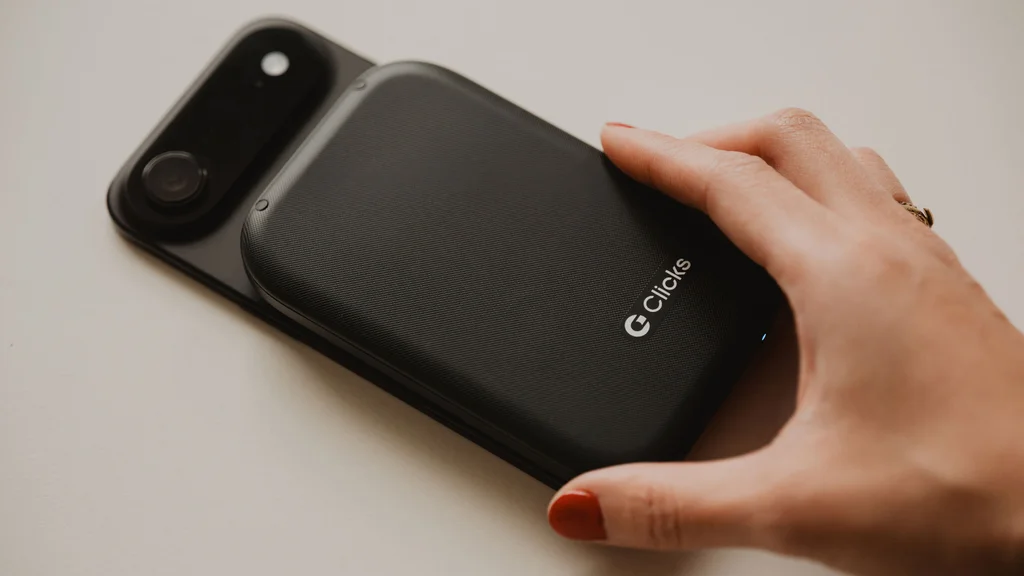
The Power Keyboard offers flexibility that’s impossible with a keyboard case. You can easily attach and remove it at your whim, and use it with phones that are already in a case (such as my Peak Design Everyday Case, which I wouldn’t want to do without). Its built-in 2300 mAh battery allows it to double as a power pack that can top off your phone’s battery. Even without being attached to a phone, it can work with up to nine devices that support text input via Bluetooth, including smart TVs and streaming boxes, tablets, and headsets such as Apple Vision Pro.
But the Power Keyboard isn’t just a nifty idea. It’s also a triumph of execution. After spending a few days with a review unit provided by Clicks, I can’t imagine a gizmo like this coming out much better. Basically, if you’re into tiny keyboards, this might be the last one you ever need to buy.
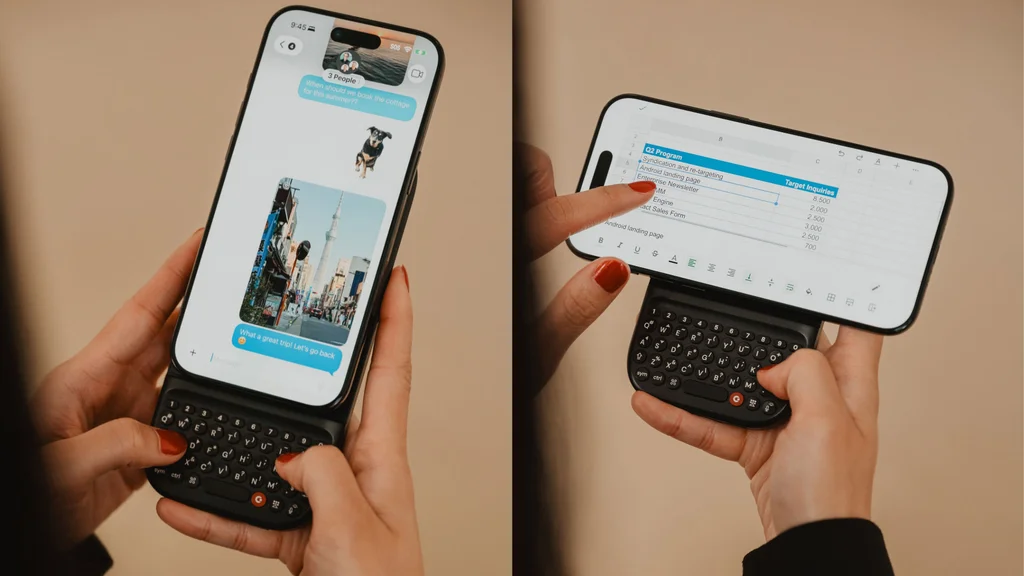
For starters, while the 47-key backlit keyboard screams “BlackBerry,” it has a killer feature absent in BlackBerrys (and Clicks’s own cases): a dedicated row of number keys. All the keys have the responsive clickiness that is the most obvious advantage of typing on plastic rather than glass. The rail mechanism that lets you slide out the keyboard feels robust, and makes a satisfying snapping sound that entertains me every time I hear it.
Even the one aspect of the Power Keyboard that’s arguably a design flaw—its top edge intrudes on the iPhone 16’s ultrawide camera—has an unexpectedly elegant fix. Rather than removing the keyboard, I just swivel it momentarily out of the way.
I just said that the feel of real, clicky keys is the obvious reason to use something like the Power Keyboard. But the more I typed on it, the more I appreciated less readily apparent advantages over on-screen typing. Removing a phone’s keyboard from the display frees up room for content: Entire use-case scenarios, such as editing spreadsheets in landscape mode, suddenly go from impractical to plausible. (To use the keyboard in that orientation, you rotate it 90 degrees rather than sliding it out.)
As my colleague Jared Newman discovered last year when he reviewed a Clicks case, the company has cleverly implemented keyboard commands that let you pull off feats such as undoing actions, opening and closing browser tabs, and even launching Apple Shortcuts with a single click. It’s a radically different interface from using onscreen gestures, but if you invest enough time in mastering it, it might be a more efficient one.
In the end, the Power Keyboard’s physicality is both its greatest virtue and its most fundamental limitation. The device is a handful—it looks a little like a BlackBerry with a magnetic hump where the screen would have been, and is almost 85% thicker than my iPhone 16 Pro and nearly as heavy. Stuck together, the keyboard and phone make for a package that strains the definition of “pocketable.”
It also took me time to get used to the top-heaviness inherent in cradling the keyboard in my hands and typing with my thumbs as the phone extended off its top. I did not, however, ever feel like this two-part contraption was in danger of falling apart or tumbling out of my grasp.
Of course, the Power Keyboard’s easy-on, easy-off, slide-out design makes it less of a commitment. You don’t have to stash it and your phone in the same pocket, or slide it open every time you want to use your phone. I suspect even many people who are thrilled by it will use it on a part-time basis—maybe to whip their way through replying to emails, for instance, which was always one of the BlackBerry’s defining purposes.
We’re fortunate to live in an era when there are multiple ways to engage with phones, from voice input to third-party plug-in keyboard apps. The Power Keyboard is yet another. Given how utterly un-Apple-esque it is, I’m startled by how seamlessly it works with my iPhone. I don’t expect to use it a lot, in part because I can get text into my iPhone faster by swiping on Apple’s keyboard. But I’m grateful to have the option, and might surprise myself.
Meanwhile, Fisher and Michaluk are not done riffing on the possibilities of BlackBerry-inspired keyboards in the modern era. When they announced the Power Keyboard in January, they also unveiled the Clicks Communicator, a whole $499 Android phone built around physical keys. It has not yet shipped. But I’m already curious what their next product might be after that—and how tiny physical QWERTY will continue to defy death in the years to come, as I’m pretty sure it will.
You’ve been reading Plugged In, Fast Company’s weekly tech newsletter from me, global technology editor Harry McCracken. If a friend or colleague forwarded this edition to you—or if you’re reading it on fastcompany.com—you can check out previous issues and sign up to get it yourself every Friday morning. I love hearing from you: Ping me at hmccracken@fastcompany.com with your feedback and ideas for future newsletters. I’m also on Bluesky, Mastodon, and Threads, and you can follow Plugged In on Flipboard.
More top tech stories from Fast Company
The AI debate isn’t about AI. It’s about control
The clash isn’t whether we’re for the technology or against it. It’s about who keeps control of their own life. Read More →
AI crawlers from Meta and Alibaba almost destroyed a volunteer-run LGBT history archive
The site’s founder says bots linked to major tech companies drove up his hosting costs and forced him to spend nights learning how to keep them out. Read More →
Google just repurposed the temperature sensor on its Pro series Pixel phones. Here’s what it does now
If we must have a mysterious circle in our Pixel Pro camera bumps, this one probably has a stronger reason to exist. Read More →
The Transportation Department is recruiting gamers to solve its air traffic controller shortage
Transportation Secretary Sean Duffy says the strategy has helped the agency reach 94% of its hiring goal. Read More →
Silicon Valley startups are about to hand corporate credit cards to AI agents
As AI agents join human cofounders, the digital banking services company Mercury is expanding its offerings with virtual cards for autonomous purchasing. Read More →
Build a custom AI assistant for your team’s workflow in 10 minutes
Eliminate repetitive administrative friction using ChatGPT, Claude, Gemini, or Copilot. Read More →