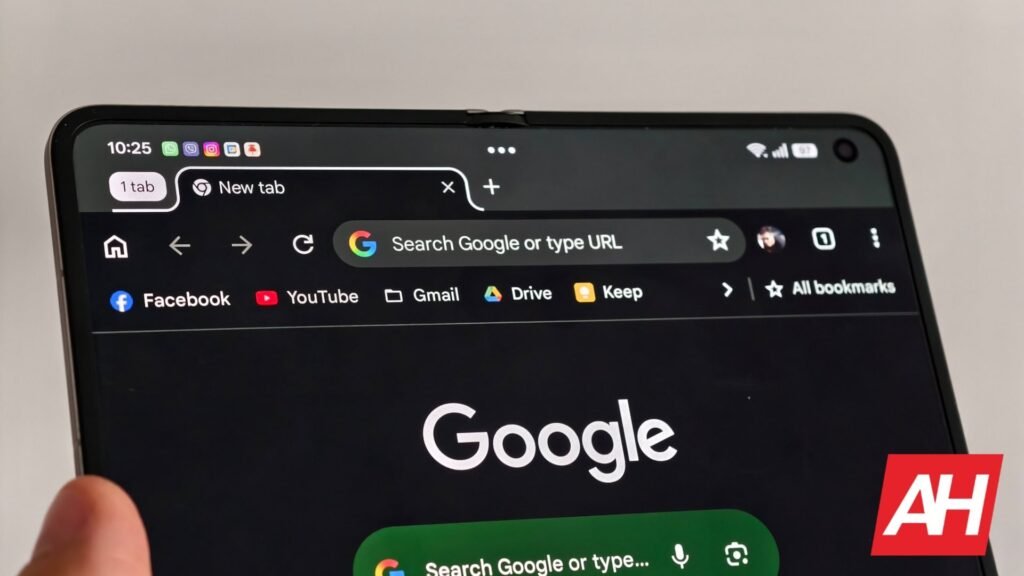

The way we interact with apps on our phones is very different from that on a computer. This is because our phones rely on our fingers, so gestures like swiping, double-tapping, and pinching are common. That’s also why Google Chrome on Android does not have a dedicated back button, at least until now.
Google Chrome on Android gets a dedicated back button
In the latest Google Chrome 150 build for Android, the app is getting a proper back button. In the past, you would swipe to the right if you wanted to go back. That gesture works just fine, and for the most part, it’s rather intuitive. However, the latest update to the app has given users a dedicated back button they can use if they prefer.
The update also tweaks the menu ever so slightly. Previously, the three-dot menu gave users a forward button, a bookmark/favorites button, a downloads button, an info button, and a reload button. However, in Chrome 150 for Android, the info button has been removed. Now, you get a back and forward button, bookmarks button, downloads, and reload.

Other than that, the rest of the UI remains the same. These changes have been available on the iOS version of Chrome for a while, so it looks like Google is finally bringing those changes for Android. That being said, 9to5Google makes a good point about these changes disrupting muscle memory.
For those who access the three-dot menu frequently, this could take some getting used to. It’s also why companies aren’t as eager to make frequent changes to its app navigation. However, we reckon that a few days with these changes and it’s business as usual again.
Where to get the update?
If your Android phone has automatic updates enabled, you don’t really have to do much. Chrome should eventually automatically update itself. But if you’d rather not wait, Chrome 150 for Android is rolling out and you can grab the latest version from the Play Store. You can check to see if you have the latest version by opening the three-dot menu.
If you notice the dedicated back button and the removal of the info button, you should be set.
The post Google Chrome on Android Is Finally Getting a Real Back Button appeared first on Android Headlines.