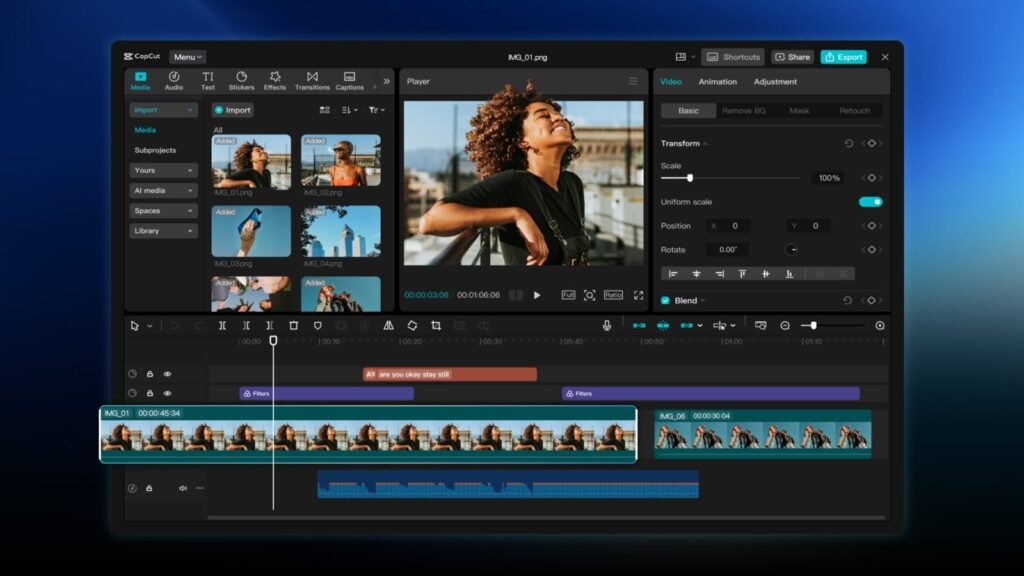

Popular video editing app CapCut is debuting on Android tablets, quite obviously called CapCut Pad. The company promises “desktop-level” video editing capabilities. Seeing how short-form content is taking over the internet, CapCut has become one of the go-to apps for many users, and this launch should only make the experience seamless for editing.
CapCut Pad brings an easy-to-use interface and desktop-level video editing to tablets
The CapCut Pad app for tablet gets a bigger, easier-to-use interface. It brings more precise multi-track timeline editing, smoother performance, and a creative workspace that’s designed for touch. The app offers features like the ability to apply video stabilization, chroma key to remove specific colors, and other tools like keyframe animation and smooth slow motion with optical flow and speed curves.
Users will also get a wide range of in-app fonts and effects to choose from. It also includes handy tools like auto captions, text-to-speech to convert text into voice in multiple languages and tones, motion tracking, and even background removal. Users can adjust the video speed from 0.1x to 100x and apply smooth speed curves. It also lets you highlight the best moments with the freeze-frame feature and add creative transitions between clips.
The app is now available on the Google Play Store
The CapCut Pad app covers all the basic video editing features like trimming, shortening clips, and splitting/merging videos. You can even add filters that update weekly and visual effects like blur, 3D, and glitch. The app supports exports up to 4K, 60fps with HDR. You can customize the resolution and format before sharing to social media platforms.
The CapCut Pad app is now available to download on your Android tablet from the Google Play Store. While it’s a free-to-use app, you need the CapCut Pro subscription for certain features. The subscription price starts at $10 per month.


The post CapCut Pad Brings Pro Video Editing to Android Tablets appeared first on Android Headlines.