
The Fitbit Air is Google’s take on the screenless fitness tracking wearable, and I absolutely love it. From the moment the Fitbit Air was spotted on Steph Curry’s wrist during an NBA game, I was excited for this product. As someone who has worn a Whoop for the past two years, not as an athlete, but to learn more about my body and to be more active, I was very excited for Fitbit. Because Whoop has that insanely expensive subscription (that’s supposed to include hardware upgrades, but doesn’t), whereas the Fitbit Air has an optional subscription – meaning you don’t need to have one, but it’s available.
I will preface this review by saying that I haven’t spent as much time as some others have. I’ve only had it for a week, due to my review unit shipping later, and being at Google I/O for part of last week. But I have spent about a week with the tracker, and feel like I can draw conclusions as to what you can expect here.
Here’s our Fitbit Air review. And in short, Whoop should definitely be worried.

The Fitbit Air is small, screenless, and subscription-optional, and after a week on my wrist, I’m convinced it’s the one to beat.
Pros
- No subscription required
- Thin and lightweight, weighs as little as 12g
- Easy band swapping
- Google Health Coach is genuinely useful
- About a week of battery life
- Google Health Premium is bundled into Google’s most popular AI plan
Cons
- Google Health app still feels rough compared to Whoop and Zepp
- Step count tends to run low, especially compared to Apple Watch
- Battery life trails Whoop 5.0’s two-week run
- Limited band selection at launch, no bicep band or apparel options like Whoop
Fitbit Air Specs
Fitbit Air Specs
| Colors | Obsidian, Berry, Lavendar, Fog, Stephen Curry Rye Band Special Edition |
| Memory | Unspecified; 7 days of detailed motion data, minute-by-minute; Stores heart rate data at 2-second intervals |
| Battery Life | Up to 7 days. Lithium-polymer battery |
| Charging Speed | 90 mins (0-100%), quick charge: 1 day of battery in 5 mins |
| Sensors | Optical Heart Rate Monitor, 3-axis accelerometer + gyroscope, Red and infrared sensors for SpO2 monitoring, device temeprature sensor, vibration motor |
| Water Resistance | Up to 50 meters |
| Weight | 0.01lb without band, 0.03lb with band |
Fitbit Air Review: Design and Comfort
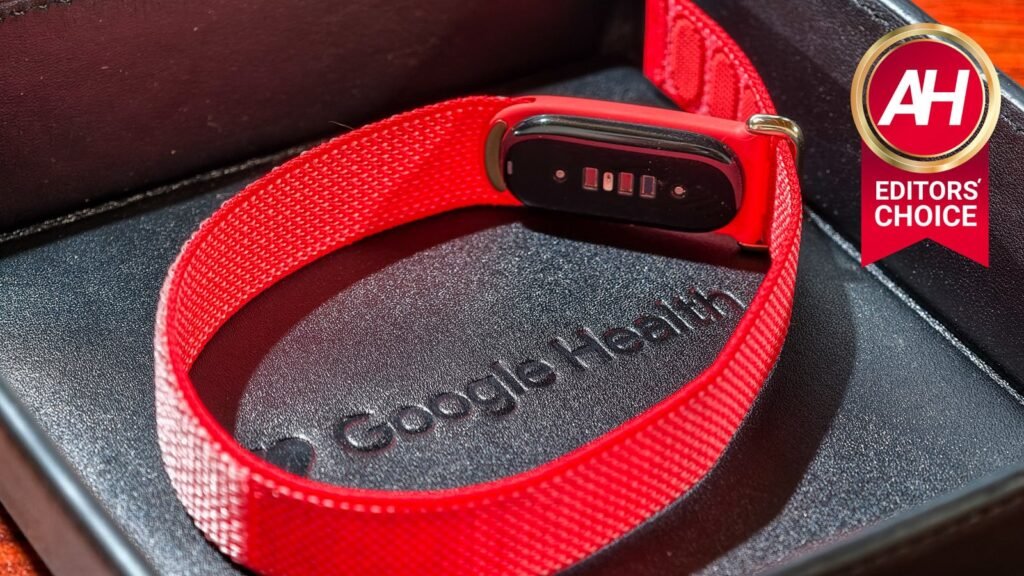
The most important aspect of the Fitbit Air is design and comfort. You want something that looks good, something that doesn’t stand out, but also something that is lightweight and still gets the job done. And I feel like the Fitbit Air does just that.
The band itself is pretty thin, especially when compared to the Whoop, which is probably at least twice as thick. I’ve actually forgotten I was wearing the Fitbit Air after a few hours of putting it on. Which is exactly what you want. You want it on your wrist and to forget about it.
The tracker itself is very tiny. It’s about half the size of the Whoop 5.0, maybe even a bit smaller. It’s also a lot lighter. However, it is important to note that the Whoop 5.0 does have more sensors and a larger battery. Whoop 5.0 can last at least two weeks on a charge, while the Fitbit Air lasts about a week. Still plenty of battery time in both, but having those two weeks in the tank is very useful for those who like to travel without the charger.


Google has made it very easy to swap bands as well. The tracker just pops out very easily. But don’t worry, i won’t pop out while you’re working out or going about your daily life. As it pops out towards your arm. So it won’t just pop out.
Speaking of bands, Google also sent out the Active and Elevated Modern bands with the performance loop. And to be honest, I really like all three. The Elevated Modern Loop is a more dressy type of band that’s trying to mimic leather, without the downsides of it being leather. Because let’s face it, you don’t want to use a leather band for working out or swimming. Liquids and leather just don’t work well together.


When I’ve been at the pool over Memorial Day weekend, I’ve been using the active band, which is a plastic band that actually looks quite nice. Both the active and elevated modern bands were sent in the obsidian colors, which I happen to really like. While the performance band was sent in the coral color. It’s different, but it does look quite nice as well.
Right now, these are the only bands available for the Fitbit Air, but I’d fully expect Google and third parties to make additional bands. I would also love to see Google make other variations of bands, for instance, Whoop has a band for your bicep, as well as underwear you can slide the Whoop 5.0 into, so you don’t have to wear the band on your wrist every day. These types of additions would be really nice.
Fitbit Air Review: Fitness Tracking and Workouts
So fitness tracking just works. Since there’s no display, there’s no way to really check your steps on the device itself; you’ll need to use the Google Health app for that. And the same thing goes for starting workouts. The Fitbit Air, like virtually every other Fitbit before it, will automatically detect workouts too, after around 10-15 minutes. But you can go into the Google Health app and start a workout. And in the app, you can see all your metrics during your workout.
Fitbit always tends to undercount steps. I’ve been wearing it with my Apple Watch over the past couple of days, and have noticed that they are generally pretty close til around Noon when I’m a bit more active. Then the numbers really tend to differ. The Apple Watch is about 10% higher in terms of step count. I also noticed that, while messing around in the pool, the Apple Watch will count steps, while the Fitbit Air does not. Which did skew my numbers a tiny bit.

For the most part, the fitness tracking is exactly what you would expect from Fitbit. It tracks just about everything. From your steps to calories burned to your sleep and even your wrist temperature. This can be very useful to see when you’re starting to get sick. There are a ton of other metrics that it will track as well. I’ll leave it up to people like The Quantified Scientist to see how accurate this stuff is, however.
For someone who’s not an athlete and just wants to live a healthier life, the Fitbit Air does track everything you’d expect. And a big reason why a band like this is better than a Ring is that you can actually lift weights with this on. With a lot of smart rings, you’re told not to wear them while lifting because they can scratch the ring, but they can also hurt your finger. Typically, pinching your finger between the ring and the weight. So that’s where a band like the Fitbit Air really comes in handy.
Fitbit Air Review: The Google Health App
Now let’s talk about the elephant in the room, the new Google Health App. Now I’ve been using it off and on in the public preview for a few months already, before Google had even announced it was eliminating the Fitbit branding. So I had kind of known what to expect here. I will say, like with a lot of new Google apps, there are features missing, but Google is listening and bringing in new features pretty quickly. A big example of this was removing the daily step-goal streak, which was added back almost immediately. So I do have faith that it will get much better.

The app does leave a bit to be desired. It’s a bit odd, but I feel like smaller companies like Whoop and Amazfit (Zepp) do a better job with their health apps. Their UI is a whole lot easier to use and shows more data, faster.
I do love having a number of metrics at the top of the screen, all of which are customizable to an extent. So, you have a circle on the left, which can only be your cardio load or steps in relation to your daily step goal. While you have three pill-shaped widgets on the left that can be virtually anything. You can also add multiple pages with six more pill-shaped widgets on each one. I’ve decided to keep mine to just one page. Using Steps as the circular widget, and then cardio load, calories burned, and my sleep as the three pill-shaped widgets. The things I care about the absolute most. There are other tabs to dive deeper into fitness, sleep, and health.


In the Fitness tab, you can check out your recent workouts, as well as some key metrics. These include things like cardio load, total energy burned, RHR, HRV, Vo2Max, and more. The Sleep tab is all about your sleep, including your sleep score and sleep duration. And then the Health tab is giving you a bunch of other metrics that are also important. These include things like heart rate, SpO2, Active Zone Minutes, your weight, calorie intake, and much more. The last two are taken in from other apps, if needed. Of course, if you have a Fitbit scale, that will just work.
The data is laid out quite nicely, I do think. But there is room for improvement. And part of that comes with the data that you’re able to bring into the Google Health app.
There was a big deal about Google Health working with Apple Health. But what I think a lot of people missed is the fact that it is read-only for Apple Health data right now. There are plans to write to Apple Health, too, but for now, Google Health can only read your Apple Health data. Hopefully, Google’s plan is to work with many more health apps, so you can use Google Health as your aggregator of all of your health data. Of course, many won’t like that, knowing how much Google likes to collect our data.
Unfortunately, many of the features that made Fitbit unique are gone and likely won’t come back. Like the different badges, and the friendly competitions with your friends and family. I don’t know about you, but back in the 2010s, before Google bought Fitbit, those challenges were a huge reason why I pushed myself to be more active.
The Google Health Coach is better than expected
At this point, we’re all tired of AI, right? I mean, I was at Google I/O last week, where Google spent two hours talking about AI. But I have to say, the Google Health Coach is actually really good.
You can create a fitness plan with the Google Health Coach, similar to what you can do with Whoop’s own AI. But I do feel like Google’s Health Coach does a better job at this, and I think it comes down to who the Health Coach is going after. Every day, people are trying to live a better, healthier life, and not athletes training for the NBA Combine.
But it’s more than just creating a fitness plan, or asking how to improve a metric like maybe your Vo2Max score. The Google Health Coach also sends you updates throughout the day, that are actually very useful.

For instance, this morning, the Health Coach told me that I had a solid sleep score. Not just telling me that, but also telling me that my physical recovery stages were lower than usual. With some feedback on how to approach the day. Telling me to stick to a 20-minute walk, and that I might feel a dip this afternoon as my body catches up on rest because I feel asleep so quickly last night. This is honestly very useful insight to have. Below that section, it does give me more details about my sleep, including how long, my score, RHV, and more.
That’s just one example of the Google Health Coach actually being quite useful, and since this is AI, I’m sure it’s only going to get better.
The screenless fitness tracker that doesn’t need a subscription
Let’s get one thing straight here, the Fitbit Air does not need a subscription to work. Unlike Whoop, where the minute your subscription expires, your band turns into a wearable paperweight, that’s not the case with the Fitbit Air. You can continue using it without Google Health Premium.
Below, you can see what’s included in the base Google Health app, versus having a Premium subscription. And it’s essentially the AI features.

While Google Health Premium is now $9.99/month or $99/year, it does come included in the Google AI Pro plan, which most of you likely have already. So Google is making that plan incredibly enticing. It also added YouTube Premium Lite to that plan recently. So, for $19.99/month, you’re getting 5TB of storage, YouTube Premium Lite, Google Health Premium, and Google Home Premium, even without the AI features, it’s definitely worth the cost.
And this is where the Fitbit Air really beats out the Whoop. I really like Whoop, I like what they’re doing. But I don’t want to pay a membership fee forever. And the Whoop starts at $199/year, which is already the same price as the Fitbit Air with Google Health Premium for a year. But then there’s Peak and MG, which are up to $359/year, which is insane. This is why I think the Fitbit Air will be a huge hit for Google.
Fitbit Air Review: Battery life and charging
My only real major issue with the Fitbit Air is the battery life. And this is mostly after coming from the Whoop 5.0 that has an advertised 14-day battery life, but I was usually getting far more battery life than that.
At 7 days, the Fitbit Air is going to be fine for most people. And you can just put it on the charger when you jump in the shower every day, and never really worry about having to charge it from empty to full. But I do wish the battery were a bit longer.
The charging side is where Whoop wins again. Whoop has a battery pack that is actually the charger. So you slide it onto your Whoop while you’re wearing it to charge. This means you never really need to take the Whoop off. Meanwhile, Fitbit does make you take off the Air to charge – sort of like the Apple Magic Mouse.
It’s fine, but I do prefer Whoop’s approach to this. I assume Fitbit did this to make the device even smaller than it already is, compared to Whoop’s.

Should you buy the Fitbit Air?
For most people, yes, the Fitbit Air is an easy recommendation. It’s comfortable enough to forget you’re wearing it, the tracking is solid for anyone living a healthier life rather than training for the combine, and you’re not held hostage by a subscription. If you’re already on Google AI Pro, Google Health Premium just comes along for the ride, which makes the value even harder to ignore. Hardcore athletes who want every last metric might still lean toward Whoop, but for everyone else? The Fitbit Air is the screenless tracker to beat.
The post Fitbit Air Review: The wearable I forgot I was wearing appeared first on Android Headlines.