
Google Photos is updating its image editor with an approach that aims to move away from heavy, artificial filters. This week, the company announced the rollout of new touch-up tools designed for subtle face editing in Google Photos. The new upgrade should allow users to enhance their photos without losing their natural look.
Google Photos’ new AI touch-up tools for facial editing with sliders
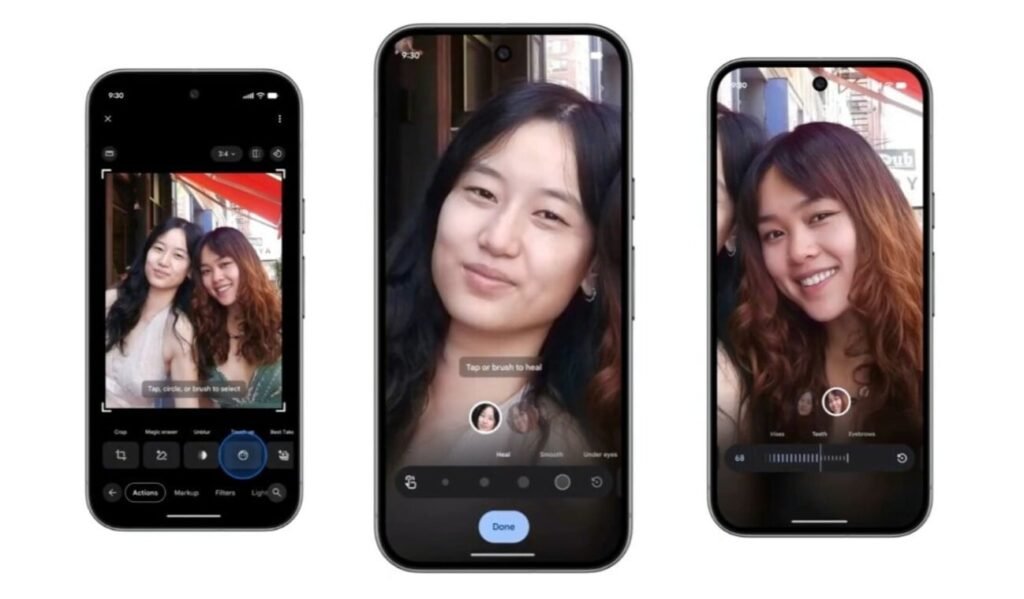
Unlike traditional filters that apply a blanket effect to the entire image, these new features allow for more granular tweaks. Once you select a face within the app, a dedicated menu appears with options such as “Heal” (to quickly remove minor blemishes) and “Smooth” (to refine skin texture).
The system also includes controls for specific details. For instance, it allows you to brighten eyes, whiten teeth, or add definition to eyebrows and lips. According to Google, the goal is to help photos capture how you feel in the moment by providing enhancements that can be applied in seconds.
A standout feature of this update is the inclusion of intensity sliders. This allows the user to decide exactly how much of an effect to apply. So, if the automatic adjustment produces results that border on the “uncanny valley” visual effect, you can tweak the intensity until you achieve a result more in line with what you’re looking for.
Requirements and availability
This expansion of Google’s AI editing capabilities is no longer exclusive to “Pro” devices. However, because these tools rely on local processing power, your hardware must meet certain technical specifications. Fortunately, the requirements are quite low. Basically, we are talking about Android 9.0 OS (or higher) and at least 4GB of RAM. That’s all.
The touch-up tools rollout for Google Photos’ image editing is happening gradually on a global scale for all Android users. This update follows the recent news that Gemini’s personal intelligence will soon use Google Photos images to guide its creative processes.
The post Google Photos Gets AI Face Touch-Up Tools for Subtle Image Editing: Fine-Tune Every Detail appeared first on Android Headlines.