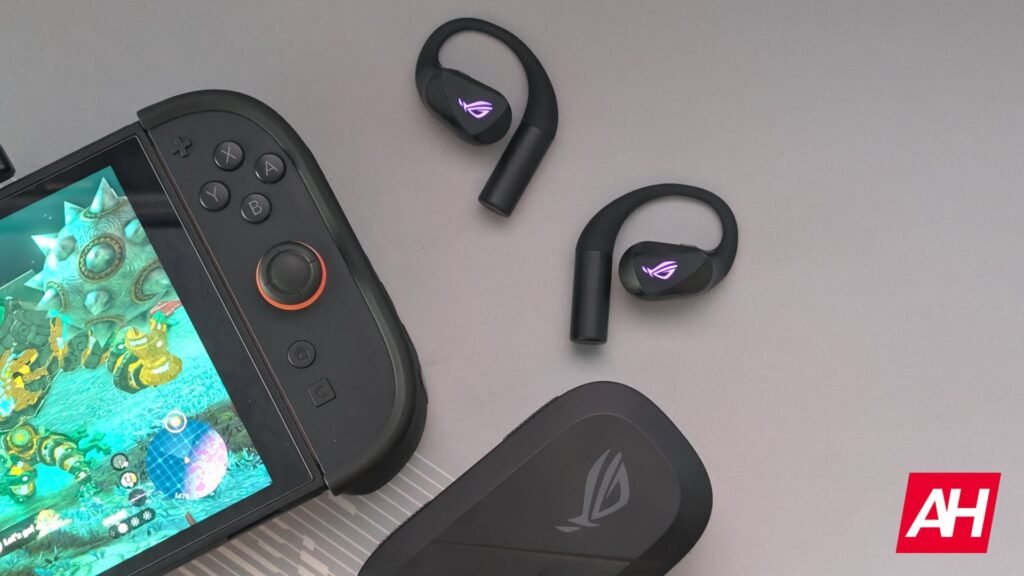

ASUS is no stranger to gaming audio with its ROG brand of gaming peripherals, but the ROG Cetra Open Wireless is the first time that ASUS’s ROG brand has entered into the space of open-back true wireless earbuds. It’s a segment of the audio space that I didn’t really know had such a following until the middle of last year, and especially so for gaming. There are tons of open-back headphones and a smaller number of open-gaming headsets, and it makes sense that they would exist. Open-back headsets provide a wider, more natural sound stage and can make for some really immersive audio for your games. I found this to be true with the ASUS ROG Kithara headset that I recently reviewed.
Still, it’s an odd concept to wrap your head around, as you’re probably used to thinking about gaming headsets as isolating you from as much noise as possible. That’s not what the ROG Cetra Open Wireless are designed to do at all. As open earbuds, they’re designed to give you a more natural sound but without keeping you isolated from sounds around you. In fact, they’re probably the perfect set of earbuds for those who want to be exposed to surrounding noises. They are not, however, that inexpensive. At $229.99, you’re spending a fair amount. So, with that in mind, let’s dive deeper into this review and see if the ROG Cetra Open Wireless earbuds are worth your hear-earned cash.
ASUS ROG Cetra Open Wireless Specs
ASUS ROG Cetra Open Wireless Specs
| Interface | Wireless |
| Connectivity | 2.4GHz, Bluetooth |
| Platform Support | PC, Mac, PS4, PS5, Nintendo Switch, Nintendo Switch 2, Android, iOS, Bluetooth devices |
| Driver Type | Diamond-like carbon-coated diaphragm drivers |
| Driver Size | 14mm |
| Headphone Impedance | 16ohms |
| Headphone Frequency Response | 20Hz – 20kHz |
| Microphone Pick-Up Pattern | Omnidirectional |
| Microphone Sensitivity | -38dB |
| Microphone Frequency Response | 100Hz – 8kHz |
| AI Noise Cancelling Microphone | Yes |
| Channel | Stereo |
| Lighting | RGB |
| Weight | 11g/116g |
| Color | Black |
ASUS ROG Cetra Open Wireless Review: Hardware
ASUS is usually a pretty top-tier brand when it comes to hardware and that hasn’t really changed in a decade or two. While the brand’s product lineup has expanded to many different areas of the consumer electronics space, the quality of the hardware used to make these products has stayed pretty consistent. With regard to the ROG Cetra Open Wireless, ASUS is living up to this legacy of being a brand that puts out quality hardware. That isn’t to say there aren’t things about the hardware that I would change. The size of the case, for one, is pretty large and is not something I would carry around in my pocket. Yeah, these are gaming earbuds, so maybe that gives way to the expectation of a big case. That said, there are other competing gaming earbuds that come in quite small cases. Cases that are easily pocketable and infinitely more portable. This is one aspect of the hardware I would love to have seen changed.
However, putting the size of the case aside, it feels like a good quality case. I do enjoy that there’s an RGB light bar on the front that ASUS uses a status indicator of the charging progress. That makes it easy to see when the battery is full on both the case and the earbuds. Speaking of the earbuds themselves, these also feel high quality and are quite comfortable to wear. I sometimes feel a little weird with open-back earbuds, because I’m so used to earbuds going in my ears, that wearing these almost feels as if I’m not wearing them correctly. Once you get past that, these are super nice and I was able to wear them all day with no discomfort. Not even a little bit. I think that’s huge for gaming because I definitely play more games than I listen to music with personal audio like headphones or earbuds.


The main earbud housing is quite large and has two different microphones (one on top and one on bottom) with physical buttons on each earbud for manual audio controls. They also feature gesture controls, which you can customize. There are also some RGB ROG Eye logos on the earbud portion that faces outward for a little extra style. Though keep in mind that these will add to battery drain. You can, however, turn the lighting effects off if you’re concerned about this.
The main part of the earbud is connected to a hook piece that goes behind your ear lobe to keep it secure, though if you feel like you need extra stability when you’re more active, the earbuds come with a neck strap that attaches to each earbud on the end of the hook. Most of the earbud housing is made from plastic with a matte finish, save for the connecting silicone piece and the touch control area which uses a glossy finish. You’ll also find the 2.4GHz low-latency USB-C adapter in the case in its own specific little pocket between the two earbuds. While the case is big, it’s a neat little complete package with all the necessary parts. The neck strap doesn’t fit in there, but you may not be using that most of the time anyway. Overall, it’s solid hardware that definitely gives way to feeling like a solid pair of premium earbuds for gaming.
ASUS ROG Cetra Open Wireless Review: Sound Quality
This is an area where the ROG Cetra Open Wireless actually surprised me as I wasn’t expecting these earbuds to sound as good as they do for gaming. Not only that but they sound good for a pretty wide variety of game types. I’ve been using the mostly for my Switch 2 for everything from Tears of the Kingdom and Skyward Sword to Mario Kart World and Metroid Dread, and no matter if I was playing an expansive open-world RPG or a sci-fi side-scrolling action game, the earbuds seemed to perform well.
This was made even more apparent when using them with my PC, where I played an even wider variety of games to see how the audio fits the scenario. Even in shooters like Battlefield 6, these seemed to perform well, even for directional audio. Though I have to admit that I still think headsets like the Astro A50 Gen 5 and the Audeze Maxwell 2 did a better job with this. The benefit of these earbuds in addition to their pretty good sound is that your hearing is unobstructed.

This is a huge thing to some players and the ROG Cetra Open Wireless achieve this without really degrading the smaller and more intricate audio details you would want to keep in some games. For instance, in some shooters, details like footsteps or directional gunfire are used to alert you to an enemy position more easily. You want these details to be as crystal clear as possible for your benefit. And I feel like the ROG Cetra Open Wireless were able to reproduce most of that detail, while still allowing me to be aware of my surroundings. This is quite nice if I actually decide to play any games on my Switch 2 or my phone out in public where I wouldn’t want to necessarily block everything out. In the comfort of my own home, I’m less concerned about audio awareness and prefer to be more immersed. Thankfully, the open-back nature of these earbuds is designed to enhance immersion, and it really does do quite a good job at this.
While these aren’t particularly bass-heavy, there is a decent amount of treble and mid to highs are pretty clear. The earbuds also come with two different onboard audio modes that can enhance things further. For example, if you want more bass, the Phantom Bass mode is designed to give this to you. It’s not entirely the same as having headphones tuned specifically to deliver more bass, but it does improve the bass somewhat when you want it to be there. On the other side there’s the Immersion Mode. This was my preferred mode to use, because it’s designed to “gently reduce” the background noise and promote a more immersive listening experience within your games. It’s still very easy to hear ambient noise with this mode enabled, but it’s less noticeable and helps you focus more on the game audio. This is definitely the mode I would suggest most people use for gaming in general, while perhaps switching up to Phantom Bass for games like Battlefield 6 where there are lots of explosions and other sound design elements that would benefit from a more bass-heavy sound signature.
The one issue I seem to have with the earbuds is that they would sometimes automatically lower the volume on their own after playing for a little bit. I could have the volume at a little below half way and after playing for a little while the volume would simply lower as if I’d pressed the volume down button on the Switch 2 a couple of times. Yet I hadn’t touched the button at all. This issue persisted even after updating the earbuds and the Switch 2 to the latest firmware and software. It’s worth noting that I only noticed it happen with audio transmitting via the 2.4GHz USB-C dongle. It also didn’t happen when I had the dongle connected to my PC or other devices, just the Switch 2. So take that for what it’s worth. Thankfully the Bluetooth audio on the Switch 2 is perfectly fine and I didn’t really notice any latency, so if you’re using these with Switch 2, Bluetooth might be the way to go if you experience this issue yourself.
How good is the microphone?
I’d say the microphone is pretty decent for a pair of earbuds. It won’t be as good as using a headset with a boom microphone, or a standalone microphone, but if you’re out and about or you simply want to use earbuds but need a mic for chat, these will do a pretty good job. My voice seemed to come through clear enough and while I was in chat no one was complaining about how my voice sounded, so that’s a plus. I think overall it’s perfectly fine and will more than get the job done if this is the microphone you’re using.
ASUS ROG Cetra Open Wireless Review: Features
These earbuds have quite a few features, and you can manage most if not all of them from the Gear Link app on your mobile device no matter what device it’s connected to. You could use the Gear Link web portal and the Armoury Crate app on PC if you’re using these with PC, but the mobile app works just fine. In fact, it’s way easier to use if you’re look to play with features or tune things.
My favorite features are the Phantom Bass and Immersion modes. You can turn these on depending on whether you want some improvements to bass or more immersion. Immersion Mode, as mentioned above, slightly reduces background noise to help audio sound more immersive. One thing the app points out is to not touch or cover the microphones on the earbuds if you want to reduce background noise. I didn’t have a problem with this, but it’s something to keep in mind so you don’t brush your fingers up against the mics. What’s nice about these is two modes is that you can enable them both at the same time if you’re playing a game that would benefit from more immersive audio that’s also more bass-heavy.
Another really neat feature is the hybrid multi-point connectivity. This lets you connect the earbuds up to two devices at once. Once via the 2.4GHz dongle and one via Bluetooth, and you can swap between them as you wish. It doesn’t do simultaneous audio, but you won’t have disconnect and reconnect between two devices which is pretty convenient. There are several different built-in audio profiles as well including RPG, FPS, Racing, and even a general Gaming profile, in addition to profiles for movies, music, and communication.
Gesture controls are there if you use these for music or movies, or phone calls, and you can use these to pause and play tracks, skip tracks or go to previous tracks, and adjust volume. The gestures are all controlled with the physical function button that can be found on each ear bud. There’s RGB lighting as well which you can turn on and off, and cycle through four different effects, including: Static, Breathing, Strobing, and Color Cycle. You can also adjust the brightness, and the color settings for effects like breathing, static, or strobing. These are neat but I end up keeping them turned off so the lights aren’t draining the battery. These are built to be water-resistant as well, but I never used them out in the rain. Just know that if you do get caught in the rain with these on, as long as it’s not a torrential downpour you’re probably fine.
ASUS ROG Cetra Open Wireless Review: Software
The software is how you will end up interacting with the different earbud features and updating the earbuds when there are firmware updates for the earbuds themselves and the USB-C dongle. Before going over the software i want to talk about the update experience, because the very first time you do this, you have to plug the dongle into your PC and go through the Gear Link web portal do an update. Update capabilities should be usable in the mobile app eventually, but the web portal says this isn’t available yet. What’s not great about this experience is how convoluted everything is.


First I had to connect the device, then launch the Armoury Crate app, and from there you see your connected devices. Once you click on the earbuds, there will be a button for updating, but once you click the update button it tells you that you need to open the Gear Link web portal. So you do that, and then you click an update button there which downloads a file that installs the update function in Armoury Crate for both the earbuds and the dongle. Then you go back to Armoury Crate and update. In my experience when doing this is told me again to launch the Gear Link web portal, which I did, and then it just wanted to re-download those files. Eventually both the earbuds and the dongle were update, but this entire process was so convoluted and I can’t imagine anyone enjoying the process of jumping around several different times. Thankfully this shouldn’t be an issue with the mobile app. The option is visible in the app, but now that everything is up to date for me I can’t actually check to see if it’s operational just yet.
Now that that’s out of the way, the rest of the software experience is a delight. The Gear Link mobile app is very easy to navigate and everything is pretty front and center for feature management. The app shows you a big picture of the earbuds at the top of the page with battery levels for the earbuds and the case, and then below that is all the options for audio, lighting, power, gestures, and more. In those menus you’ll find sub-menus for related features. For instance, in the audio menu, you’ll find the different audio profiles, the toggles for Phantom Bass and Immersion Mode, and then an equalizer to further fine-tune your sound. The equalizer also has a bunch of built-in profiles if you want to test those out as well. Or you can simply drag your finger on the equalizer graph to do things manually. Overall the software experience is great.
ASUS ROG Cetra Open Wireless Review: Battery Life and Charging
The battery life is probably my favorite thing about these earbuds. They last quite a while on a single charge and I enjoy not having to toss them back into the case as often. For reference, my SteelSeries ArctisBuds last for 10 hours on a single charge. The ROG Cetra Open Wireless last for up to 16 hours. And since I don’t use the RGB, I didn’t have to worry about that draining the battery more. On top of this, the case provides up to an additional 48 hours, for a total of 64 hours. This is excellent really. During my time using the earbuds I was able to get between 15 and 16 hours before needing to throw them in the case, so ASUS’s claim was pretty accurate for me. With that in mind, this is after turning off the RGB, and without using the microphones or enabling Phantom Bass or Immersion Mode. When turning on the two modes, my battery life was closer to about 8 hours (10 hours via Bluetooth), though that’s still more than acceptable as I never play for that long without taking any breaks.
Obviously, this will change from user to user. Enabling the RGB, which some people will prefer to do, will take this battery life down. Adjusting the volume constantly and tweaking a few other things may also alter it. For the most part, though, you should be able to get well over 10 hours and likely closer to the rated maximum of 16 hours. As for charging, you get 3 hours out of just 15 minutes in the case which is a nice boost if you run out before you finish using the earbuds.
It took me a little over an hour and 15 minutes to bring the earbuds back up to full, and if the case is completely out of charges as well, you’re looking at over 2 hours to fully charge both. Not terrible honestly. At the end of the day, battery life is quite good with these earbuds. I wasn’t disappointed at all.
Should you buy the ASUS ROG Cetra Open Wireless earbuds?
This is definitely a niche product in the gaming audio market, but I think these being available will start to change that. The user experience is pretty good and quite honestly these will probably become my new favorite earbuds to use for gaming. They’re comfortable, they sound great, they last for a long time between charges, and they work with everything I play games on.
However, these won’t be a right fit for everyone and I know that. I think if you want something where all ambient noise is blocked out, then these aren’t for you and that’s ok. If you enjoy having more situational awareness while playing games, these are fantastic. They let just enough noise in but it’s incredibly easy to set these up to help you focus on the game audio and ignore everything else, while still being able to hear what’s important. They’re a little spendy, but I think the price is worth it for what you get.
You should buy the ASUS ROG Cetra Open Wireless earbuds if:
- You want a pair of true wireless earbuds for gaming that have an open design
- You’re looking for long-lasting battery life
- You want earbuds that provide immersive audio
You shouldn’t buy the ASUS ROG Cetra Open Wireless earbuds if:
- You’re looking to spend less money for earbuds
- You want something with active noise cancellation
- You want something more compact
The post ASUS ROG Cetra Open Wireless Review: My New Favorite Gaming Earbuds appeared first on Android Headlines.