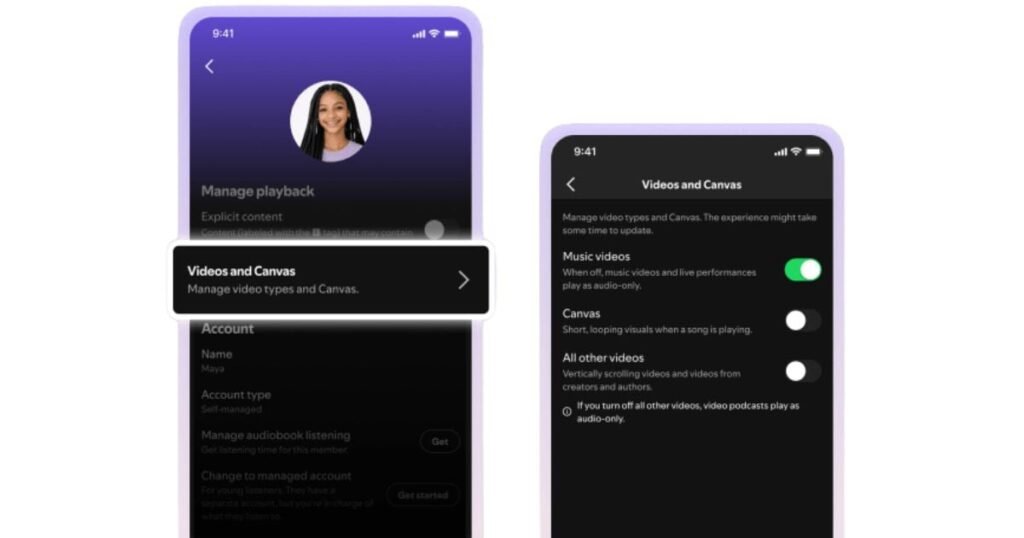

Popular music streaming service Spotify is making a huge change to its app for those who just want to listen to music without distraction. Spotify has added new controls that let users turn off all videos from playing inside the application. The service’s latest update covers both music and podcasts, giving users total control over what they see while streaming their favorite music.
Spotify is giving users new controls to turn off all videos
Spotify users had been requesting this feature for a long time. For a long time, audio streamers had to deal with at least some video elements inside the app. Now, the tech firm is giving listeners more control to turn off videos and just listen to music.
Spotify users will find the new controls under the “Content and display” setting on their phone or in the “Display” section if using a PC. The Spotify app already has an option to disable Canvas clips, which are the short, looping, autoplay videos that the service added back in 2019.
Now, the same older setting is accompanied by a new option, which disables access to music videos entirely across the app. There’s also a separate option to disable all other videos across the app, including podcasts and vertical video formats.
There’s another layer for better family controls
It’s worth mentioning that the latest Spotify update also comes with new tools for users who share a subscription with others. If you have a Family Plan, then you can find the new controls to turn off videos for each individual member of the plan in your app’s settings.
You can use these options to limit video content to each user on the subscription. Parents highly requested this feature because they prefer their kids to focus strictly on audio while using Spotify.
Spotify has started rolling out the new feature to Android, iOS, and PC applications across the globe. It’s worth adding that Spotify has released the new controls in a gradual manner, so it could take some time to reach your account.
The post Spotify Finally Lets You Turn Off Videos Across the Entire App appeared first on Android Headlines.