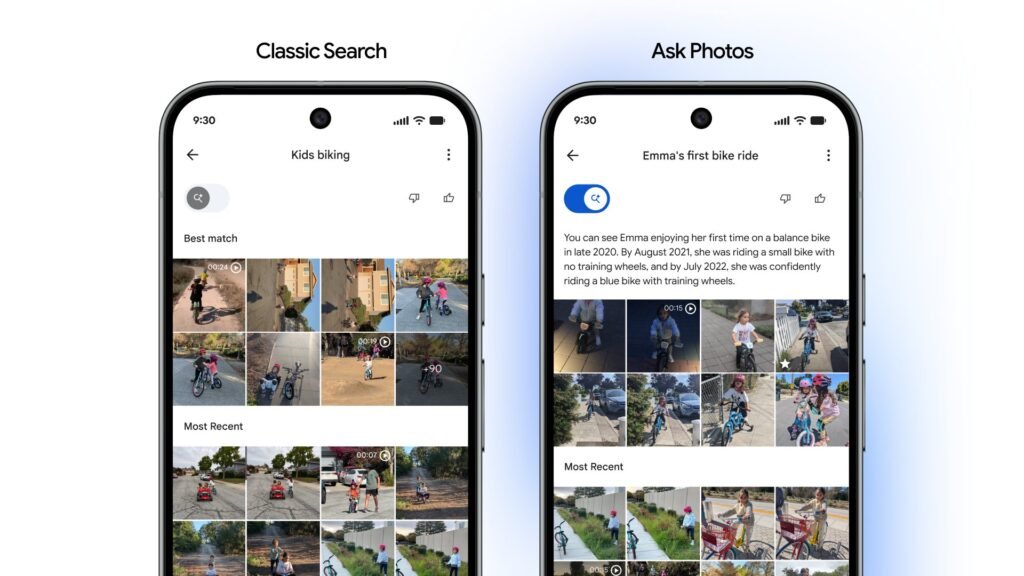

Google is giving users more control over how they navigate their media galleries. A new feature rolling out to Google Photos introduces a simple toggle that lets you disable the Gemini-powered “Ask Photos” experience to use the traditional keyword-based search.
The change, which Google Photos chief Shimrit Ben-Yair confirmed on social media, places a small switch in the upper-left corner of the search results screen. This placement makes it easy to swap modes without having to dive into deep settings menus. It’s perfect for those quick searches where you need more speed than AI processing power.
Google Photos’ new toggle lets you disable Ask Photos to use classic search
The main benefit of this new toggle is the ability to choose between efficiency and depth. Classic search is built for speed. If you are looking for a specific album or a simple term like “beach 2022,” the traditional system surfaces results almost instantly. It is the best choice for people who know what they want and want to find it quickly.
Meanwhile, “Ask Photos” uses Google’s Gemini AI to understand more complex questions in natural language. You can ask for more than just keywords. For example, you could ask, “What is my license plate number?” or “The first time Emma rode her bike.” This mode can interpret nuance and context that a standard search might miss. However, the AI-powered process often takes a bit longer to parse through large libraries.
It’s worth noting that the Google Photos option to switch between traditional search and Ask Photos is a server-side update. So, you might not have it even if you’ve installed the latest app update. In that case, you’ll just have to be patient.
The latest upgrade joins other recent improvements, such as the long-awaited “Sticker Creation” tool and a faster way to access local folders. Plus, the app’s UI received a new floating toolbar to improve navigation.
The post Google Photos Gets Toggle to Switch Between Classic Search & ‘Ask Photos’ appeared first on Android Headlines.