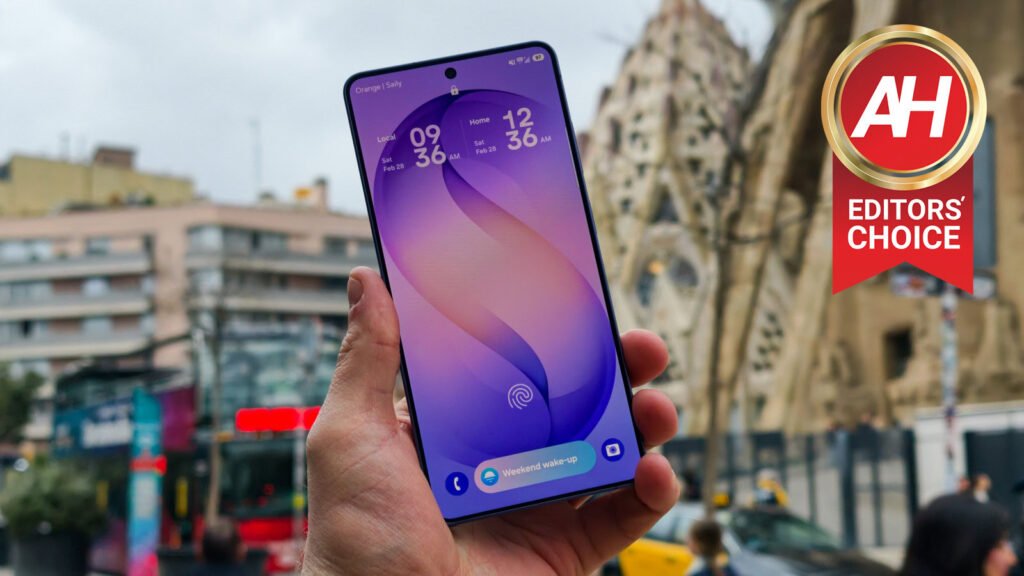

Samsung’s Galaxy S26 series was released last month, and for many, looking at the spec sheet, it looked like it was a pretty small upgrade. But after spending over a week with the device, traveling to Barcelona for Mobile World Congress, and using the device extensively, I can tell you it’s a much bigger upgrade than you’ll notice on the surface or on the spec sheet.
Samsung has equipped the Galaxy S26 Ultra with a handful of smaller upgrades, which, when added up, lead to a much bigger upgrade than you might expect. And the biggest upgrade might actually be the cameras, surprisingly.
But let’s jump into the full review, and I’ll tell you all about it.

The Samsung Galaxy S26 Ultra is the rare phone that doesn’t need to win a single category to win the whole game. It’s lighter, smarter, and faster than anything Samsung has ever made. With seven years of software support, Privacy Display, and a camera system that finally gets colors right, this is the Android phone that everyone else is trying to catch.
Pros
- Snapdragon 8 Elite Gen 5 for Galaxy delivers a significant performance jump over last year
- Impressive Thermal Management
- Privacy Display is a genuinely useful, hardware-level innovation with no real competition on the market
- Battery life is excellent for the size, easily lasting a full day of heavy use including 5G roaming and GPS
- 60W charging is a meaningful upgrade and uses standard USB-C PD PPS; no proprietary nonsense
- Horizon Lock with Super Steady 2.0 is a standout video feature for creators
- APV and LOG video recording puts it in serious creator territory
Cons
- Still no Silicon-Carbon, same size battery since Galaxy S20 Ultra
- Display is 8-bit with FRC, not true 10-bit
- Privacy Display introduces a gray tint, removes the anti-reflective coating, and reduces brightness
- Camera module forces the phone to wobble when placed on a flat surface
- No charger or 5A cable in the box
- ALoP sensor on the 5x periscope kills telemacro shooting
Samsung covered flights and hotel to and from Unpacked in San Francisco, including a week’s worth of events. However, none of our Galaxy S26 content (including this review) is sponsored. Samsung did not see this review before it was published.

Samsung Galaxy S26 Ultra Specs
Samsung Galaxy S26 Ultra Specs
| Display Size | 6.9 Inches |
| Display Resolution | 3120 x 1440 |
| Refresh Rate | 1-120Hz |
| Dimensions | 163,6 x 78,1 x 7,9 mm |
| Weight | 214 grams |
| Chipset | Qualcomm Snapdragon 8 Elite Gen 5 |
| RAM | 12GB/16GB (LPDDR5X) |
| Storage | 256GB/512GB/1TB, non-expandable |
| Main Camera | 200MP (f/1.4 aperture, 1/1.3-inch sensor size, 0.6um pixel size, PDAF, OIS) |
| Ultrawide Camera | 50MP (f/1.9 aperture, 1/2.5-inch sensor size, 120-degree FoV, 0.7um pixel size, Dual Pixel PDAF) |
| Telephoto Camera | 10MP (f/2.4 aperture, 1/3.94-inch sensor size, OIS, PDAF, 3x optical zoom) |
| Periscope Telephoto Camera | 50MP (f/2.9 aperture, 1/2.52-inch sensor size, 5x optical zoom, 0.7um pixel size, PDAF, OIS) |
| Front Camera | 12MP (f/2.2 aperture, 1/3.2-inch sensors size, 1.12um pixel size, Dual Pixel PDAF) |
| Battery | 5,000mAh |
| Charging | 60W wired, 15W wireless (charger not included) |
| OS | Android 16 with One UI 8.5 |
| Network & Connectivity | 5G, LTE, Wi-Fi 7, Bluetooth 5.4 |
| Water Resistance | IP68 |
| Colors | Black, Cobalt Violet, Sky Blue, White |
Samsung Galaxy S26 Ultra Review: Hardware
The Galaxy S26 Ultra is largely the same as the Galaxy S25 Ultra, as far as looks go. There’s really only two major differences that you’d notice. One is that the corners are now more rounded than before. Making them line up nicely with the rest of the lineup, instead of standing out like a red-headed stepchild. Two, the camera module now has the same design as the Galaxy Z Fold 7, which means that it does wobble a lot, when placed on a table.
Otherwise, the design looks the same, and that’s fine. Companies don’t need to drastically change their design every year, this is part of their brand identity too. For Apple, you know when you see the stove top in the corner, that’s an iPhone. For Google, when you see the visor, you know that’s Pixel. And for Samsung phones when you see the three cameras going down the side of the phone, it’s a Galaxy.
Another change that is not as noticeable is actually with the S Pen. The top of the S Pen is also more rounded, but not quite round enough to sit flush in the bottom of the phone. It does protrude a little bit, which does make it easier to pull out when needed.


And of course, how could we forget, Samsung moved back to armor aluminum, after switching to titanium for the last two generations. While many will say that they are just following Apple, I don’t think that’s necessarily true. I think Samsung found that titanium really doesn’t make a difference for durability, and adds weight while also driving up the cost. So switching back to armor aluminum meant that Samsung could offset the higher cost of RAM and flash storage, since the Galaxy S26 Ultra did not get a price increase this year.
The phone does feel a bit odd or different in the hand. And I can’t quite put my finger on it. It actually might come down to the rounded corners, as it makes the phone feel a whole lot more comfortable in the hand. And because of that, I’ve found myself picking it up more and more, despite having other phones with me, while in Barcelona.
Samsung Galaxy S26 Ultra Review: Display
There’s actually some controversy about the display on the Galaxy S26 Ultra this year, a couple of things actually. In our briefing with Samsung ahead of Unpacked, we were told that this is a 10-bit display, but that’s not true. It’s still 8-bit with FRC now. Unfortunately, Samsung did misinform the media on multiple occasions, which is the bigger issue to me. Since Samsung is relying on us to get its message across. But even with showing 16.7 million colors on this display, it still looks amazing. It’s one of the best displays I’ve seen on a device; the only one that might beat it is the HONOR MagicPad 4, which isn’t a phone, and this is without any measuring and testing tools being used.

The other controversy is the Privacy Display. This is using a new technology called Flex Magic Pixel, which Samsung display showed off a few years ago, and it’s not available in the Galaxy S26 Ultra. And no, this is not the same as installing a privacy screen protector onto your phone. This does way more than that. A privacy screen protector can’t black out only your notifications, or certain apps, or your lockscreen password and PIN. Which makes this a far bigger deal. It can also be turned on and off at will, with can’t be done with a privacy screen protector. Not to mention, they typically affect the quality of the display and facial recognition.
Now where the controversy comes into play here is that, this display does look worse than last year’s. Especially with Privacy Display turned on. Because of the way it works, it does put a sort of gray tint over the screen. And it also means that the anti-reflective layer is no longer here. A big selling point for the Galaxy S24 Ultra and Galaxy S25 Ultra. Finally, Privacy Display does also lower brightness on the Galaxy S26 Ultra, just a tad. It is noticeable when you turn it on, but in real world use, I’ve barely noticed it.
Below, you can see a before and after of having the Privacy Display turned on. So you can see that gray tint that does get added, with it being turned on.


This is a really great feature to use in public, and I’ve used it a ton during Mobile World Congress and while flying to Barcelona on different planes. But it’s not something I’d have turned on all the time, unfortunately. Fortunately, Samsung does make it easy to toggle on and off at will, with a toggle in quick settings, and you can also map the power button (or side key as Samsung calls it) to double-click to toggle the Privacy Display.
That said, I’m very excited to see what Samsung can do with a Gen 2 of Privacy Display.
Samsung Galaxy S26 Ultra Review: Performance
As Samsung does every year, they have also packed the Galaxy S26 Ultra with the latest and greatest specs – for the most part. So we have the Snapdragon 8 Elite Gen 5 for Galaxy powering this device worldwide, with 12GB of RAM and a 5,000mAh capacity battery. It would be nice to see 16GB of RAM here, given the fact that Google has 16GB of RAM in its ‘Pro’ phones, but given the current RAM prices, we can’t be too upset.
In day-to-day usage, the Galaxy S26 Ultra performs quite well. I haven’t had any real issues with the phone overheating, slowing down or anything. In fact, it barely even gets hot while running benchmarks – except for 3DMark Wildlife Extreme Stress Test, of course.
As I’ve mentioned already in this review, I have taken this from Unpacked, to Mobile World Congress, and used it a ton, in ways that I normally wouldn’t use a phone. At MWC, that requires roaming, using a lot of 5G, GPS for Google Maps and even the camera for taking photos of products and booths at Fira Gran Via. During all of that, the performance didn’t take a hit at all. It kept on chugging as you would expect.
Even using AI features, like Photo Assist, which a lot of people are tired of hearing about, the Galaxy S26 Ultra never slowed down a bit. In fact, I noticed that it was faster at rendering photo changes with Photo Assist than it was on the Galaxy S25 Ultra.
Benchmarks
Let’s talk about benchmarks, something that we all hate, but it’s the best way to compare the performance of the Galaxy S26 Ultra to its predecessor as well as its competition.
With every review unit that we get, we run a number of benchmarks and keep track of their scores so we can compare them in other reviews. First, is Geekbench 6.
| Device | Geekbench 6 – Single-Core | Geekbench 6 – Multi-Core | Geekbench 6 – GPU |
|---|---|---|---|
| Samsung Galaxy S26 Ultra | 3,675 | 11,241 | 25,275 |
| Samsung Galaxy S25 Ultra | 3,128 | 9,793 | 18,379 |
| OnePlus 15 | 3,648 | 10,788 | 24,530 |
| OPPO Find X9 Pro | 3,483 | 10,344 | 29,999 |
Here, we are comparing the Galaxy S26 Ultra to its predecessor, the Galaxy S25 Ultra, so we can see how much it changed year-over-year. As well as, to the OnePlus 15 which also runs on the Snapdragon 8 Elite Gen 5, and then the OPPO Find X9 Pro which runs on the MediaTek Dimensity 9500 chipset.
We can see from these scores that we do get that usual 20-30% improvement year-over-year, and slightly larger numbers on the ‘For Galaxy’ version of the Snapdragon 8 Elite Gen 5 chipset. Still a pretty good showing for the Galaxy S26 Ultra here.
| Device | AnTuTu Score |
|---|---|
| Samsung Galaxy S26 Ultra | 3,824,993 |
| Samsung Galaxy S25 Ultra | 2,439,788 |
| OnePlus 15 | 3,701,202 |
| OPPO Find X9 Pro | 3,403,119 |
As we’ve seen with other Snapdragon 8 Elite Gen 5 devices so far, we do get very close to that 4 million level on AnTuTu, though I’ve still yet to see it on any device. Despite Qualcomm touting that at Snapdragon Summit last year. Because of that huge jump, it does how about a 40% improvement year-over-year, which is quite impressive.
Finally, we also test it on 3DMark Wildlife Extreme Stress Test, which runs the same 60-second benchmark twenty times, showing whether the phone can sustain its performance or not. This is a really good way to see if it does thermal throttle or not. The Galaxy S26 Ultra had a really good showing here, with the second highest “Best Loop” score we’ve ever seen.
- Best Loop: 7,115
- Lowest Loop: 4,056
- Stability: 57%
The only device with a higher score than this was the OPPO Find X9 Pro, which had a much lower stability score. Meaning that the Find X9 Pro peaked and them throttled throughout the rest of the benchmark. While the Galaxy S26 Ultra throttled a little bit, but still stayed fairly consistent. It also had a pretty low temperature of 102.9 degrees Fahrenheit.
Thermals
We also test out the thermals on these devices, to see just how good they are at staying cool and performing under pressure. So we run a few different tests here to test out the thermal temps. Of course, the big one is 3DMark Wildlife Extreme Stress Test, which is typically the hottest a phone will ever get.
We also play an hour of Genshin Impact at full graphics settings and finally we test out the camera. Recording video at 4K60 for 10 minutes, which is typically the lowest temperature reading we get.
| Device | 3DMark Wildlife Extreme Stress Test | Genshin Impact | Camera – 4K60 |
|---|---|---|---|
| Samsung Galaxy S26 Ultra | 102.9 | 94.5 | 92.4 |
| Samsung Galaxy S25 Ultra | 104.1 | 95.1 | 97.8 |
| OnePlus 15 | 119.6 | 97.6 | 100.7 |
| OPPO Find X9 Pro | 112.4 | 92.1 | 87.8 |
So looking at the table above, we can see that the new, larger vapor chamber does make a pretty big difference here. Going back to the 3DMark Wildlife Extreme Stress Test again, it stayed cooler than the Galaxy S25 Ultra, while also having a higher stability percentage. Which means it was able to sustain that performance longer.
In the end, performance is not an issue here, at least at launch. Sometimes, Samsung will push out some new updates that ends up affecting performance, so this could change down the road.
Samsung Galaxy S26 Ultra Review: Battery Life and Charging
Let’s talk about the elephant in the room, battery life. Samsung is once again including the same 5,000mAh capacity battery for the sixth generation. Which is getting pretty tiring at this point. Samsung did tell us that they are testing out silicon-carbon batteries, but haven’t committed to putting them in future devices yet. Obviously, since the Galaxy Note 7 issues, Samsung is much more stringent about their battery testing, and with how many millions of units they sell, moving to silicon-carbon would be a huge undertaking.

But, how well does this 5,000mAh capacity battery actually perform? Quite well. I used this all day at MWC a few days in Barcelona, and as mentioned before, that included loads of roaming on 5G, GPS for Google Maps and lots of camera usage. I ended the day usually around 30% battery. A lot of phones would not have made it that far.
On other, more normal days for me, I was able to get a day and a half to two days on a charge, which is not bad at all for the battery size. We’ve even seen in some battery tests that the Galaxy S26 Ultra is able to beat out silicon-carbon competition like the OnePlus 15.
But, keep in mind that updates do usually nuke the battery for Samsung. We’re not sure why Samsung does this, but updates do really affect the battery. So while it’s great today, it might not always be great.

When it comes to charging, this is a great upgrade to have. So it’s now 60W charging, which doesn’t sound like a huge upgrade. But keep in mind that this is USB-C PD PPS, and not a proprietary USB-A charger like a lot of other Chinese devices out there. Which means you can use any 60W or faster USB-C charger that supports USB-C PD and PPS. You will need a 5A cable, which does not come in the box – that’s a 3A cable, unfortunately.
However, I will say, the difference between charging with a 3A and a 5A cable is very small. We’re talking less than 10 minutes difference.
Benchmarks
Similar to performance, we also run a benchmark for the battery and charging of each smartphone. For battery life, we charge the phone up to 100% and let it stay plugged in for a bit longer to ensure it is actually at 100%. Then load up a YouTube video and play it non-stop at around 100nits (this is usually around 80% brightness on most devices). And the video plays until the phone drops down to about 1%.
| Device | Battery life | Charging Speed |
|---|---|---|
| Samsung Galaxy S26 Ultra | 23 hrs, 45 minutes | 45 mins, 23 seconds |
| Samsung Galaxy S25 Ultra | 22 hrs, 03 minutes | 1 hr, 14 seconds |
| OnePlus 15 | 23 hrs, 52 minutes | 40 minutes, 21 seconds |
| OPPO Find X9 Pro | 24 hrs, 28 minutes | 1 hr, 6 minutes, 34 seconds |
So as we can see here, a real upgrade in the battery life on the Galaxy S26 Ultra here, while also a nice upgrade in the charging speed, over the Galaxy S25 Ultra. Though, still not quite as good as the OnePlus 15, which has about 46% more battery capacity. But nonetheless, this is quite good.
Samsung Galaxy S26 Ultra Review: Software
Out of the box, the Galaxy S26 Ultra runs One UI 8.5 on top of Android 16. If you’ve used a Galaxy phone in the past couple of years, you’ll feel right at home. One UI 8.5 is clean, fast, and it’s still absolutely loaded with settings. Some people love that. Others get lost for 20 minutes trying to find where Samsung hid the notification shade toggle. But, Samsung is using AI to help with that. In the Settings app, just type in the search bar what you’re trying to do, and Galaxy AI will help you find what you need to change.
Of course, the big story here is once again, Galaxy AI. And Samsung is adding a few new features this time around, like Now Nudge, an improved Bixby, and additions to Circle to Search.
Now Nudge is probably the most interesting new AI addition. It’s a content-aware, real-time feature that tracks what you’re doing on screen and offers contextual actions; so if you’re texting a friend about grabbing dinner next Friday, it’ll suggest adding it to your calendar. It’s the kind of thing that sounds gimmicky until it actually saves you from the five-app juggling act you do every time you make plans. The caveat? Right now, Now Nudge only works in supported messaging apps, including Samsung Messages, Google Messages, WhatsApp, Signal, and Instagram DMs, among others. It’s a solid start, but Samsung needs to open this up wider.

Bixby got a real glow-up here, and I say that as someone who has spent years dunking on it. The agentic AI capabilities mean it can now chain actions together across apps, like handling multi-step requests like ordering food, hailing a ride, or comparing prices on e-commerce platforms. More practically, you can tell Bixby that the screen is hurting your eyes, and it’ll actually point you to the specific settings that would fix it. That’s legitimately smart. Samsung also baked in deep Perplexity AI integration, so saying “Hey, Plex” pulls up a real-time AI search that can execute multi-step workflows across system and third-party apps. Between Bixby, Gemini, and Perplexity all living on one phone, Samsung is essentially throwing every AI assistant at the wall and seeing what sticks. I’m not mad at it.
Circle to Search got an upgrade worth mentioning too. It can now recognize and search for multiple objects on your screen at once. So a photo with a coat and a pair of shoes will pull up shopping results for both simultaneously. It’s the kind of quality-of-life update that sounds small but makes the feature actually feel complete.
On the photo editing side, Photo Assist in the Gallery app now takes natural language commands, so you can just describe what you want edited, and Galaxy AI handles it. You can even swap out shirts between two different photos, which is either super useful or a recipe for chaos, depending on your intentions.
Samsung’s software support promise still stands at 7 major OS upgrades and 7 years of security updates, which remains one of the strongest commitments in the Android space. No complaints there.
Where things get a little messy is the sheer volume of AI features crammed into every corner of One UI 8.5. Galaxy AI is seeping into every aspect of the operating system, and for some users, that’s starting to grate. There’s a version of this phone where Samsung trusts users to find the good stuff; instead, it insists on surfacing AI suggestions constantly, whether you asked for them or not. It’s a lot. And many of these capabilities are still restricted to Samsung’s own system apps, which limits how useful they actually are in day-to-day life for people who live in Google or third-party ecosystems.
Still, as far as Android software experiences go, One UI 8.5 is the most refined version of Samsung’s vision yet. The AI features that work, work well. Samsung just needs to learn when to get out of its own way.
Samsung Galaxy S26 Ultra Review: Camera
I’ve been using the Galaxy S26 Ultra camera quite extensively over the last 10 days or so, and have taken over 400 pictures with this camera. So I think I have a pretty good idea of how good (or how bad) this camera actually is.

Sadly, we didn’t really get a major upgrade this year, especially for the 3x telephoto camera. Instead most of the cameras stayed the same on the spec sheet, though the style of the 5x periscope telephoto camera did change. It’s now an ALoP sensor, which provides more light, but it also reduces the minimum focusing distance from around 30cm to 80cm. Which means, telemacro is out.
However, pictures from all of the lenses on this camera look quite good. And you can be the judge for yourself in the gallery below. Even the 3x camera is pretty good, though I find myself using it very rarely. When asked why they were keeping the 3x camera, Samsung said that this camera is really only here for portrait shots. It helps create a better bokeh effect for portrait shots on the rear camera setup. So that’s cool.


Samsung also has a number of different styles you can add with Galaxy AI, including using AI to make edits for you. Below, are different styles that Galaxy AI can apply to the same picture, some of these are pretty cool, but most of them change the picture entirely, showing things that aren’t actually there. The first one is the original (taken at Barcelona’s airport when I was leaving MWC), the rest are AI styles.


On the video side, Samsung also made some changes, like adding AVP. This is basically Android’s version of Apple’s ProRAW mode, which debuted at Snapdragon Summit last September with the Snapdragon 8 Elite Gen 5. And you can shoot in AVP and LOG at the same time, which does take up a good amount of storage, so if you plan to shoot in either or both, definitely opt for more than the 256GB of base storage here. I’ve tested this out, just to see the max storage, and it looks like 8K30 in LOG AVP is going to cost you over 20GB of storage per minute. That’s just insane.
Recording in LOG still is really cool, and not many phones allow this. While I’m not a full-time YouTuber, I’m more into the written content, I can see how useful this can be. Additionally, the horizon lock with Super Steady 2.0, is another really useful feature for creators. As you can have super smooth video, without a gimbal attached. While many creators are spinning their phones around to show you how it works, I opted for a quick walking video entering Fira Gran Via for MWC last week, which you can see below. You don’t see any bobbing up and down as I’m walking, which you would typically see from other phones.
Unfortunately, with Horizon Lock, you are limited to QHD quality. So you won’t get the full 4K and definitely not 8K resolution. But for the few times you might need it, this is a much-appreciated feature. And yes, I know it’s not the first time we’re seeing it in a smartphone. But it is the first time we’re seeing it in a smartphone that tens of millions of people will be buying.
The bottom line on the camera is, it’s a good setup. I knew, going into this review that the cameras were not going to wow me. Not after using some of the best out of China like the vivo X300 Pro, OPPO Find X9 Pro, and the OPPO Find X8 Ultra. But for most people, this camera is definitely a really good camera to use. And Samsung has done a marvelous job at correcting the colors this year. Instead of it being very oversaturated like it has been in the past.
Should you buy the Samsung Galaxy S26 Ultra?
The Samsung Galaxy S26 Ultra is not a phone for everyone. At $1,299, it never was. But the question isn’t whether it’s expensive. The question is whether it’s worth it for you.
If you’re someone who’s been on a Galaxy S23 Ultra or older, stop reading and go buy this phone. The jump in performance, software intelligence, charging speed, and camera processing is significant enough that you’ll feel it every single day. You’re long overdue.

If you’re coming from a Galaxy S25 Ultra, it’s a tougher sell. The hardware changes are incremental, the battery is still 5,000mAh, and One UI 8.5 is rolling out to you anyway. Unless Privacy Display is something you genuinely need, and if you travel a lot for work or commute on public transit, you might be surprised how much you actually do. Or you’re a video creator who’s been waiting for Horizon Lock and AVP support, there’s no urgent reason to upgrade. Wait for a deal or a strong trade-in offer.
But who is this phone really for? It’s for the power user who wants the best Android experience money can buy, without compromise. It’s for the business traveler who needs a phone that can handle a full day at a conference on 5G roaming without sweating it. It’s for the creator who wants pro-level video tools without carrying a separate rig. It’s for the person who lives in the Samsung ecosystem and wants a device that ties everything together with a level of software polish that, frankly, keeps getting better every year.
It’s also still the only phone you can buy with a built-in S Pen. And while I know a lot of people never pull it out, the folks who rely on it aren’t going anywhere. Samsung knows exactly who’s buying this phone.
The Galaxy S26 Ultra isn’t a revolution. It’s a refinement – and a pretty convincing one at that. Samsung took everything that made the S25 Ultra great and made it lighter, smarter, and faster, all without bumping the price. That’s harder to do than it sounds. And in a year where the spec sheet looks underwhelming on paper, the real-world experience tells a very different story.
You should buy the Samsung Galaxy S26 Ultra if:
- You are on a Galaxy S23 Ultra or older.
- You want the best all-around smartphone money can buy.
- You want the S Pen.
You should not buy the Samsung Galaxy S26 Ultra if:
- You want the best Android camera experience.
- You are on the Galaxy S24 Ultra or Galaxy S25 Ultra.
The post Samsung Galaxy S26 Ultra Review: The Jack of All Trades appeared first on Android Headlines.